“Reliablesoft's Digital Marketing program is The Gold Standard for Digital Marketing Education in 2026. It offers practical skills highly demanded in the job market, and many students successfully land high-paying jobs or launch freelance careers.”
Digital Marketing Bundle (90% Off)
$127.00
Digital Marketing Full Course
The Complete Digital Marketing Course
An all-in-one training bundle to build real-world digital marketing skills and earn your digital marketing certification. It includes 21 courses covering SEO, Paid Ads, Digital Marketing Strategy, Social Media, YouTube, AI, and more. No experience needed.


 15K+
5-star reviews
15,000+ students
15,000+ students
21courses in one bundle
UpdatedNovember 2026
2certifications included
Lifetimeaccess + free updates
60-daymoney-back guarantee
Invest in your future
Learn digital marketing and build practical skills AI can’t replace.
If you're tired of…
- Free tutorials that leave you with more questions
- Courses full of theory and no clear next step
- Spending money on ads that don't convert
- Getting little or no traffic from Google
- Not knowing which skills clients and employers pay for
With the bundle you get…
- A personalized plan from beginner to certified
- Step-by-step blueprints and checklists for every channel
- The same processes we use for our agency clients
- Two certifications for your CV and LinkedIn
- Lifetime access and free updates as marketing changes
What's inside
21 courses. One clear path.
Start with SEO, then add ads, social, AI and career skills. Every course has video lessons, a PDF version and checklists. Open any course to see every lesson.
- Welcome & Downloads
- SEO Course Downloads
- About This Course
- How to Use This Course
- Author Information
- SEO Tools
- Tools of the Trade
- Introduction to SEO
- How Search Engines Work
- What Is SEO
- Why SEO
- Technical SEO Basics
- On-Page SEO Basics
- Off-Page SEO Basics
- Summary and Next Steps
- Technical SEO
- What Is Technical SEO
- Google Search Console
- Preferred Domain
- URL Inspection Tool
- Crawling and Indexing
- Robots.txt
- SEO-Friendly URLs
- XML Sitemap Optimization
- Schema Markup and SEO
- Breadcrumbs
- Canonical URLs
- Hreflang
- Pagination
- The 404 Page
- Site Structure
- Technical SEO Checklist
- On-Page SEO
- On-Page SEO (Video)
- What Is On-Page SEO
- Page Title Optimization
- Meta Description Optimization
- H1 Tag Optimization
- Content SEO
- Internal Linking
- Image SEO
- Video SEO
- Homepage SEO
- Posts and Pages SEO
- Categories and Tag Pages SEO
- On-Page SEO Checklist
- Off-Page SEO
- What Is Off-Page SEO
- Nofollow Links
- Link Building Techniques
- How to Clean Your Link Profile
- Off-Page SEO Checklist
- Local SEO
- What Is Local SEO
- Google Business Profile
- Reviews
- Local SEO for Your Website
- Track Your Local SEO Results
- Local SEO Checklist
- Mobile SEO
- SEO for Mobile Websites
- Mobile SEO Checklist
- Advanced SEO
- How to Perform a Content Audit
- How to Create an SEO Strategy
- How to Create Linkable Content
- How to Get Google Sitelinks
- Google Featured Snippets
- Conversion Optimization
- Landing Page Optimization
- A/B Testing
- Conversion Optimization Checklist
- Website Speed
- What Is Page Speed
- How to Increase Your Page Speed
- How to Measure Your Page Speed
- Website Speed Checklist
- SEO Success Story
- From 0 to 500K Visits Per Month
- Welcome & Downloads
- How to use this course
- Course downloads
- Author bio
- How AI Search Works
- Traditional SEO vs AI SEO
- What "ranking in LLMs" actually means
- How AI Decides Who to Cite
- Optimizing for the Answer, Not the Click
- Formatting Content for AI
- Giving the Direct Answer First
- Using Tables and Lists to Get Cited
- Updating Old Pages for AI Search
- Creating Content AI Actually Wants
- Why AI Ignores Copycat Content
- Adding Original Data and Research
- Using Expert Quotes to Build Trust
- Building Topical Hubs to Prove Authority
- Making Your Brand Easy for AI to Understand
- Moving from Keywords to Entities
- Connecting Your Brand Profiles with Schema
- Off-Page SEO for AI
- Getting Mentioned on Reddit, and Forums
- Digital PR to Train AI Models
- Managing Your Brand Reputation Online
- Tracking and Measuring Success
- How to Test if AI is Recommending You
- Tracking AI Traffic in Google Analytics
- Your Monthly AI SEO Checklist
- Welcome & Downloads
- About This Course
- Course Downloads
- Author Information
- Google Ads in 10 Steps
- The 10 Steps and Your Launch Plan
- Google Ads Basics
- What Is Google Ads?
- How Google Ads Works
- Google Ads Account Structure
- Google Ads Campaign Types
- Keyword Match Types
- How to Plan a Profitable Campaign
- Set Up Your Google Ads Account
- How to Create a Google Ads Account
- Account Settings and Linking
- Conversion Tracking
- What Is Conversion Tracking?
- How to Create Conversion Actions
- How to Install the Google Tag
- Enhanced Conversions and Consent Mode
- Search Campaigns
- What Are Search Ads?
- How to Create a Search Campaign
- Ad Groups and Keywords
- Responsive Search Ads
- Assets for Search Ads
- AI Max for Search Campaigns
- Performance Max and Shopping
- What Is Performance Max?
- How to Create a Performance Max Campaign
- Shopping Ads and Merchant Center
- Demand Gen Campaigns
- What Are Demand Gen Campaigns?
- How to Create a Demand Gen Campaign
- Display Ads and the Display Network
- Remarketing
- What Is Remarketing in Google Ads?
- How to Set Up Remarketing
- Google Ads Optimization
- Negative Keywords
- Ad Optimization
- Location Targeting
- Recommendations and Optimization Score
- Audiences and Demographics
- Bid Strategies
- Budget Optimization
- Google Ads Checklist
- Google Ads Checklist
- Welcome & Downloads
- About This Course
- Course Downloads
- Author Information
- Meta Ads Basics
- How Meta Ads Work
- Setting Up Your Meta Business Account
- Facebook, Instagram and Other Placements
- Meta Pixel and Conversions API
- What Are the Meta Pixel and Conversions API?
- How to Install the Meta Pixel
- How to Set Up the Conversions API
- How to Test Your Tracking
- Conversion Events
- Standard Events and Custom Conversions
- How to Create Custom Conversions
- Custom and Lookalike Audiences
- What Are Custom Audiences?
- How to Create Custom Audiences
- Custom Audiences to Create
- Lookalike Audiences
- Advantage+ Audience Explained
- Campaign Structure
- The Meta Ads Sales Funnel
- Prospecting Campaigns
- Retargeting Campaigns
- Existing Customers and Retention
- Campaign Setup
- How to Create a Sales Campaign
- How to Set Up an Ad Set
- Lead Campaigns and Instant Forms
- Ad Creation
- How to Create Meta Ads
- Meta Ad Creative Tips
- Catalog Ads for Online Stores
- Campaign Optimization
- How to Monitor Your Campaigns
- Campaign Optimization Tips
- Bid Strategies and Cost Control
- Testing and Scaling Your Ads
- Landing Page Optimization
- Landing Page Optimization Tips
- Meta Ads Checklist
- Meta Ads Checklist
- Welcome & Downloads
- About This Course
- Course Downloads
- Author Information
- AI Basics for Marketers
- What Is Generative AI?
- AI Tools for Marketers
- Writing Good Prompts
- What Is Prompt Engineering?
- Prompt Writing Best Practices
- Custom Instructions, Projects and Skills
- AI Content and Google
- Google's Guidelines on AI Content
- How to Use AI in Content Creation
- AI for Marketing Tasks
- AI for SEO
- AI for Content Marketing
- AI for Social Media Marketing
- AI for PPC Advertising
- AI for Email Marketing
- AI for Ecommerce Marketing
- AI for YouTube and Video
- AI for Data Analysis and Reporting
- Prompt Library
- Prompt Library Cheat Sheet
- Welcome & Downloads
- About This Course
- Course Downloads
- Author Information
- Introduction to eCommerce SEO
- What Is eCommerce SEO?
- Where Your Products Appear on Google
- The eCommerce SEO Process
- Keyword Research for eCommerce
- Keyword Research for Online Stores
- Finding Keywords on Amazon and Google
- Finding Keywords With SEO Tools
- eCommerce Site Structure
- How to Structure Your Online Store
- SEO-Friendly URLs and Breadcrumbs
- eCommerce Homepage SEO
- Designing Your Homepage for Shoppers
- Homepage Title, Description and Content
- Homepage Structured Data and Footer
- Category Page SEO
- How to Optimize Category Pages
- Category Filters and Pagination
- Product Page SEO
- Product Page Titles and URLs
- Writing Product Descriptions That Sell
- Optimizing Product Images and Videos
- Product Structured Data and Reviews
- Setting Up Google Merchant Center
- Blogging for eCommerce
- Why Your Store Needs a Blog
- Blog Post Ideas for Online Stores
- Link Building for eCommerce
- Link Building for Online Stores
- Ways to Earn Links to Your Store
- Guest Posting and Media Outreach
- eCommerce SEO Checklist
- eCommerce SEO Checklist
- Welcome & Downloads
- About This Course
- Course Downloads
- Author Information
- Content Marketing Basics
- What Is Content Marketing?
- Why Content Marketing?
- Content Marketing Strategy
- How Much Does Content Marketing Cost?
- Content and Topic Ideas
- How to Find Content Topic Ideas
- How to Find Content Ideas With SEO Tools and Competitor Analysis
- How to Find Content Ideas in Your Own Data
- What Is Evergreen Content?
- How to Create Linkable and Shareable Content
- Pillar Pages and Topic Clusters
- What Are Pillar Pages and Topic Clusters?
- How to Plan a Pillar Page
- How to Write and Structure a Pillar Page
- How to Promote and Grow a Pillar Page
- Content Writing and Promotion
- SEO Writing: Keywords, Titles and Search Intent
- SEO Writing: Headings, Links, Expertise and Images
- How Often Should You Publish New Content?
- How Long Should a Blog Post Be?
- How to Promote Your Content
- Content Promotion Through Outreach and Guest Posts
- How to Promote Content With Paid Ads
- How to Promote Content on Your Website
- Content Marketing Tools
- Content Marketing Tools
- Content Marketing Checklist
- Content Marketing Checklist
- Welcome & Downloads
- About This Course
- Course Downloads
- Author Information
- YouTube Marketing Basics
- Why Use YouTube for Marketing
- How YouTube Search and Recommendations Work
- Long Videos vs Shorts
- Planning Your YouTube Content Strategy
- Setting Up Your YouTube Channel
- Creating a YouTube Channel
- Choosing a Channel Name and Handle
- Writing Your Channel Description
- Channel Branding: Picture, Banner and Watermark
- Setting Up Your Channel Home Tab
- Uploading Your First Video
- Finding Video Ideas and Keywords
- How to Find Keywords for YouTube Videos
- YouTube Keyword Research Tools
- Creating Your Videos
- Planning and Scripting a Video
- Recording, Editing and AI Video
- YouTube SEO
- Writing Video Titles
- Thumbnails and Click-Through Rate
- Writing Video Descriptions
- Tags and Hashtags
- Captions, Subtitles and Translations
- Cards, End Screens and Playlists
- Growing Your Channel
- Getting More Likes, Comments and Subscribers
- Improving Audience Retention
- Promoting Your Videos Outside YouTube
- Measuring Results With YouTube Analytics
- YouTube Advertising
- How YouTube Advertising Works
- YouTube Ad Formats
- Creating a Video Views Campaign
- Optimizing a Video Views Campaign
- Creating a Demand Gen Campaign for Sales
- Optimizing Video Ads for Conversions
- Making Money on YouTube
- Ways to Make Money on YouTube
- YouTube Partner Program and Ad Revenue
- Affiliate Marketing on YouTube
- Selling Your Products and Services on YouTube
- YouTube Sponsorships and Brand Deals
- Sending YouTube Viewers to Your Website
- YouTube Marketing Checklist
- YouTube Marketing Checklist
- Welcome & Downloads
- About This Course
- Course Downloads
- Author Information
- Email Marketing Basics
- What Is Email Marketing?
- How Email Marketing Works
- Why Email Marketing Matters
- Building Your Email List
- Setting Up Your Email List
- Signup Forms and Popups
- Lead Magnets That Grow Your List
- Email Consent and the Law
- Writing Emails That Get Results
- Subject Lines and Preview Text
- Writing Emails People Click
- Email Metrics and A/B Testing
- Email Deliverability
- Email Authentication and Sender Rules
- Keeping Your Email List Healthy
- Email Marketing Automation
- What Is Email Automation?
- Essential Automated Emails
- Email Sales Funnels
- Email Marketing Tools
- Choosing an Email Marketing Platform
- Lowering Email Marketing Costs
- Email Marketing Checklist
- Email Marketing Checklist
- Welcome & Downloads
- About This Course
- Course Downloads
- Author Information
- Social Media Marketing Basics
- What Is Social Media Marketing?
- How Social Media Algorithms Work
- Choosing the Right Social Networks
- Setting Up Your Social Media Profiles
- Social Media Marketing Strategy
- Creating a Social Media Strategy
- Planning a Content Calendar
- Creating Social Media Content
- What to Post on Social Media
- Short-Form Video Basics
- Hashtags and Social Search
- Engaging With Your Community
- Growing Your Audience
- Growing Your Followers Organically
- Working With Creators and Influencers
- Social Media Advertising Basics
- Measuring Social Media Results
- Social Media Metrics and Reporting
- Social Media Marketing Checklist
- Social Media Marketing Checklist
- Welcome & Downloads
- About This Course
- Course Downloads
- Author Information
- Affiliate Marketing in 10 Steps
- The 10 Steps and Your 30-Day Plan
- Affiliate Marketing Basics
- What Is Affiliate Marketing?
- Pros and Cons of Affiliate Marketing
- Affiliate Marketing Terminology
- How Affiliate Marketing Works
- Planning Your Affiliate Business
- Affiliate Marketing Strategy
- How Much Money Can You Make?
- How to Choose a Niche
- Keyword Research for Affiliate Marketing
- Affiliate Programs
- How to Choose Products to Promote
- How to Find Affiliate Programs
- Joining an Affiliate Program
- High-Ticket Affiliate Programs
- Creating Affiliate Content
- How to Write Product Reviews
- Best-Of and Comparison Posts
- Managing Your Affiliate Links
- Where to Place Affiliate Links
- Affiliate Disclosures
- Promoting Beyond Google
- Affiliate Marketing on YouTube
- Affiliate Marketing With an Email List
- Affiliate Marketing on Social Media
- Affiliate Marketing Best Practices
- Affiliate Marketing and Google Search
- Tracking and Improving Your Results
- Affiliate Marketing Mistakes
- Affiliate Marketing Checklist
- Affiliate Marketing Checklist
- Welcome & Downloads
- About This Course
- Course Downloads
- Author Information
- Keyword Research Basics
- What Is a Keyword?
- Different Types of Keywords
- What Is Keyword Research
- Long-Tail Keywords
- What Are Long-Tail Keywords?
- The Importance of Long-Tail Keywords
- How to Find Long-Tail Keywords
- Semantic Keywords
- What Are Semantic Keywords?
- How to Find Semantic Keywords
- Perform Keyword Research
- How to Do Keyword Research
- Method 1: The Top-Down Approach
- Method 2: Competitor Analysis
- How to Find Trending and New Keywords
- Google Keyword Planner Tutorial
- Keyword Planner: Long-Tail Keywords and Search Volume
- Keyword Planner: Competitors, Bulk Analysis and Local Keywords
- How to Use Keywords
- Keyword Research Checklist
- Keyword Research Tools
- Keyword Research Tools
- Welcome & Downloads
- About This Course
- Course Downloads
- Author Information
- Retargeting Basics
- What Is Retargeting?
- Benefits of Retargeting
- How Retargeting Works
- Remarketing vs Retargeting
- Tracking, Consent and Privacy
- Retargeting Strategy
- Retargeting Goals and Audiences
- Retargeting Ad Formats and Platforms
- How Automation Changed Retargeting
- Google Ads Remarketing
- Google Remarketing Options
- How to Set Up Google Remarketing
- Google Remarketing Optimization
- Meta Ads Retargeting
- Meta Retargeting Options
- How to Set Up Meta Retargeting
- Meta Retargeting Optimization
- Beyond Google and Meta
- Retargeting on LinkedIn, TikTok and Microsoft
- Email and SMS Retargeting
- Retargeting Best Practices
- Retargeting Best Practices
- Measuring Retargeting Results
- Retargeting Checklist
- Retargeting Checklist
- Google Analytics Basics
- Introduction to Google Analytics 4
- How to Install Google Analytics 4
- How to Configure GA4 Basic Settings
- Google Analytics Reports
- Introduction to GA4 Reports
- How to Read a GA4 Report
- GA4 Metrics and Channels Explained
- Comparisons and Filters
- How to Customize Reports
- How to Customize the Reporting Menu
- GA4 Reports for SEO: Traffic and Pages
- GA4 Reports for SEO: Users and Devices
- Insights, Annotations and Ask Advisor
- Explorations
- Advanced Google Analytics
- Key Events
- How to Create Custom Key Events
- Google Analytics Checklist
- Google Analytics Checklist
- Start Here
- Welcome to Reliablesoft Academy
- Choose Your Learning Path
- Your Personal Learning Plan
- Digital Marketing Basics
- What Is Digital Marketing?
- The Main Digital Marketing Channels
- How Digital Marketing Works
- AI in Digital Marketing
- Digital Marketing Strategy
- Digital Marketing Roles and Careers
- Digital Marketing Checklist
- Welcome & Downloads
- About this Course
- Course Downloads
- Author Information
- The Free Tools Growth Model
- The Decline of SEO Traffic
- Free Tools: The New SEO Traffic Engine
- Case Studies: 600K+ Users From Google
- Finding the Right Tools
- Why Choosing the Right Tools Matters
- Step 1: Define Your Goals
- Step 2: Brainstorm With ChatGPT
- Step 3: Analyze Search Demand
- Step 4: Enrich Your List
- Step 5: Validate Your List
- Key Learnings
- Planning Your Tool Directory
- Why Planning Your Directory Matters
- Step 1: Group Tools Into Clusters
- Step 2: Define Your URL Structure
- Key Learnings
- Implementing Your Directory
- Creating a Directory on WordPress
- Other Platforms
- Key Learnings
- Creating AI-Powered Tools
- Step 1: Define the Scope
- Step 2: Build Your Tool with ChatGPT
- Step 3: Deploy and Test Your Tool
- Step 4: Publish in Your Directory
- Best Practices: Using AI to Build Tools
- Optimizing for SEO
- Why SEO Matters
- Optimizing the Main Category Page
- Optimizing Category Pages
- Optimizing Tool Pages
- SEO Growth Tips
- Key Learnings
- Turning Traffic into Leads & Sales
- Introduction
- Capturing Emails
- Using Internal Banners
- Affiliate Marketing
- Sponsorships
- Premium Tools
- Monetizing with Ads
- Cross/Up Selling
- Key Learnings
- Welcome & Downloads
- About This Course
- Course Downloads
- Author Bio
- Freelance Digital Marketing Basics
- What Is Freelance Digital Marketing?
- Services You Can Offer as a Freelancer
- Who Hires Freelance Digital Marketers
- Is Freelancing Right for You?
- Skills You Need as a Freelancer
- Marketing Skills Clients Pay For
- Business and Soft Skills
- Learning Skills and Building a Portfolio
- Choosing a Niche
- What Is a Freelance Niche?
- How to Choose and Test Your Niche
- Profitable Digital Marketing Niches
- Finding Clients
- Writing Your Value Proposition
- Building Your Website and Portfolio
- Using LinkedIn and Social Media
- Finding Clients in Your Network and Communities
- Winning Jobs on Freelance Marketplaces
- Comparing Freelance Platforms
- Cold Outreach Without Spamming
- Discovery Calls and Proposals
- Setting Your Rates
- Pricing Models for Freelance Marketers
- Deciding How Much to Charge
- Creating Pricing Packages
- Working With Clients
- Contracts, Invoices and Getting Paid
- Onboarding a New Client
- Reporting Results to Clients
- Keeping Clients Long Term
- Tools, Tax and Admin Basics
- Growing Your Freelance Business
- Specializing and Building Your Brand
- Using AI to Work Faster and Sell More
- Raising Rates and Earning More per Client
- Productizing Your Services
- Keeping Your Skills Up to Date
- From Freelancer to Agency Owner
- Mistakes to Avoid
- Pricing Mistakes That Hurt Your Income
- Client Mistakes That Cause Stress
- Marketing Mistakes That Hold You Back
- Productivity Mistakes That Waste Time
- Your Freelance Launch Plan
- Freelance Launch Checklist
- Welcome & Downloads
- About this course
- Downloads
- Author Bio
- The Creator Opportunity
- From 0 to $1000K (Video)
- Going from Zero to Hero
- The One-Person Business Model Explained
- How Do Creators Make Money?
- Picking a Profitable Niche
- The Faceless Strategy
- The YouTube-First Strategy
- Why YouTube Is the Best Place to Start
- Your 90-Day Action Plan
- Welcome & Downloads
- About This Course
- Downloads
- Author Bio
- How YouTube Really Works
- Why YouTube Is a Massive Opportunity Right Now
- How the YouTube Algorithm Works
- Shorts vs. Long-Form Video
- How to Make Money on YouTube
- How YouTubers Actually Make Money?
- How Much Money Can You Make?
- YouTube Partner Program Basics
- Choose the Right Niche and Channel Strategy
- How to Choose a Profitable YouTube Niche
- Passion vs. Profit: What Actually Matters
- How to Validate a Niche Before You Start
- Personal Brand vs. Business Brand
- Choosing a Faceless Strategy
- Action Plan: Your Next Steps
- Channel Set Up and Optimization
- Naming Your Channel and Securing Your Brand
- Creating Your YouTube Account
- What to do Before Publishing Content
- Optimizing Your Channel Settings
- Channel Branding
- Writing a Strong Channel Description
- Action Plan: Your Next Steps
- How to Find Winning Video Ideas
- Researching Search Demand
- The Upgrade Strategy
- Replicating Success Ethically
- Finding Market Gaps
- Building a Content Plan
- Action Plan: Your First 10 Videos
- Create Your First AI Video
- The AI Production Workflow
- Scripting with AI
- Designing Your Avatar
- Bringing It to Life
- Editing the Final Video
- Action Plan: Your Next Steps
- Publishing Your Video
- Creating Clickable Thumbnails With AI
- Writing Winning Titles
- Optimizing Descriptions, Links, and Tags
- Publishing Strategy: Timing and The Pinned Comment
- Action Plan: The Publishing Checklist
- How to Grow a YouTube Channel Faster
- The 90-Day Timeline and Upload Frequency
- Tracking the Right Metrics
- Improving Retention and Watch Time
- Doubling Down vs. Pivoting
- Expanding Your Niche
- Avoiding Common Beginner Mistakes
- Action Plan: Your Growth Strategy
- Content Repurposing
- Creating Shorts from Long Videos
- Welcome & Downloads
- About this course
- Downloads
- Author Bio
- The TikTok Traffic Engine
- Video
- Setting the Right Expectations
- How the TikTok Algorithm Works Right Now
- What to Post on TikTok to Grow Faster
- The Link-in-Bio Strategy
- The TikTok Traffic Funnel
- Welcome & Downloads
- About this course
- Downloads
- Author Bio
- Instagram Growth Tactics
- Video
- Instagram Vs TikTok
- How the Instagram Algorithm Works
- Instagram Post Types to Grow Faster
- The Instagram Traffic Funnel
⭐ Trusted by 15,000+ students
Everything you need to master digital marketing.
Whether you want a new career, more clients or more traffic, this bundle gives you the skills and the certificates to prove it.
- Finish in 2 weeks
- Learn at your own pace
- Perfect for beginners
- Access on any device
- Updated November 2026
- Frequent updates
- Personalized learning plan
- 60-day money-back
Limited-time deal · 90% off
Get the bundle for $127 →
Offer ends in
Digital Marketing Course Bundle
$127$1,260Save $1,133
One payment · Unlimited lifetime access
21 courses × $60 each$1,260
SEO + Digital Marketing certificationsIncluded
Download courses to study offlineIncluded
Lifetime access + free updatesIncluded
Email supportIncluded
🛡️ 60-day money-back guarantee♾️ Lifetime access
60Day money
back
back
Risk-free
The best guarantee in the industry.
Take the courses for a full 60 days. If you're not happy with your purchase, just let us know and we'll refund your money. That's how confident we are that this course will help you.
Everything you need to succeed
A Complete Step-by-Step System to Get Traffic, Leads and Sales
Learn what works, from an agency that does it every day. Each course gives you a proven blueprint and checklists to follow, so you stop guessing and start getting results.
Search engine optimization
Increase your Google SEO traffic
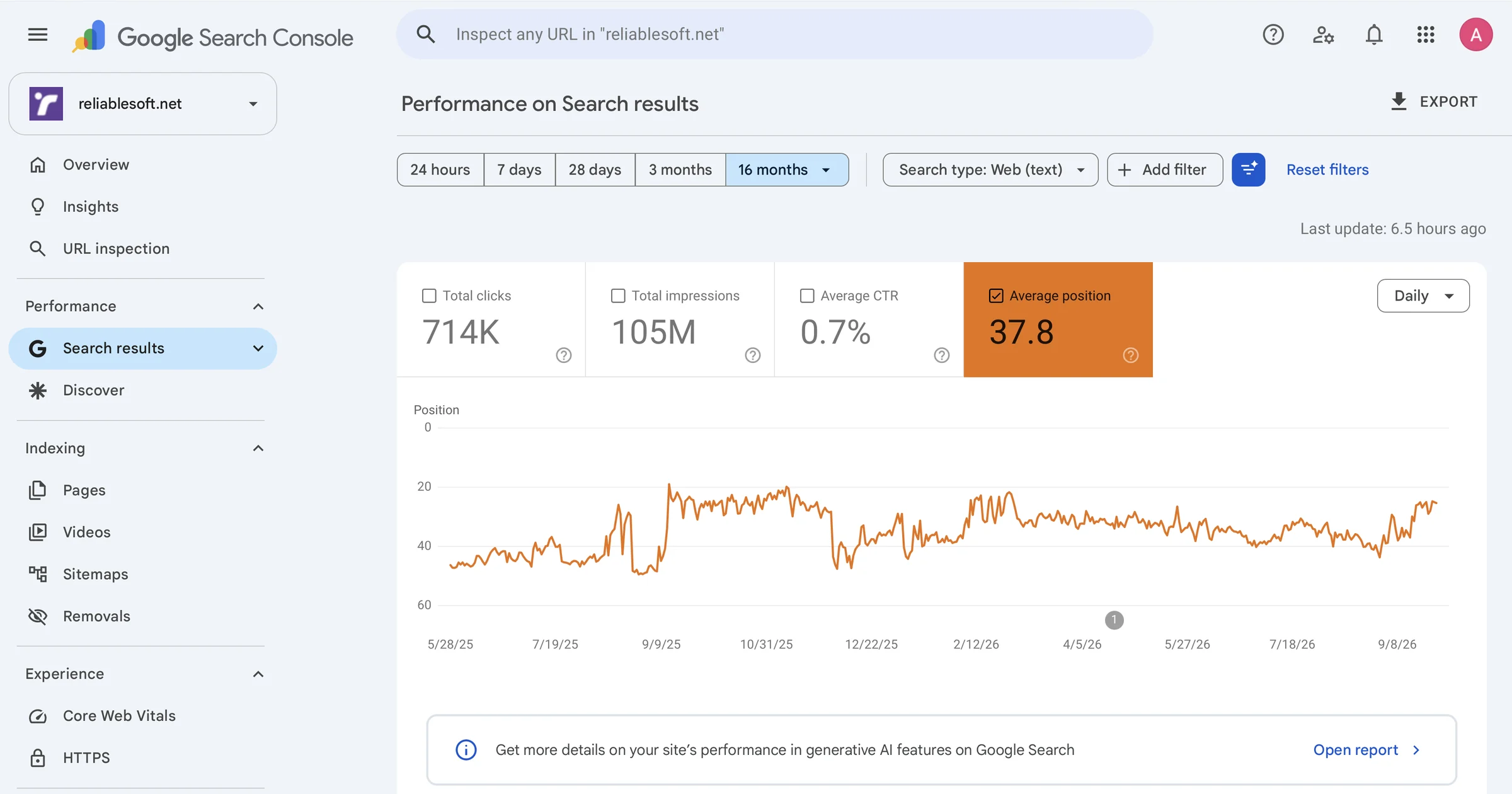
Follow the exact blueprint behind 714,000 Google clicks to our own website in the last 16 months. It's the same process we use for our clients, not recycled advice from SEO blogs.
- Techniques you won’t find on YouTube or in free guides
- Advice AI can’t give you, learned from real campaigns
- Insider tactics from 20+ years of ranking sites in competitive niches
AI search optimization
Get recommended by ChatGPT and Google AI
Learn how AI tools choose the sources they quote, and how to shape your content and brand so they choose you, while still ranking in regular search.
- Format content so AI can quote it
- Make your brand easy for AI to understand
- Track your AI traffic and mentions

Google Ads
Make money from Google Ads
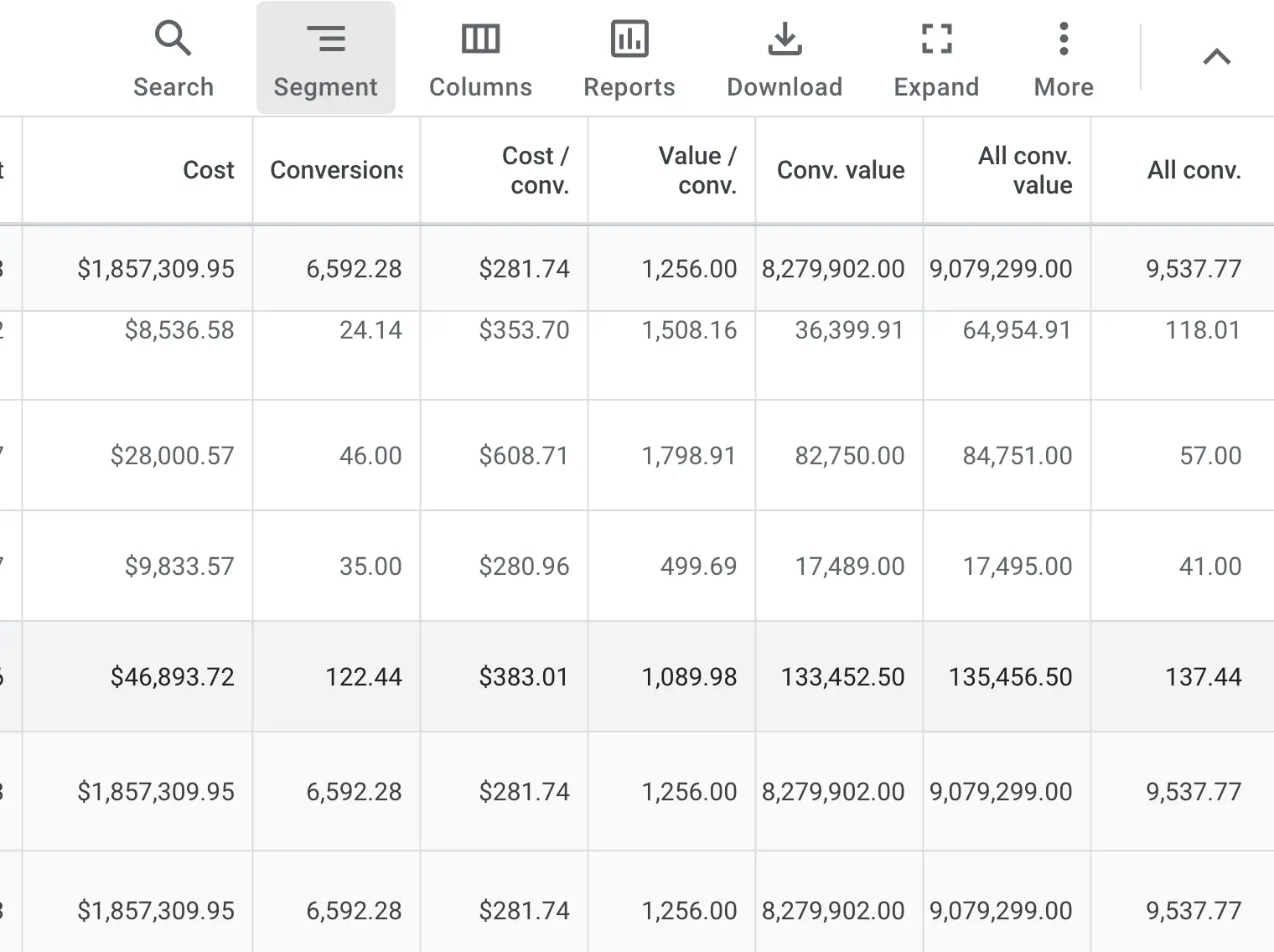
Build campaigns that earn more than they cost, using the process we use to manage client accounts as a certified Google Partner.
- Bidding and budget strategies Google’s reps won’t tell you
- How to make Performance Max and AI Max work for you, not for Google
- How we manage Google Ads accounts for clients, so you can offer it as a service
Facebook + Instagram ads
Run high-converting Meta ads
Learn the targeting, creative and optimization tactics behind 4X sales for our clients, so your budget goes to ads that sell.
- Set up your first Facebook and Instagram campaigns
- Build campaigns that turn new audiences into customers
- Scale your best-performing ads with confidence

AI content creation
Become an AI content creator
Use AI tools to create videos without filming yourself or buying equipment. Start with YouTube, then share the same content on TikTok and Instagram to grow an audience that brings traffic and income.
- Choose a profitable niche and a YouTube-first strategy
- Create and publish your first AI video
- Turn every video into TikTok and Instagram content
- Grow views, subscribers and your first $1,000 a month


Taught by an official Google Partner agency
Google only awards Partner status to agencies that meet its standards for ad performance, spend and certified staff. You learn from a team that runs real client campaigns every day.
2002in business since
Reviews
Trusted by 15,000+ students.
5-star reviewsfrom our students
“It is by far the best course I have ever seen. The content is great, it covers every single topic in detail, and the explanations are clear! I strongly recommend it.”
“Alex knows SEO. I noticed a difference of improvement on my website by the second lesson of the Course. The course is easy to follow and well written.”
“After nine years in residential real estate, I decided to start a digital marketing business. Your Complete Digital Marketing Course for Beginners inspired me, gave me the confidence, and equipped me with the skills to make this leap. Thank you, Alex!”
“Today I just took and passed the exam to get my certification. The course has really helped me and given me a new passion for SEO and digital marketing. Now it doesn't seem like such a mystery to me anymore.”
“I found Alex's digital marketing course very pragmatic and user friendly. He is able to articulate and break down technical issues in simple business terminology.”
After the course
Turn your skills into action.
Here's what you'll be able to do when you finish, with the blueprints and checklists from the courses to guide you.
🧑💻
Start freelancing
Offer digital marketing services to clients anywhere and set your own rates.
- Audit a website and fix what holds back its SEO
- Set up and manage Google and Facebook ad campaigns
- Price your services and land your first clients
💼
Get hired
Apply for roles like SEO Specialist, Social Media Manager or Marketing Assistant.
- Add both certifications to your CV and LinkedIn
- Plan a digital marketing strategy from scratch
- Report on results with Google Analytics
📈
Grow your business
Get more traffic, leads and sales for your website, blog or online store.
- Rank your pages higher on Google and in AI search
- Build an email list with automated campaigns
- Win back lost visitors with retargeting
🎬
Become an AI content creator
Build a faceless YouTube channel with AI tools and work toward your first $1,000 a month.
- Choose a profitable niche and channel strategy
- Create and publish videos with AI tools
- Repurpose videos for TikTok and Instagram
Two certifications included
Prove your skills on your CV and LinkedIn.
Both certifications are included in the bundle at no extra cost.

SEO Specialist Certification
- 1Complete SEO Course
- 2Pass the final exam
- ✓You're SEO Certified

Digital Marketing Certification
- 1Complete ten more courses from the bundle
- 2Pass the final exam
- ✓You're Digital Marketing Certified
Your instructor
Learn from a practitioner, not a theorist.
Alex holds a Computer Science degree and a Master's in e-commerce. He has worked with businesses in competitive niches like travel, banking, education, fitness and hosting.
Everything in the courses is what his agency uses for clients today.
20+years experience
15,000+students taught
2002agency founded
Referenced byForbesEntrepreneurSearch Engine JournalContent Marketing Institute
FAQ
Questions, answered.
Who is this course bundle for?
Anyone who wants to learn digital marketing, whatever their experience: business owners, marketers, freelancers, web designers and developers, content writers, job seekers and career changers.
Is it a one-time payment?
Yes. You pay $127 once and get unlimited lifetime access to all 21 courses, including every future update. There is no subscription.
What happens after I buy?
You get instant access to all courses on our online learning platform, plus your personalized learning plan. You can start the first lesson straight away.
Do I need prior experience?
No. The courses explain in detail everything you need to know and do, from the basics up.
How long will I have access?
Instant, unlimited, lifetime access to all courses and content, plus free updates for life.
How long does it take to complete?
Each course takes 1–3 hours. Every lesson has written and video content in small segments. Most students finish the whole program in under two weeks, studying a couple of hours a day.
How do the certifications work?
Complete the SEO Course and pass the final exam to become SEO Certified. Complete ten more courses and pass the final exam to earn the Reliablesoft Digital Marketing Certification.
What if it's not for me?
You're covered by our 60-day money-back guarantee. Let us know and we'll refund your money.
Are the courses actionable?
Yes. As an active agency since 2002 we manage client campaigns worth millions of dollars. You'll learn the same practices, with step-by-step blueprints and checklists.
Do I need to attend classes at a set time?
No. Everything is online and self-paced. Study anytime on the web or your phone, or download the courses to read offline.
Can I get an invoice for tax purposes?
Yes. Send us the details you need and we'll issue a formal invoice.
Limited-time offer
Get all 21 courses and 2 certifications for $127.
Join 15,000+ students learning digital marketing from an official Google Partner agency.
Get the bundle for $127 →$1,260 · 90% off · Lifetime access · 60-day money-back guarantee