


Want to learn AI but feel like everyone is moving faster than you? You are not alone, and you are not behind. The trick is to stop collecting random tips and follow one clear plan. This is that plan.
What to know before you start
I have spent more than fifteen years helping people pick up new tech and digital skills. The one lesson that holds up every time is simple.
You do not learn by watching more. You learn by doing, with a real result at the end of each day.
The best way to learn AI is not to watch more content. It is to follow a clear plan with a real outcome each day.
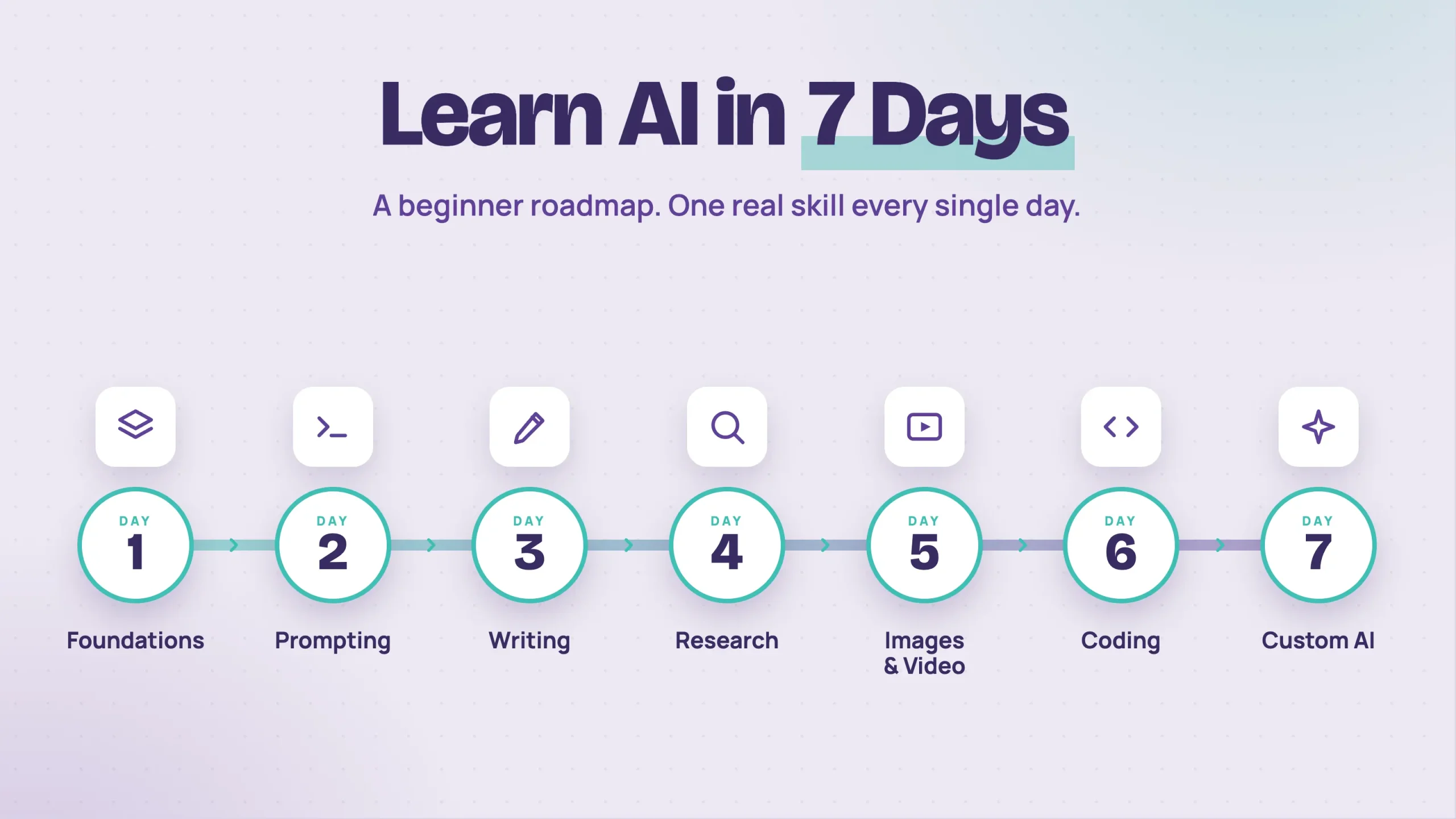
So I built a seven day plan that takes you from total beginner to genuinely confident with AI. Each day gives you a few practical tips, one recommended resource, and a clear outcome so you always know what you can do by the time you finish.
Most of the courses here are free, and the Google ones on Coursera start with a free trial before a monthly subscription. If you want more options later, here is our pick of the best Coursera certificates.
First, a quick reset on what these tools really are. Think of AI as a very smart assistant that has read most of the internet. It can write, summarize, explain, brainstorm, and even code.
But it has no memory of you unless you give it context, and it is not always right.
AI tools are not search engines. They build answers from patterns, so they can sound completely sure of themselves and still be wrong. Always double check anything that matters, like names, numbers, and facts.
The three tools worth knowing by name are ChatGPT, Gemini, and Claude. They do similar things, they all have free versions, and the small differences only matter once you are further along. For now, just know they exist.
One more thing to keep you motivated. AI skills are showing up in more job posts every month. Job posts that named generative AI as a skill grew from about 16,000 in 2023 to more than 66,000 the next year, according to Lightcast and Stanford's AI Index.
The 7 Day Roadmap to Learn AI
- Get the foundations right
- Learn to write great prompts
- Use AI as your writing partner
- Turn AI into your research assistant
- Create your first AI images and video
- Build small things with AI coding
- Build your own custom AI assistant
1. Get the foundations right
Day one is not about doing anything fancy. It is about getting your head around what AI actually is. If you skip this part, everything later feels confusing.
You already have the core idea from above. AI is a smart assistant that predicts the most likely answer. It is powerful, but it needs your guidance and a quick fact check.
To build a solid base, take the free AI for Everyone course by Andrew Ng. You can audit it for free, and it runs about seven hours.
You do not need every lesson. Focus on module 1, which covers what AI is, and module 2, which is about building AI projects in real life. Skim modules 3 and 4 if you are short on time.
Outcome: by the end of day one you will understand what AI is and what it can do. That alone puts you ahead of most people still trying to figure this out on their own.
2. Learn to write great prompts
Day two is where things get practical. You are going to learn the one skill that decides whether AI helps you or wastes your time. Prompting.
The way you talk to AI directly shapes the quality of what comes back.
Two people can use the same tool and get completely different results. The only difference is how they wrote the prompt.
Here are four habits that instantly improve every prompt you write. Our guide to prompt engineering goes deeper once you have these down:
- Set the scene. Tell the AI who to act as, what you want, and who it is for. Instead of "write a LinkedIn post about AI," try "act as a marketing expert and write a LinkedIn post for small business owners about how AI saves them time."
- Give context. Paste the email you are replying to. Share what you already tried. The more it knows, the better the answer.
- Ask for the format. Bullet points, a table, a 200 word email, or three options to choose from. Say it clearly and the AI will deliver it.
- Refine, do not restart. If the first answer is close, just say "make it shorter" or "rewrite the opening." That back and forth is where the best results come from.
The fastest way to get good is the Google Prompting Essentials course on Coursera. It takes about four hours, so you can finish it within the free trial.
Focus on the prompting framework, which is role, task, context, and format, plus the lessons on improving a prompt. Those are the parts you will use every day for the rest of your life with AI.
Outcome: by the end of day two you will write prompts that beat the average user, and that one skill makes every other day easier.
3. Use AI as your writing partner
Day three is where AI starts to save you real hours. You are going to use it as a writing partner, not a replacement.
A few rules I follow. Never ask it to "write a blog post about X" with no context. You will get something generic and you will hate it.
Instead, give it your angle, your audience, and the tone you want. The more you guide it, the more it sounds like you.
Use AI as an editor too. Some of my favorite uses are pasting in a draft I already wrote and asking it to tighten the flow or sharpen the opening. The writing stays yours. The AI just polishes it.
Want it to match your voice? Paste two or three things you have written and say "match this style." It works better than you would expect.
Then always do a final pass in your own words, because people can usually tell when something is pure AI.
To level up, take the Google AI Essentials course on Coursera. It takes under five hours and is built for working professionals. It costs $49 a month after a 7-day free trial, and most people finish it inside the trial. Focus on the modules about using AI for everyday work and the prompting practice.
If your goal is to use AI for content at a professional level, our AI Content Creator course walks you through the full workflow.
Outcome: by the end of day three you will have a writing workflow that saves time, plus a finished piece to show for it.
4. Turn AI into your research assistant
Day four turns AI into a research helper. Once you can do this, you will never read a long report the same way again.
For files you already have, like PDFs, articles, or meeting notes, use NotebookLM. It is a free Google tool, and the way it works is clever.
You upload your sources, and it only answers from those sources. That means it will not make things up, which is the biggest weakness of normal chatbots when you research.
To research a topic from scratch, use Gemini Deep Research or ChatGPT research mode. Give it a clear question and let it read across the web and come back with a structured report. The first time you see it work, it feels like magic.
Two habits matter most. Always end your prompt with "and include the links you used," so you can check the sources. And do not settle for a plain summary.
Ask for the three most surprising findings, or the strongest argument, or the main counter arguments. That is where the real insight lives.
To sharpen these skills, take Google AI for Research and Insights, part of the Google AI Professional Certificate. It is easy for beginners and walks you through NotebookLM and Gemini Deep Research step by step.
Outcome: by the end of day four you will read a 50 page report in minutes and research almost any topic faster than you thought possible.
5. Create your first AI images and video
Day five is the fun one. You will make your first AI image and your first short video, and you do not need to be artistic or technical to do it.
For images, use Gemini's Nano Banana model. It is one of the best image makers out there right now, and it sits inside the free Gemini app. If you already pay for Claude, you can use Nano Banana there too: here's how to generate images directly in Claude.
A strong image prompt has four parts. The subject, the style, the setting, and the mood.
For example: "a young woman working on a laptop in a sunlit cafe, photorealistic, warm tones, shallow depth of field." That gives you a far better result than something vague like "a woman with a laptop."
For video, use Veo, also from Google. The easiest way to use it is in Google Flow, Google's AI video studio. Start with short clips of 5 to 10 seconds and describe the motion clearly. Lines like "slow zoom in" or "camera pans left" make a real difference.
One tip most people miss. Generate three or four versions of every prompt. These tools are inconsistent, and the best result is rarely the first one. Treat the first try as a rough draft.
Your free resources for today are Google's official Nano Banana prompting guide, the Veo prompting guide, and the prompt examples on Google's Gemini site.
Outcome: by the end of day five you will have made an AI image you are actually proud of and your first video clip. That changes how you think about content for good.
6. Build small things with AI coding
Day six sounds harder than it is. I know what you may be thinking. "I am not a coder and I do not want to learn programming." That is completely fine, and you do not have to.
Knowing how to use AI to write small bits of code gives you real leverage. You can automate boring tasks and build little tools that solve real problems, without waiting on someone else.
You do not need to learn a language. You need to learn how to describe what you want clearly. If you can write a clear prompt, you can build something.
Start tiny. A script that renames files in a folder. A simple one page website. A small automation that saves you ten minutes a day. Anything bigger and you will get stuck and frustrated.
When something breaks, and it will, paste the error message back and ask the AI to explain it in plain English. That is how you actually learn. You go from "I have no idea what this means" to "oh, that makes sense" in about a minute.
Treat an AI coding tool like a smart new team member. Clear instructions, patient feedback, and small tasks to start.
To get comfortable, take Anthropic's Claude Code 101 course. It is about ninety minutes and the cleanest intro to AI coding I have seen. Focus on the setup and the first hands on examples.
Outcome: by the end of day six you will know what AI coding tools can do and have a much clearer picture of what you can build next.
7. Build your own custom AI assistant
Day seven ties everything together, and most beginners do not even know it exists. You are going to build a custom assistant, often called a custom GPT.
It is a version of your AI tool that you set up once with your own instructions, your own tone, and even your own files as a knowledge base. Think of it as a personal assistant built for one specific job.
Here is why it matters. If you have used AI for a while, you have probably typed the same role and the same context over and over.
A custom assistant lets you set all of that up one time. After that, it already knows who it is and what you need.
Build one you will actually use every week. A writing editor that knows your style. A social post generator in your voice. A study tutor. A brainstorm partner for your business.
Pick one that solves a real problem you have right now. You can also upload your own files, like brand notes or documents, so the answers are far more accurate and useful.
To get started, take the free Claude 101 course from Anthropic. It shows you how to set these up in Claude, where they are called Projects.
Once you get the idea, you can do the same with Gems in Gemini or custom GPTs in ChatGPT. The setup differs a little, but the concept is identical.
Outcome: by the end of day seven you will have built at least one custom assistant you use weekly, and you will understand a side of AI most casual users never reach.
The biggest mistake to avoid
Here is the one trap I see most beginners fall into. They treat learning AI like watching a TV series. They consume video after video, nod along, and then nothing changes in their real life.
The people who actually get good at this do not watch more. They open the tools and use them.
So after every lesson this week, ask yourself one question. What did I just learn, and how will I use it today?
Stay close to that question, and one week is genuinely enough to change what you are capable of.
Frequently Asked Questions
Can you learn AI by yourself?
Yes. Everything in this plan is self-paced, and the tools themselves are the best teachers. Use them every day on real tasks, and when something confuses you, ask the AI to explain it in plain language.
Can you learn AI for free?
Yes. AI for Everyone, Anthropic’s Claude 101 and Claude Code 101, NotebookLM and the free versions of ChatGPT, Gemini and Claude cost nothing. The Google courses on Coursera start with a free trial, and if you work through them quickly you can finish before you pay anything.
Can I learn AI in 3 months?
Yes, for using AI at work. This plan gets you confident in a week, and three months of daily practice will make you better than most of your colleagues. Building AI systems or models is a different path that usually takes a year or more, starting with Python.
Do I need to know how to code to learn AI?
No. Days one to five and day seven need no coding at all. Day six introduces AI coding, but even there you describe what you want in plain language and let the AI write the code.
Next steps
That is the full seven day plan. Day one for foundations, day two for prompting, day three for writing, day four for research, day five for images and video, day six for coding, and day seven for custom assistants.
The total time is about a normal work week. The skills you walk away with are the same ones companies are paying real money for right now. If you work in marketing, see how vibe marketing uses these same tools to run whole campaigns.
If you want to keep going with structured, guided training, take a look at the Reliablesoft Academy. And remember the rule that beats every shortcut. Open the tools and use them.