


Getting to the top of YouTube search results can lead to many views for your videos. However, with many people making videos on the same topics, how do you ensure that yours makes it and stays at the top?
The answer is YouTube search engine optimization (YouTube SEO).
What Is YouTube SEO?
YouTube SEO is the process of optimizing your videos to rank higher in YouTube and Google search results. The process starts by finding the actual search terms people use when looking for videos on YouTube and using these keywords in your video title, description, tags, and content.
With SEO for YouTube, you can produce videos that people want to see, maximize the exposure of your videos, and get more views and channel subscribers.
How Does YouTube Rank Videos?
According to YouTube's own explanation of how search works, it ranks search results on three main elements:
- Relevance: how well your title, tags, description, and video content match the search query.
- Engagement: signals such as the watch time of a particular video for a particular query.
- Quality: signals that help YouTube decide which channels show expertise, authoritativeness, and trustworthiness on a topic.
YouTube also personalizes results based on each viewer's search and watch history, so two people can see different results for the same search.
In practice, this means YouTube SEO has two jobs. Your metadata (title, description, thumbnail, captions) tells YouTube and viewers what the video is about, and the video itself has to keep people watching once they click.

12 Top Tactics For YouTube SEO
Follow these steps to optimize your videos for search.
- Start With Keyword Research
- Optimize your Channel Description and Keywords
- Create Engaging Video Titles
- Add Keywords To Video Descriptions
- Improve Video CTR
- Add Relevant Tags to Videos
- Make Use of Hashtags
- Improve Video Engagement Signals
- Increase Audience Retention
- SAY Keywords In Your Video Content
- Enable Transcript and Subtitles
- Promote Your Videos (Inside and Outside YouTube)
1. Start With Keyword Research
The first step is to do keyword research to find the search terms that people are using.
There are a variety of ways and tools that you can use to perform keyword research on YouTube.
Start by going to YouTube and typing something you want to make a video into the search bar.
As you enter your words, YouTube will display a list of popular searches that include the keyword.
You can use these as a starting point for discovering the search terms viewers are using.
Another way to find keyword ideas is to check your competitors’ channels. Go to their top videos and see what keywords are being used in the titles and descriptions.
If you already have a channel, use the Research tab in YouTube Studio Analytics. It shows what your viewers and other YouTube users are searching for, including searches with few good videos, which are good opportunities for new content.
2. Optimize your Channel Description and Keywords
After you find these terms, you should add the most relevant ones to your channel description and channel keywords.
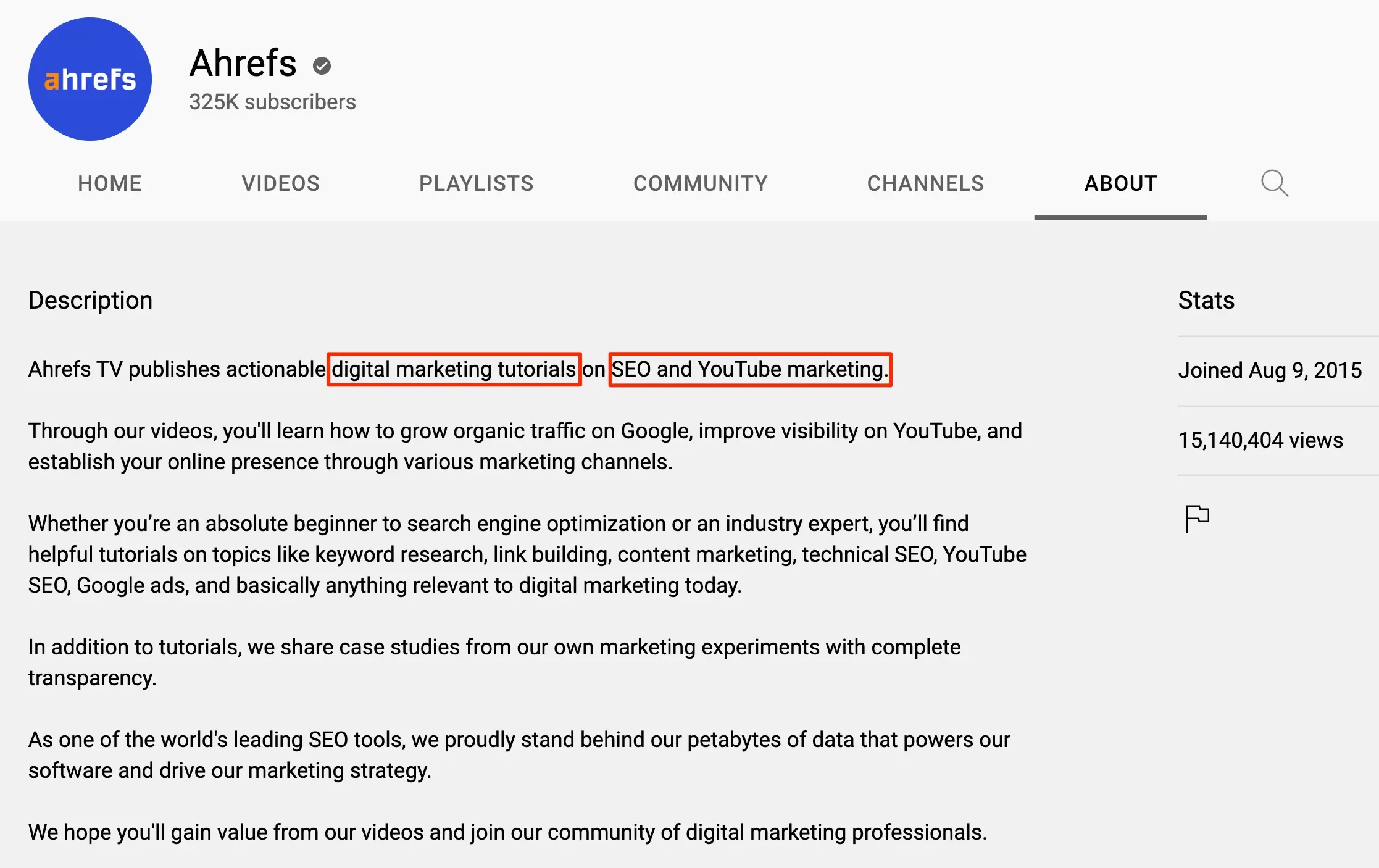
Channel Description
The channel description is shown on the About page of your channel. It gives you the opportunity to tell viewers about your channel and the videos you make.
It helps YouTube and viewers understand what your channel covers, so describe your topics naturally using your main keywords.
Here is a nice example from Ahref's YouTube Channel.
Channel Keywords
You can also add channel keywords in YouTube Studio under Settings. They give YouTube a small hint about your channel’s topics, so use a few of your most important keywords together with your brand name. Don’t expect them to move rankings on their own.
Here is an example from our YouTube Channel.
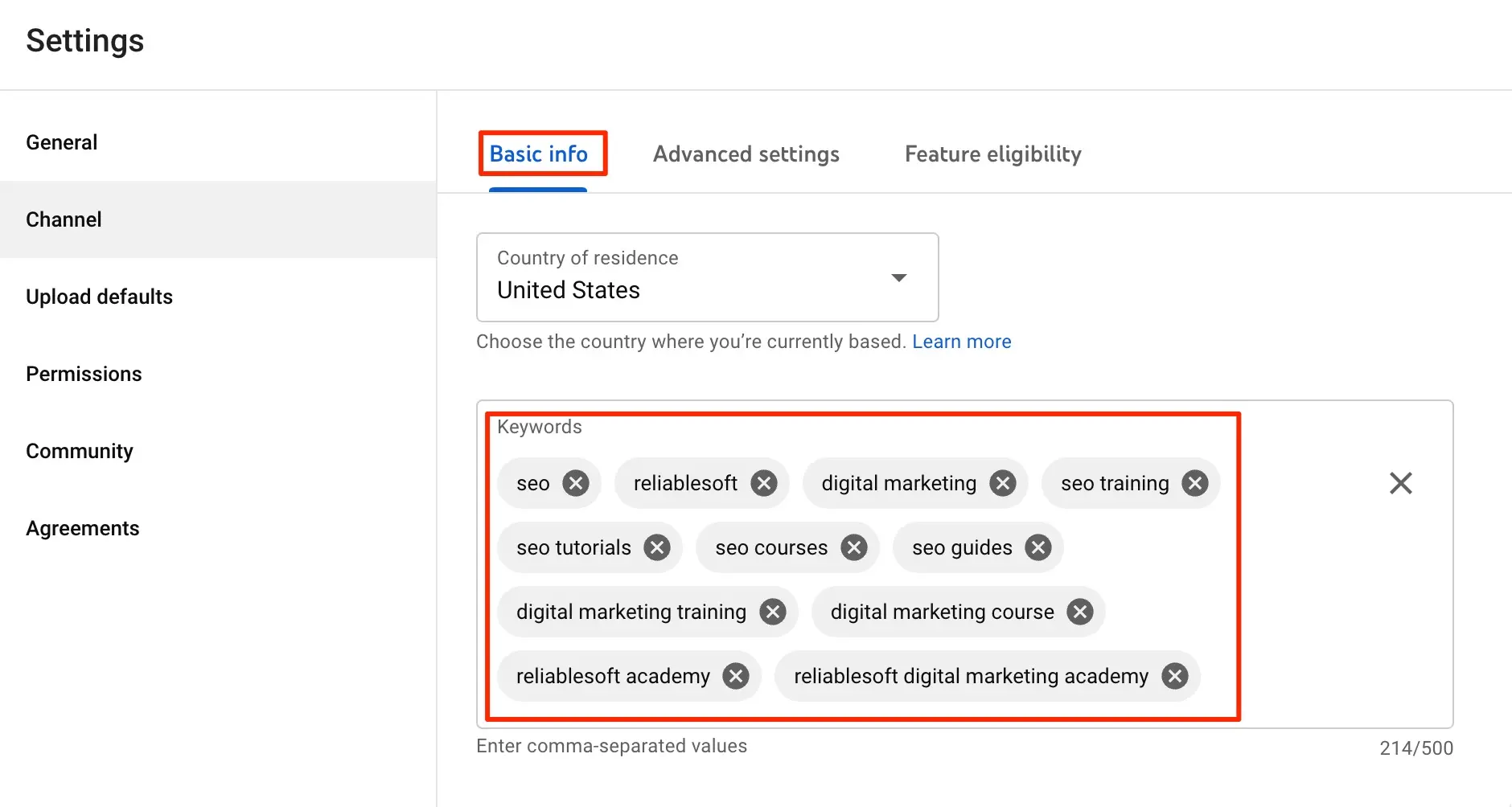
Notice that we added the keywords we want to rank for like “digital marketing training” and branded keywords like “reliablesoft academy”.
Our YouTube Marketing Course covers YouTube keyword research and how to optimize your videos for search step by step. For more options, see our list of the best YouTube courses.
3. Create Engaging Video Titles
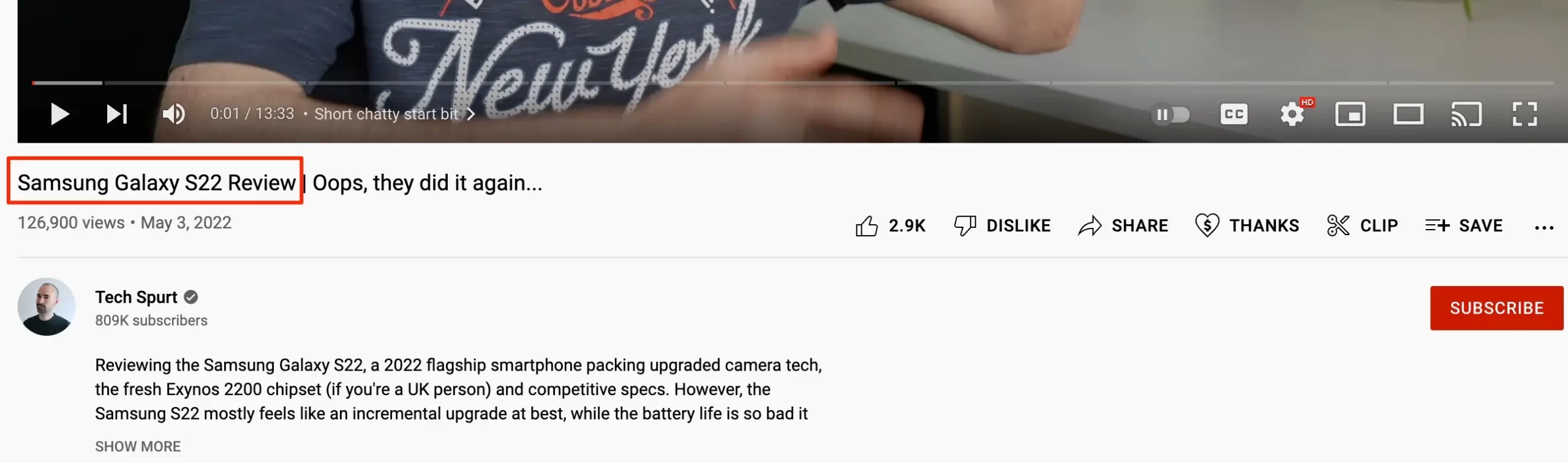
The next step is to optimize your video titles by adding your target keywords. Look to add your main keyword to the beginning of the title as it will make it clear to YouTube and viewers that the video is related to their search query.
For example, in this smartphone product review, the title starts with the video’s main keyword target “Samsung Galaxy S22 Review”.
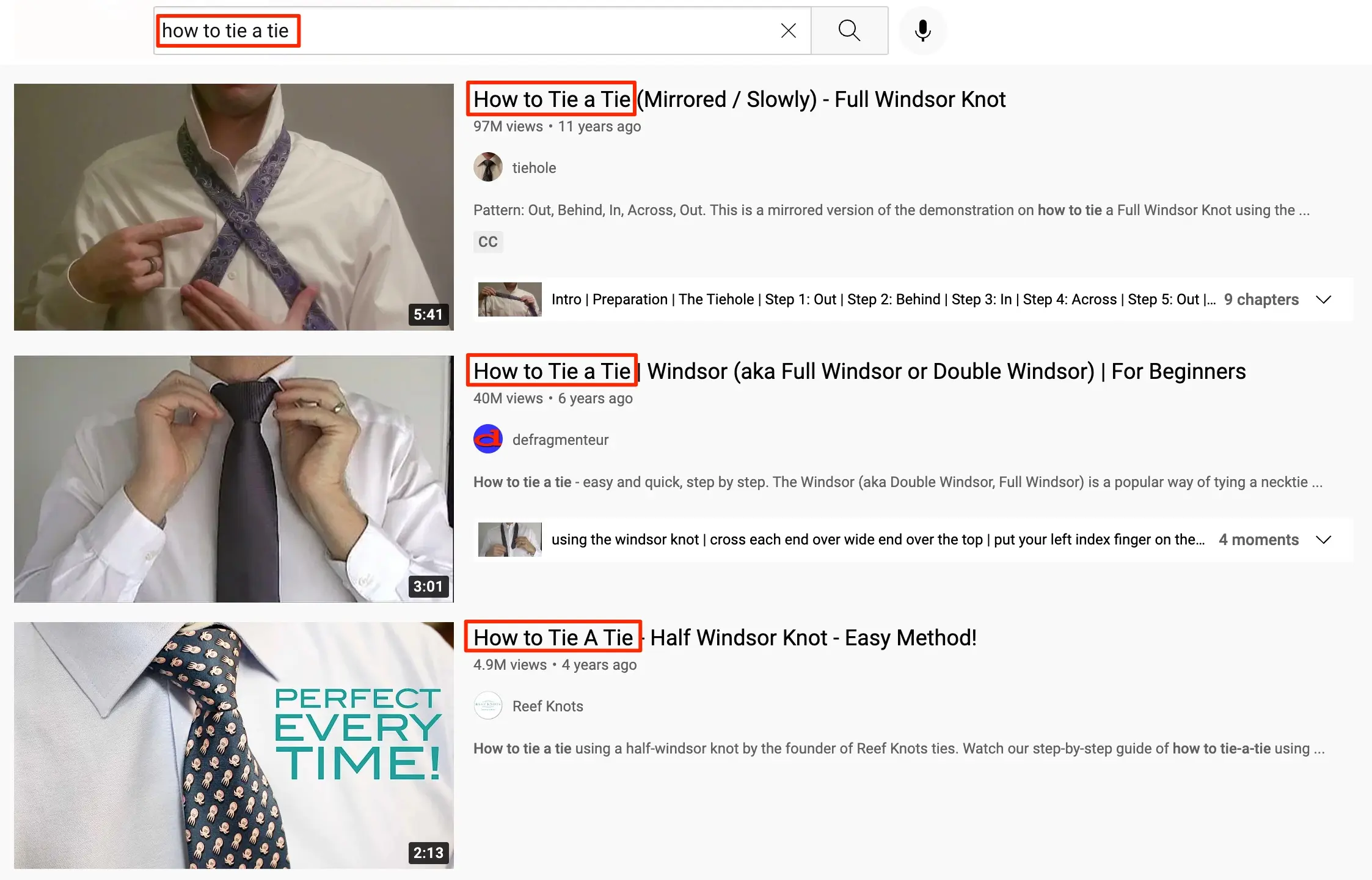
It’s also important to match your video title to the search intent of the target keyword. If someone is searching for a term with informational intent, you can use a title like “how to” as a way to signal to the viewer that your video contains instructions and information.
Keep your titles concise, around 70 characters or less, so the important words aren’t cut off in search results and on mobile.
When creating titles for your videos, take a moment to check the titles for competing videos. This will help you understand how others are optimizing their titles for YouTube SEO.
4. Add Keywords To Video Descriptions
After you optimize your title, you’ll need to do the same for your descriptions.
The YouTube video description is where you tell viewers what your video is about. YouTube also uses it to understand your videos, making it an important SEO factor.
Here are some ways to optimize your video descriptions for YouTube SEO:
Include target keywords
Like titles, you should include your keywords in the description as it will help YouTube’s algorithm understand and surface the content.
The keywords should be related to the video content and they should fit into the description naturally.
Add your main keywords early
It’s important to add your main keyword target to the beginning of the description, generally within the first 20 or so words.
This will signal that it's a key part of the content. It will also ensure that the keywords appear in the part of the description that is initially visible to viewers.
YouTube collapses all but the beginning of descriptions below a Show More button. You want the main keyword target to be seen by people who scan the description to see if they’re interested in the video.
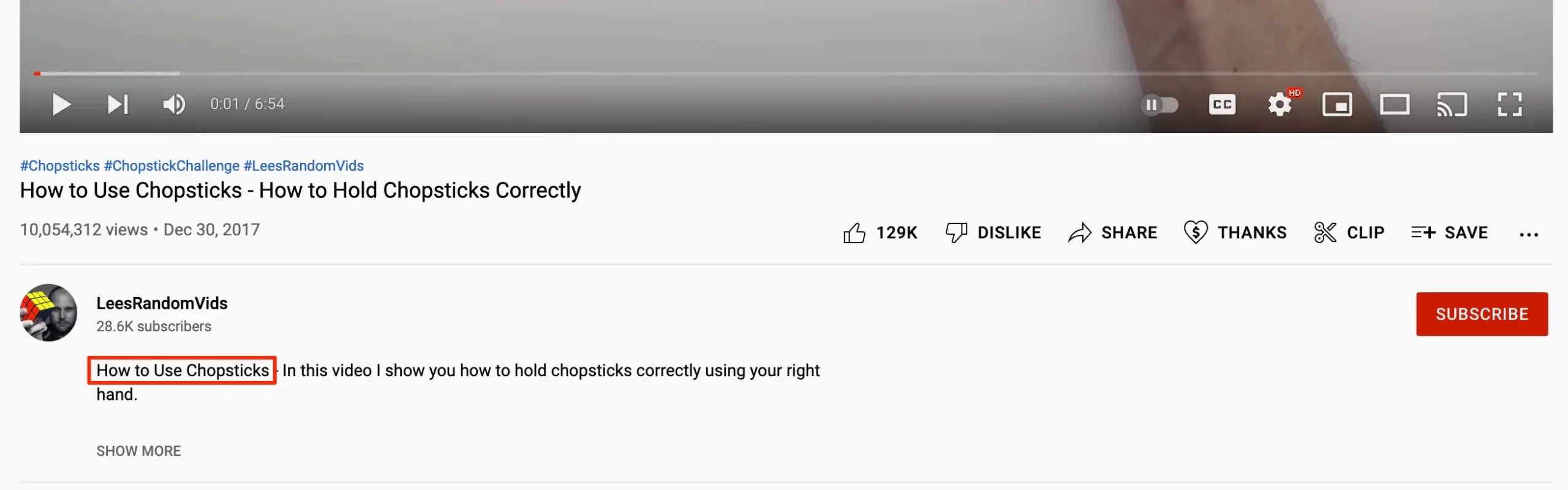
For example, in this video on how to use chopsticks, you see the main keywords at the start of the description.
Repeat your keywords
After the opening lines, use your main keyword and related terms where they fit naturally, for example when you describe what the video covers.
Don’t stuff keywords into the description. YouTube’s spam policies prohibit misleading metadata and excessive tags or keywords in descriptions.
Write a useful summary
A description of a few short paragraphs usually works well: a summary of what the video covers, timestamps for chapters, and links to related videos or resources. A more detailed description gives YouTube and viewers more context, but only add text that is useful to viewers.
5. Improve Video CTR
The Click-through rate (CTR) is the percentage of people who click on your video after seeing it appear in the search results.
Improving your CTR will not only lead directly to more viewers but also to YouTube ranking your videos higher. If people are clicking on them in high numbers, it’s a sign that your video is a good match for the keyword.
On the contrary, if people are skipping over your video without clicking it, your rankings can drop.
Here’s how to improve your YouTube video CTR:
Optimize Your Thumbnails
The best way to improve your YouTube CTR is to use eye-catching thumbnails.
Thumbnails are one of the few things viewers see when reviewing search results so they need to capture attention and convince the person to click on them to see the content.
When you create a video, YouTube will automatically apply a thumbnail from a still image during the video.
You’ll need to replace this default thumbnail with a custom thumbnail. According to YouTube’s thumbnail guidelines, your account must be verified to upload custom thumbnails. For regular videos, use a 16:9 image with a resolution of 3840 x 2160 pixels (minimum width 640 pixels) in JPG or PNG format.
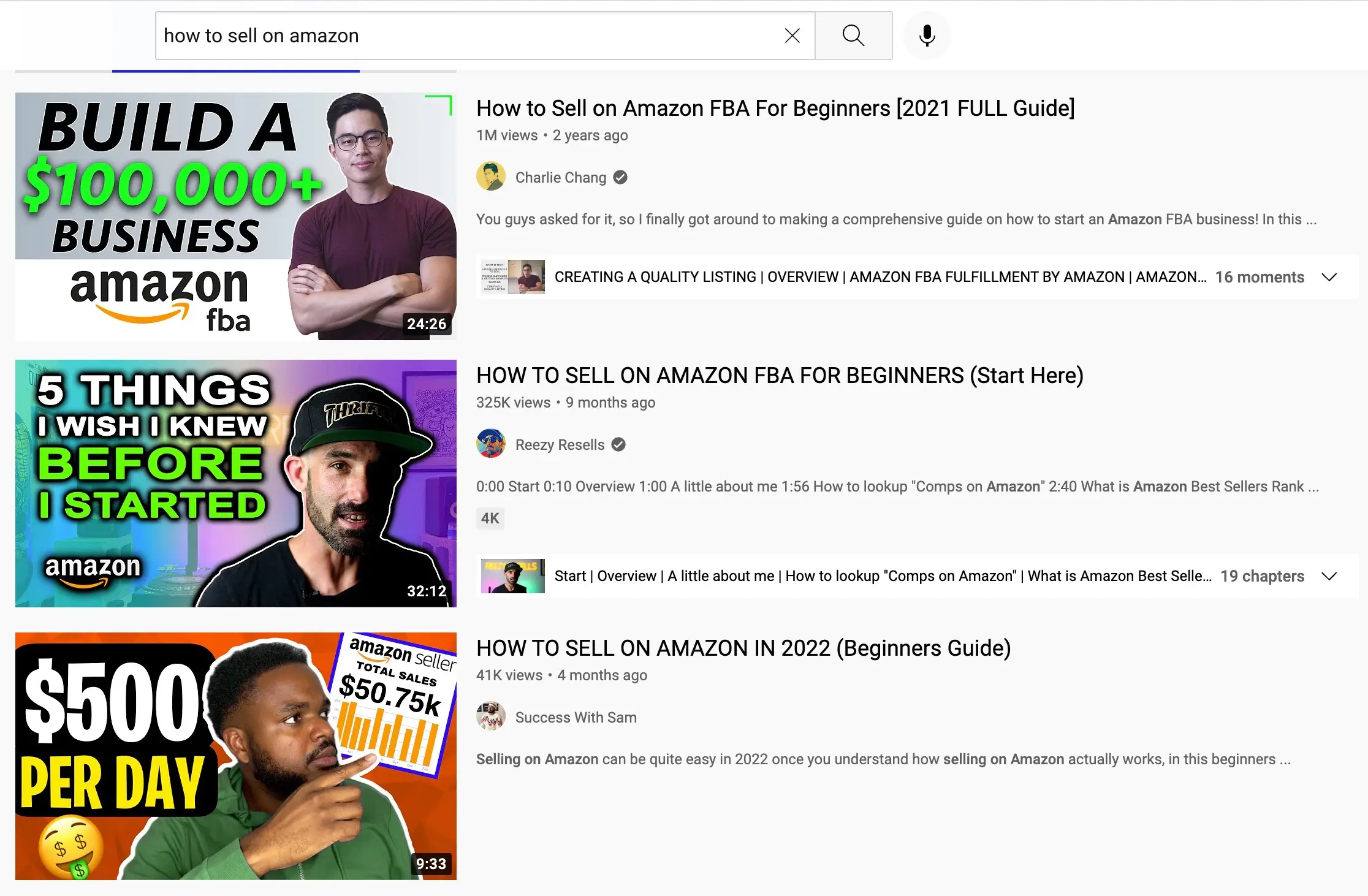
When designing thumbnails, many channels use a text overlay that describes the video along with a graphic or image of the person in the video.
Below is an example:
Write Compelling Titles
In addition to thumbnails, video titles are one of the few details a YouTube searcher has when deciding what videos to click.
By creating a compelling title that gives your audience a reason to watch, you can drive more clicks to your videos.
Appropriate Video Length
YouTube search results include an overlay of the video length on the thumbnail.
Many searchers will look at this value when deciding which video to click. As such, you want your video lengths to match users’ expectations.
For example, if someone is searching for an in-depth guide, they’ll expect a longer video. While someone looking for a quick answer to a question will expect a short video.
6. Add Relevant Tags to Videos
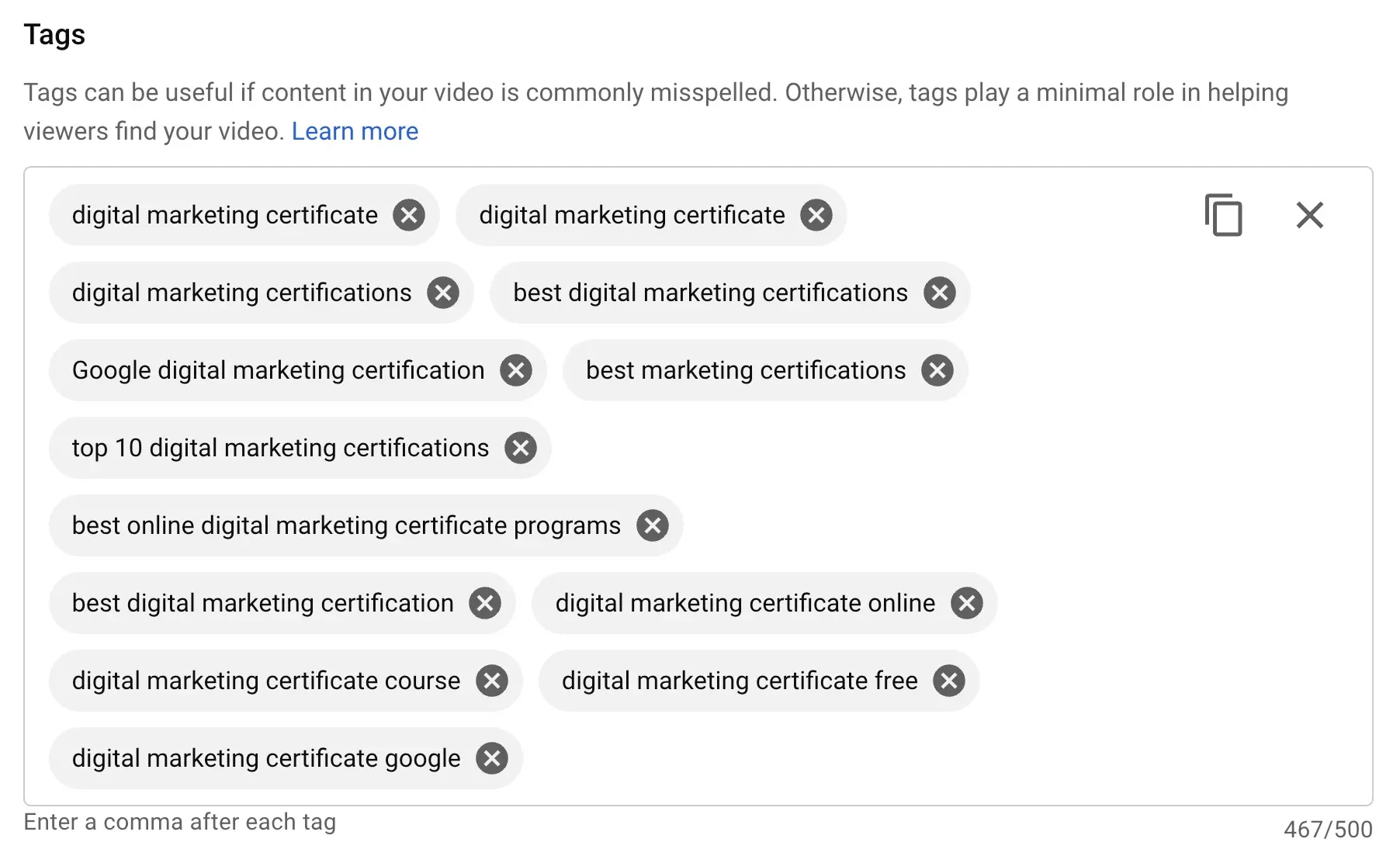
YouTube tags are optional keywords you can add to a video. They matter much less than most people think. YouTube says tags play a minimal role in your video’s discovery, and that your title, thumbnail, and description are more important.
Tags are most useful when your topic is commonly misspelled. Add your main keyword and a few common variations or misspellings, and spend the rest of your time on your title, thumbnail, and description.
To add tags to a video, go to YouTube Studio, edit the video details, and click the Show More button to view the additional settings and add your tags.
Keep your tags relevant and few. Adding lots of unrelated tags can break YouTube’s spam policies.
7. Make Use of Hashtags
Hashtags are text tags used across many social media platforms to help users find content that they are interested in.
With YouTube, you can add hashtags to video titles and descriptions so that visitors can easily find them when they search for a specific hashtag.
Adding keywords to hashtags can also boost YouTube SEO as the algorithm will scan them to see what the video is about.
When you add hashtags to video titles or descriptions, up to three hashtags that YouTube considers most engaging appear by the video title as clickable links. Viewers can click the link to see a list of other videos with the same hashtag.
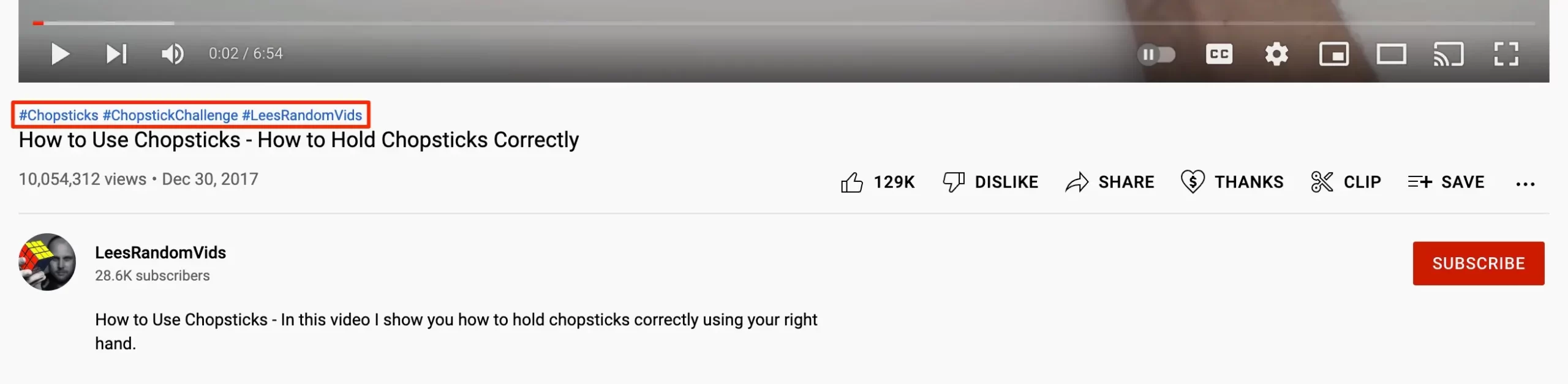
This makes it easy for users to search and it helps trends grow and gain visibility.
Hashtags only surface results that use the exact text so if you want your videos to be visible, you need to apply the exact hashtags that people are using.
I recommend adding your hashtags to the video description and not the title as the latter can be distracting.
Like video tags, you don’t want to go overboard with the hashtags. I recommend sticking to three to four per video. If a video has more than 60 hashtags, YouTube ignores all of them.
8. Improve Video Engagement Signals
Part of YouTube’s ranking algorithm is based on how viewers engage with your videos.
The more your audience engages with your videos, the better rankings you’ll experience.
The main metrics YouTube uses to measure engagement are likes, comments, shares, and the number of subscribers that you’re gaining.
YouTube also analyzes what happens when people are watching your videos. For instance, they’ll monitor how long people stay on the page to determine the average amount of time viewers watch and how many make it through the entire video.
Now, the best way to get more people to engage with your videos is to create great content that people enjoy watching.
Beyond creating high-quality videos, here are some ways to improve your video engagement signals:
Tell your viewers to subscribe and like the video
If you’re a frequent YouTube user, you’ve likely seen creators implementing this tactic.
It’s simple but can be effective as simply asking viewers to like and subscribe will win over many who would have otherwise forgotten.
Try to include the request at the beginning of the video so that more people see it. Some people won’t make it all the way through so it’s better to ask early on.
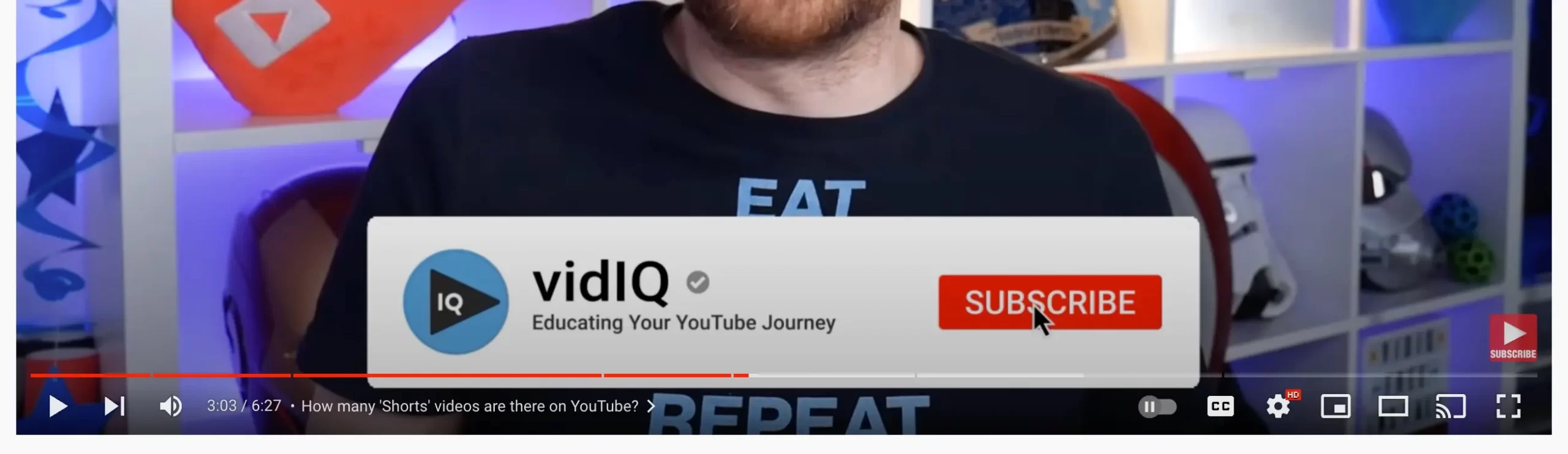
You can also add graphics to the video with a reminder to subscribe or like the video. This way, you can give viewers a visual reminder without interrupting the video content.
Ask for comments
Another way to get more activity on your videos is to ask customers to comment on the video.
When asking viewers to comment, try to be specific with your request. Instead of saying “leave a comment below”, tell them a specific topic to comment on.
As viewers comment on your videos, reply to their comments and do so quickly. This can increase engagement and viewers will appreciate the conversations.
Use YouTube Premieres
With YouTube Premieres, you can premiere your video live for visitors to watch in real-time.
Premieres can be highly engaging events. They often involve many of the viewers talking to each other in the chat window.
You can use this opportunity to encourage your audience to like, subscribe, comment, and watch more of your videos.
9. Increase Audience Retention
It doesn’t matter how well you optimize your videos for SEO if people don’t enjoy watching them.
YouTube’s Audience retention report shows how much of your video people watch and where they stop. Watch time is one of the engagement signals YouTube uses to rank search results, so it’s vital that your videos keep people watching.
Here are some ways to increase the amount of time people spend watching your videos:
Make Sure Titles and Thumbnails Match Content
I’ve mentioned how viewers use thumbnails and titles to decide which videos to watch.
While you need to catch users’ attention while optimizing for your target keywords, you also need to ensure that the thumbnails and titles align with the actual content.
Otherwise, visitors will quickly exit your videos because they don’t meet their expectations.
Break Videos Into Chapters
YouTube gives you the ability to divide your content into sections using Video Chapters. Like the chapters in a book, Video Chapters make it easy to navigate content and they help viewers know what will come next.
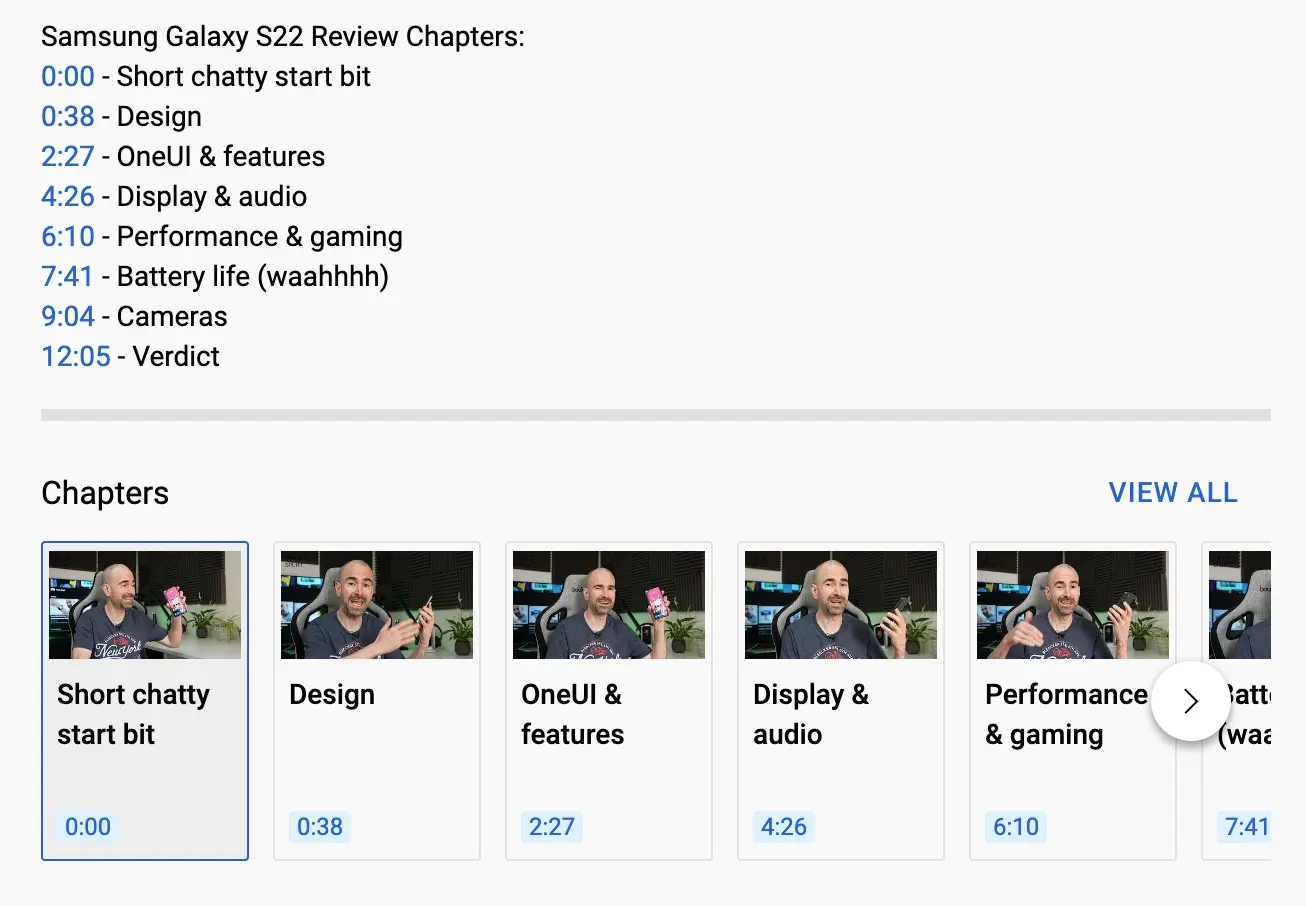
They also allow the watcher to quickly find a particular section. This can help keep people on the page as someone looking for specific information could exit your videos at the start if they believe they won’t find it.
Make a Video Series
Making a series of connected videos is a great way to get people to watch multiple videos. For example, you could create a course for learning a skill and each video in the series contains a different lesson.
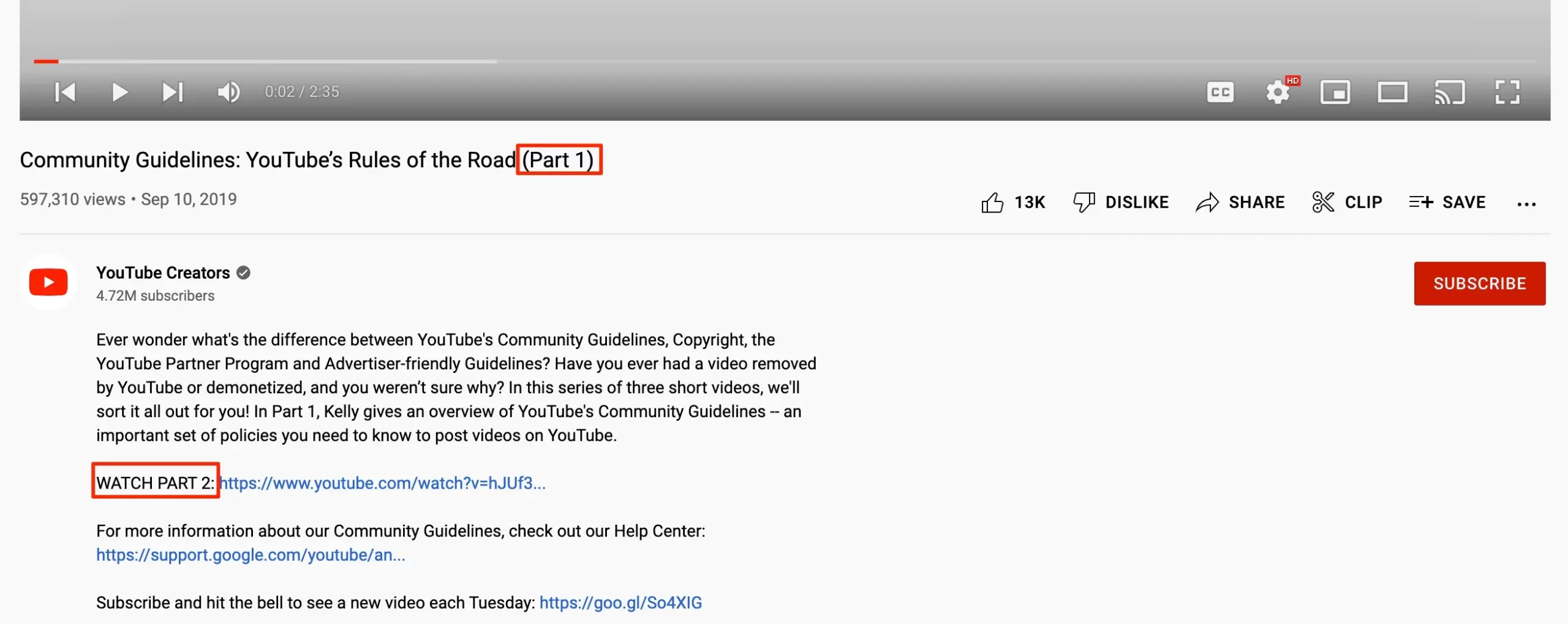
Videos contain a connected set of topics and are released every other day to encourage repeated viewing.
By producing a group of related videos, your viewers are more likely to watch successive videos. This will lead to higher watch times and, ultimately, better YouTube rankings.
Use YouTube Analytics to Find Improvements
Another way you can increase viewing time is to optimize the parts of your content that are underperforming.
With YouTube Analytics, you can review data for your videos including when people are dropping off.
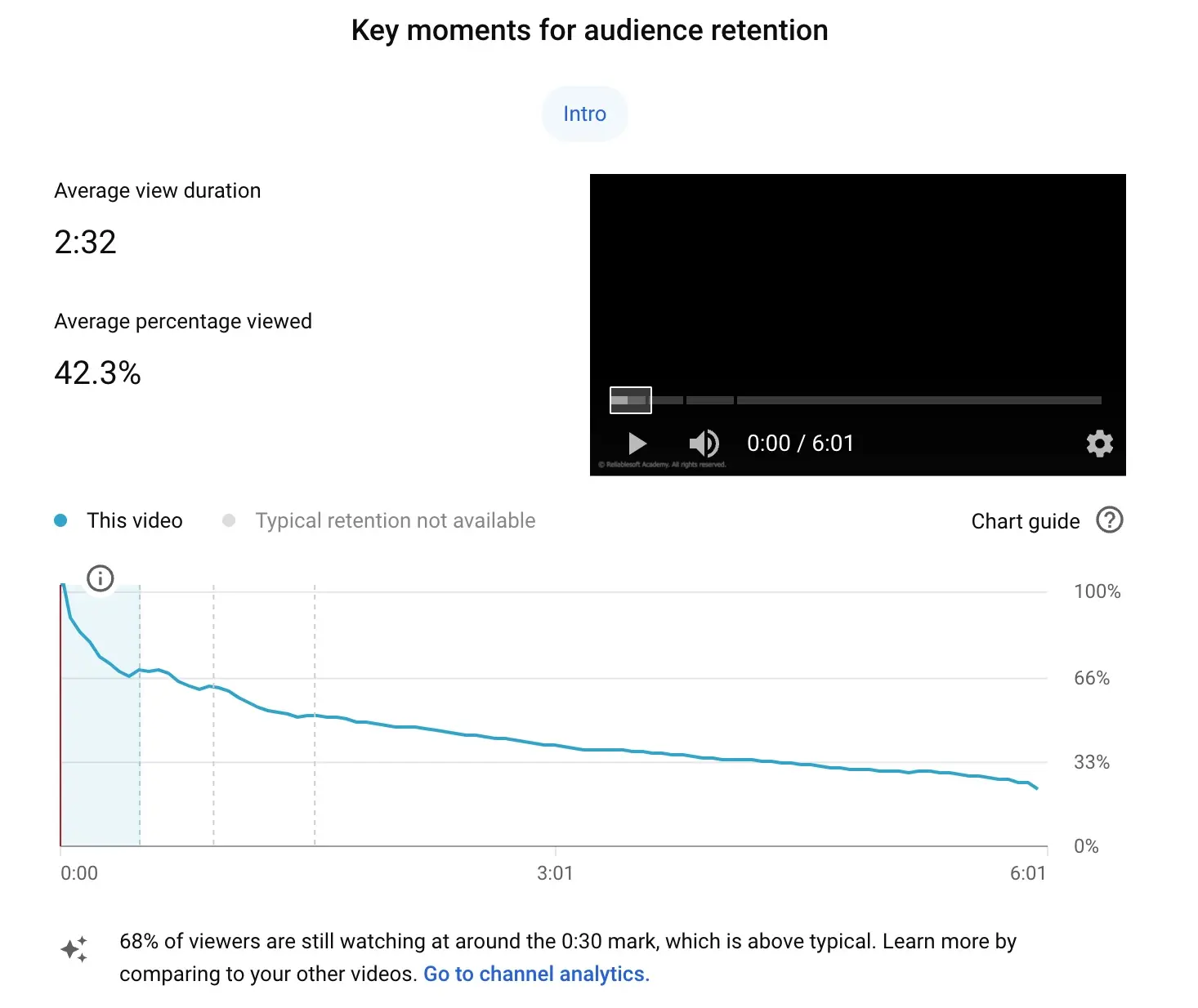
If you find that a certain part of the video is causing people to leave, you can review the content and make changes that encourage viewers to continue watching.
10. SAY Keywords In Your Video Content
When planning your content, remember to say your target keywords at the beginning of the video.
This will ensure that YouTube knows that the content is related to the keyword.
Mentioning the target keywords early in the video will also confirm to viewers that the content is indeed related to the topic they searched for.
11. Enable Transcript and Subtitles
Another YouTube optimization for content is to enable subtitles, closed captions, and transcripts for your videos.
Subtitles are used to provide dialogue to viewers that don’t understand the video language while closed captions are meant to assist those who can’t hear the audio.
These features make your videos accessible to everyone and they can improve the viewing experience at times when the audio is difficult to hear or understand.
If someone can’t understand a portion of the audio, they can simply turn on the captions to read what’s being said.
Adding a transcript to the video will generate the subtitles and captions.
With each video, you have the option to add your own transcript file or you can have YouTube automatically transcribe the audio.
Don’t worry if their transcription isn’t the best. You can review and edit the transcript to make any required changes.
Transcripts can be useful for anyone looking to search for a specific phrase or topic. They can copy the text from the transcript and paste it into a file to find the topic they’re looking for.
12. Promote Your Videos (Inside and Outside YouTube)
SEO for YouTube is an effective way to get more viewers but it often takes time to elevate your pages to the top of the rankings.
You can speed up the process by promoting your videos and exposing your content to a wider audience of people.
As your videos gain more viewers, they’ll gain SEO momentum and start to see higher search rankings.
Let’s look at some of the best ways to promote your YouTube videos:
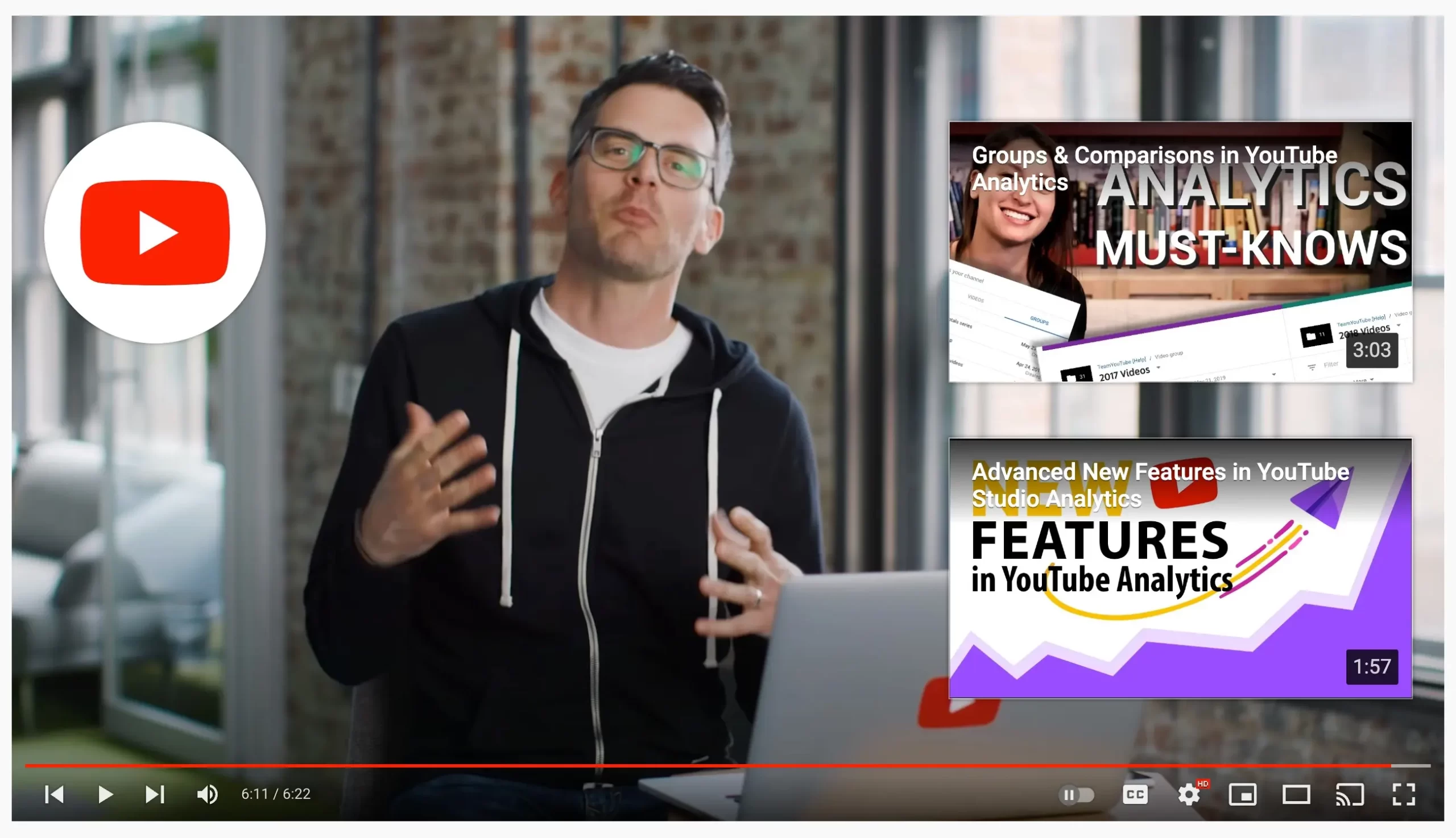
Use End Screens and Cards
End screens appear in the last 5 to 20 seconds of a video. You can add up to four elements, such as another video, a playlist, or a subscribe button, to keep viewers watching your content.
Cards are small interactive panels that can appear at any point during a video to recommend a related video, playlist, or channel. Use them at the moment a related topic comes up.
Group Videos Into Playlists
Playlists keep viewers watching one video after another, which increases your watch time. They can also appear in YouTube search results on their own. Group related videos into playlists with keyword-rich titles and add each new video to the right playlist.
Make Channel Sections
As your channel grows and you start to stack up a large number of videos, it will become more difficult for viewers to navigate your channel page.
You can make it easier for them to find the content they want by creating channel sections.
With channel sections, you can divide the videos on your channel page into clearly organized groups.
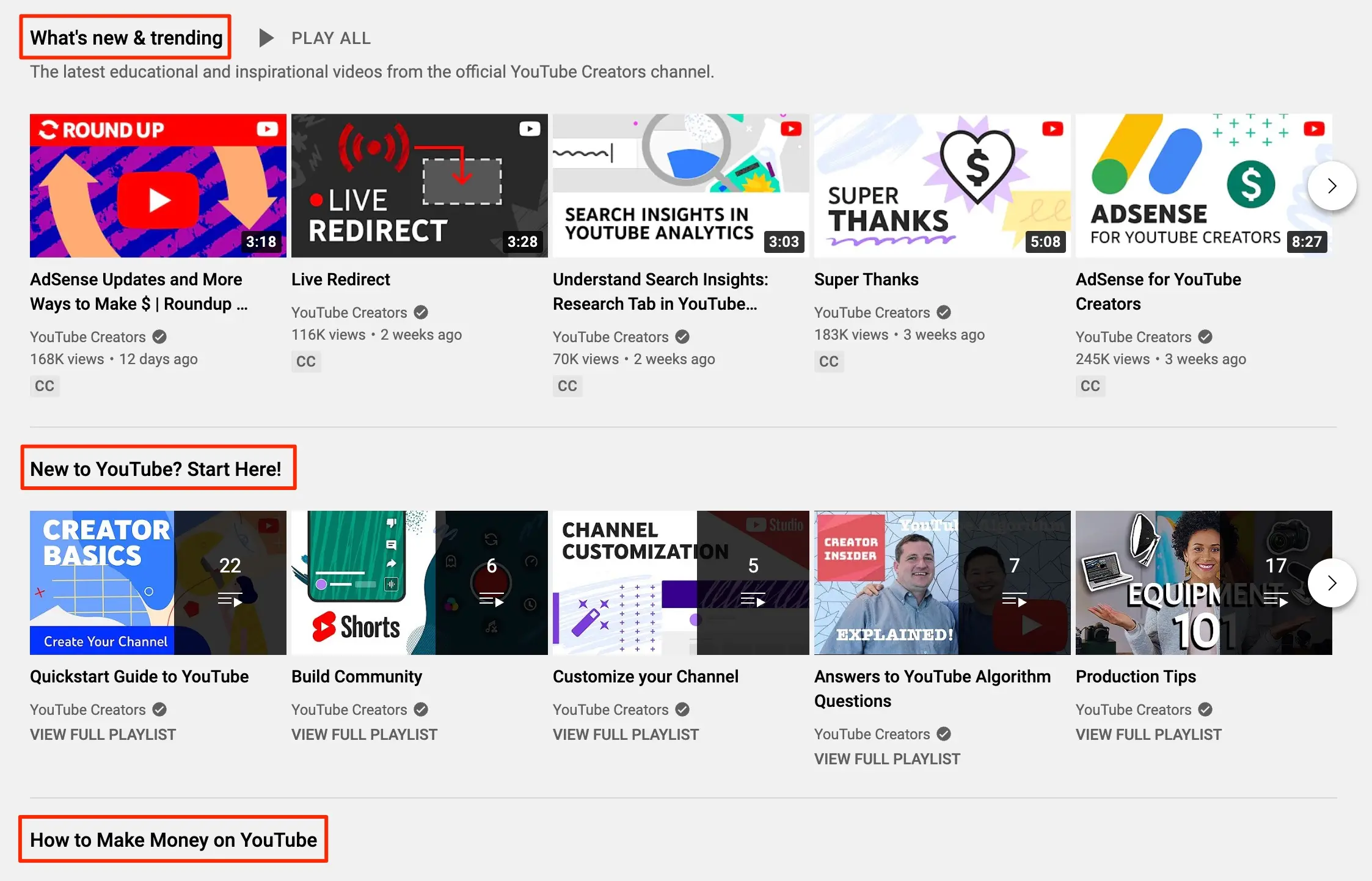
You can group and label these sections however you’d like, whether it’s a particular topic or videos over a certain length.
Embedding the Video on Your Blog
Next, you should look to drive video traffic from external websites. One great way to do this is to embed your videos directly on your blog.
This will let your blog visitors watch the video straight from your site. It will also include a link to the video's YouTube page.
Share on Social Media
Your website isn’t the only place to market your videos. You can also post your videos to your social profiles to drive traffic from the platforms to YouTube.
Sharing your videos will also encourage some of your audience to share them as well, helping to provide even more visibility.
YouTube SEO for Shorts
Shorts are vertical videos up to three minutes long, and they follow many of the same rules as long-form videos. Viewers mostly find Shorts in the Shorts feed rather than through search, so the first seconds matter even more.
To optimize your Shorts:
- Write a clear, keyword-rich title that describes what the Short is about.
- Add a few relevant hashtags to the title or description to connect your Short to a topic.
- Hook viewers immediately. Show the most interesting part in the first second or two, because people swipe away quickly.
- Use a 9:16 thumbnail where you can set one; YouTube recommends 2160 x 3840 pixels for Shorts.
- Link Shorts to your long-form videos so viewers who like a Short can watch the full video.
Use Shorts to reach new viewers and long-form videos to rank in search and build watch time. Most channels get the best results by using both.
Conclusion
Ranking videos on YouTube is a great way to increase exposure for your business. The steps in this guide will help you optimize your videos to have YouTube SEO success.
And remember, the more helpful content you can offer your audience, the more viewers you’ll naturally attract to your YouTube channel.
If you’re just getting started, see our guides on how to create a YouTube channel and choose a YouTube channel name.
YouTube SEO FAQ
Does SEO really work on YouTube?
Yes. YouTube ranks search results on relevance, engagement, and quality, so matching your title, description, and content to what people search for helps your videos appear. But SEO only gets the click. Your video still has to keep people watching to hold its ranking.
Do YouTube tags still matter?
Very little. YouTube says tags play a minimal role in discovery and are mainly useful for commonly misspelled topics. Your title, thumbnail, and description matter much more.
What is the 7 second rule on YouTube?
It isn’t an official YouTube rule. It’s a creator guideline that says you have only a few seconds to convince viewers to keep watching. Start with a strong hook that confirms the video is about what they searched for, and skip long intros.
How long does YouTube SEO take to work?
New videos can start appearing in search within days, but it usually takes longer to rank for competitive searches. Channels that publish consistently on a focused topic tend to see results faster, because YouTube learns what the channel is about.


