

Most guides on Claude AI marketing throw twenty features at you. Agents, Skills, Connectors, MCP. None of it tells you what to actually do on Monday morning.
This guide takes a different path. It walks through nine practical marketing tasks, from a weekly plan to competitor research and scheduled work, all built for one real business. By the end, you will have a complete Claude AI marketing system that runs from a single folder.
Setting up your Claude marketing home base
Before touching any marketing task, you need a home base. This is the step almost everyone skips.
Nearly everything in this system happens in the Claude desktop app, using what Anthropic calls Cowork: instead of just chatting, Claude works inside a folder on your computer. It can read files, create files, and run longer tasks, which is exactly what marketing work needs.
The app is free to download, but Cowork, Claude Design and Claude Code all need a paid Claude plan, starting with Pro.
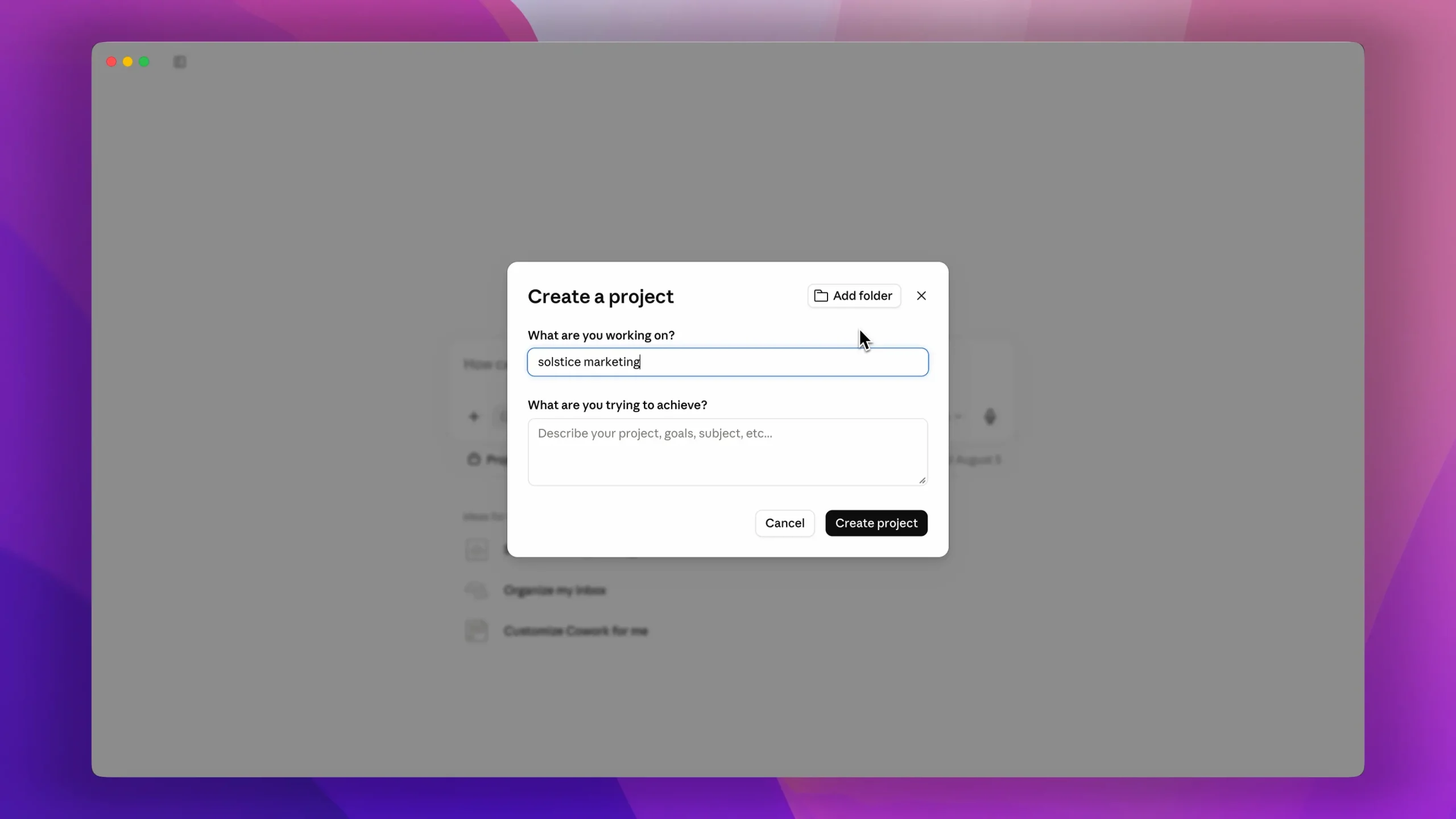
Open the app and create a new project. In September 2026 Anthropic started merging Cowork and chat into one Claude on Pro and Max plans, so on updated accounts you can do all of this from a normal conversation. If your app still shows a separate Cowork mode, switch to it first. For this walkthrough, the demo business is Solstice Yoga, a small local studio in Florida, so the project is named Solstice Marketing.

Then click "Add Folder" and give it a brand new empty one. Click "Always Allow" so Claude has permission to change files, then create the project. That folder is now your home base. Every plan, page, and tool you build lands there, and you keep all of it.
If you are brand new to this mode, our Claude Cowork guide for beginners covers the full setup in more detail.
Teach Claude your business first
Now the step that changes everything: teaching Claude about your business. Most people open Claude and type "write me an Instagram post for my yoga studio." They get fluff.
That is not a Claude problem. It is a context problem. Claude does not know your prices, your customers, or how you talk. So it guesses, and guesses sound generic.
You fix this once, with one prompt. And here is the trick that makes it special. Instead of writing a brief yourself, you make Claude interview you. The core of the prompt says:
"You are my marketing strategist. Interview me about my business, one question at a time, up to 10 questions. Then compile my answers into a one page brand brief and save it as a file called Brand Brief in this folder."
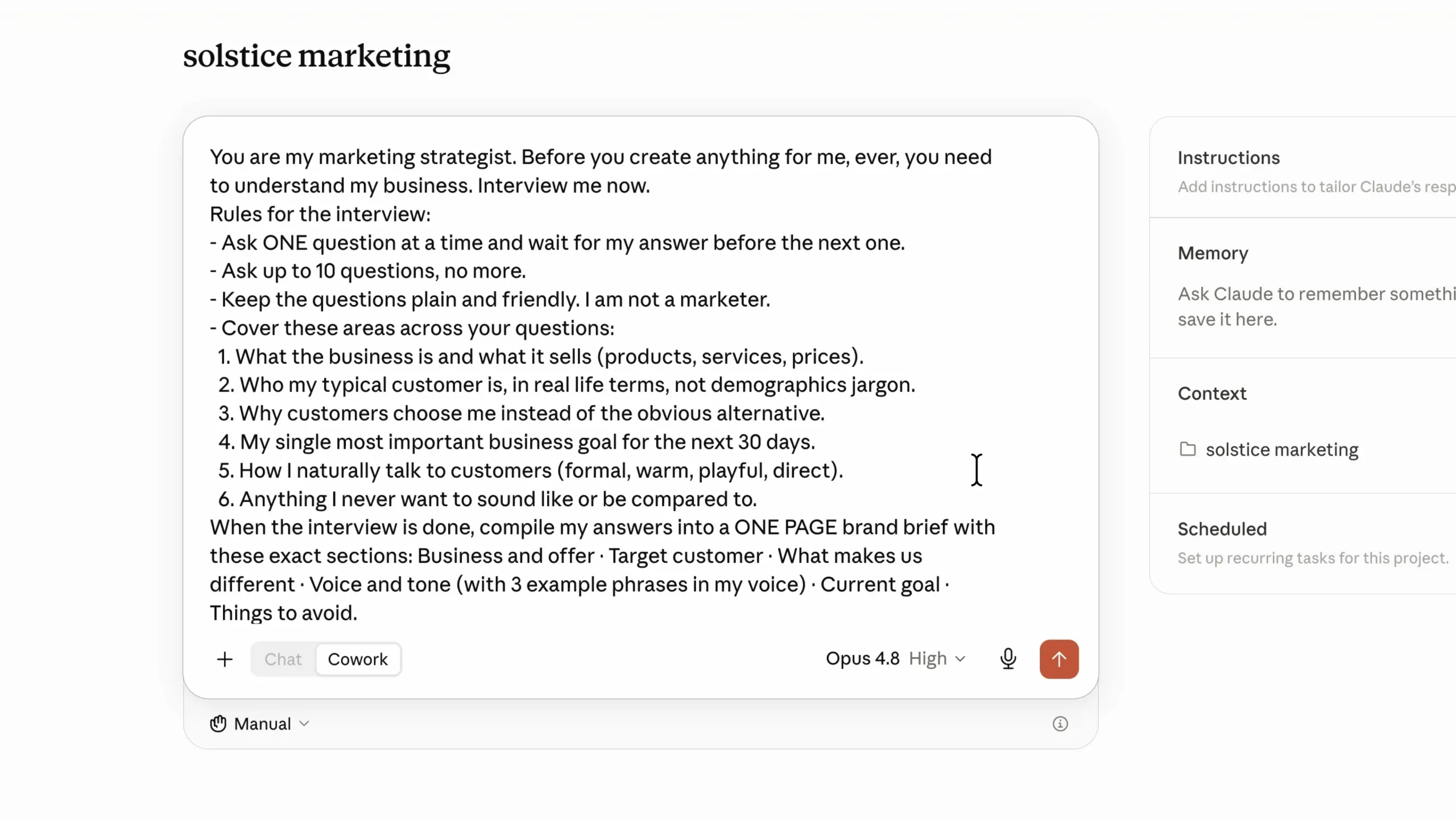
Claude starts asking questions. What is the business called? Who is your typical customer? Why do people pick you over the big gym down the road? You answer in plain language.
When the interview ends, Claude writes the brief and saves it into your folder. Target customer, offer, pricing, voice, goals, all in one file. From now on, every prompt starts with three words: "read my brand brief." No pasting, no repeating yourself.
If you have posts or emails that performed well, paste three to five of them in during the interview. Claude uses them to match your tone far more closely than a description alone.
This one file is the difference between AI content that sounds like everyone and content that sounds like you.
Last piece of setup, and it takes one minute. Install the official marketing plugin by Anthropic. Click the plus button, then "Add Plugins," search for marketing, and add it.
Now type a slash and look at the menu: campaign planning, SEO audits, competitor briefs, content drafting. Each one is a skill built by marketers, and you run it with a simple command.
If you want to go further and build your own, here is how to create custom Claude skills for your workflows.
9 ways to use Claude AI for marketing
With the folder ready, the brand brief saved, and the marketing plugin installed, you can put the system to work. Here are the nine tasks.
- Build a one week marketing plan
- Design social media graphics with Claude Design
- Build a landing page with Claude Code
- Handle real emails with Connectors
- Run a mini SEO audit
- Turn your plans into interactive tools
- Research your competition
- Repurpose one piece into a week of content
- Put routine tasks on a schedule
1. Build a one week marketing plan
In your project, type a slash and pick the campaign plan skill. The prompt starts with "read my brand brief," then adds three constraints. The constraints are where you should pay attention.
For the yoga studio: "I have five hours this week. My budget is zero. My one goal is 10 new trial class sign ups. Give me a day by day plan where every task takes 30 minutes or less."
Then comes the line that does the heavy lifting: "Nothing generic. If a task could apply to any business, replace it with one that only makes sense for mine." That sentence forces Claude to actually use the brief instead of reciting textbook marketing advice.
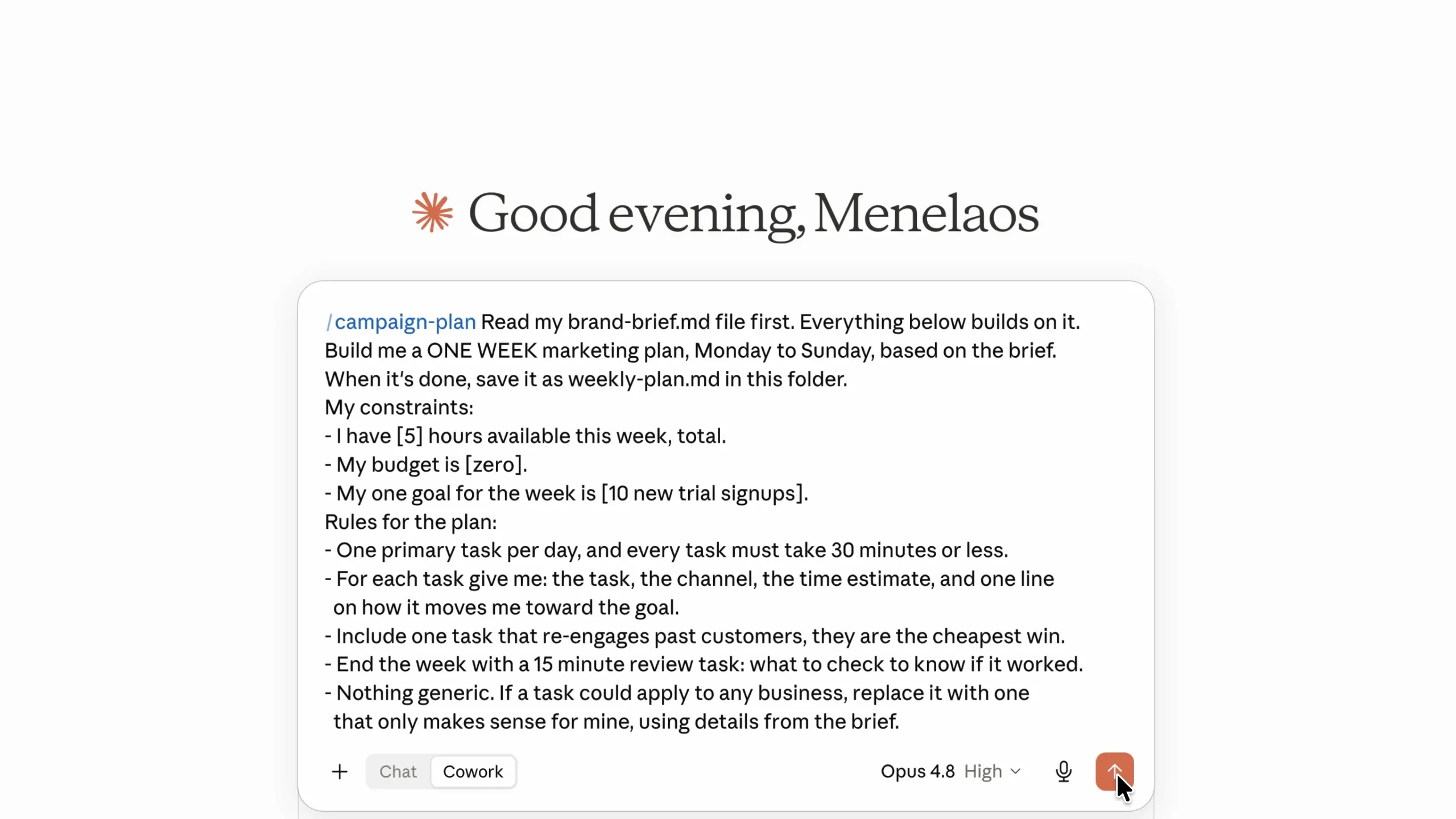
The result proves it. Monday is a post about the sunrise rooftop class, because Claude knows from the brief that this is the thing nobody else offers. Every day has one task, a time estimate, and a line explaining how it feeds the goal of 10 trial sign ups.
That is not a strategy deck. That is a to do list a busy owner can actually follow. And it saves in your folder, which matters because you come back for it in task 6.
2. Design social media graphics with Claude Design
Claude Design is Claude's design tool. It creates graphics, carousels, websites, presentations, and even animations without Photoshop and without a designer.
Monday's task in the plan is that rooftop class post, so make it. Open Claude Design, either from the sidebar or by asking for a design inside your conversation, and give the prompt three things: the brand brief, the topic, and a suggested structure.
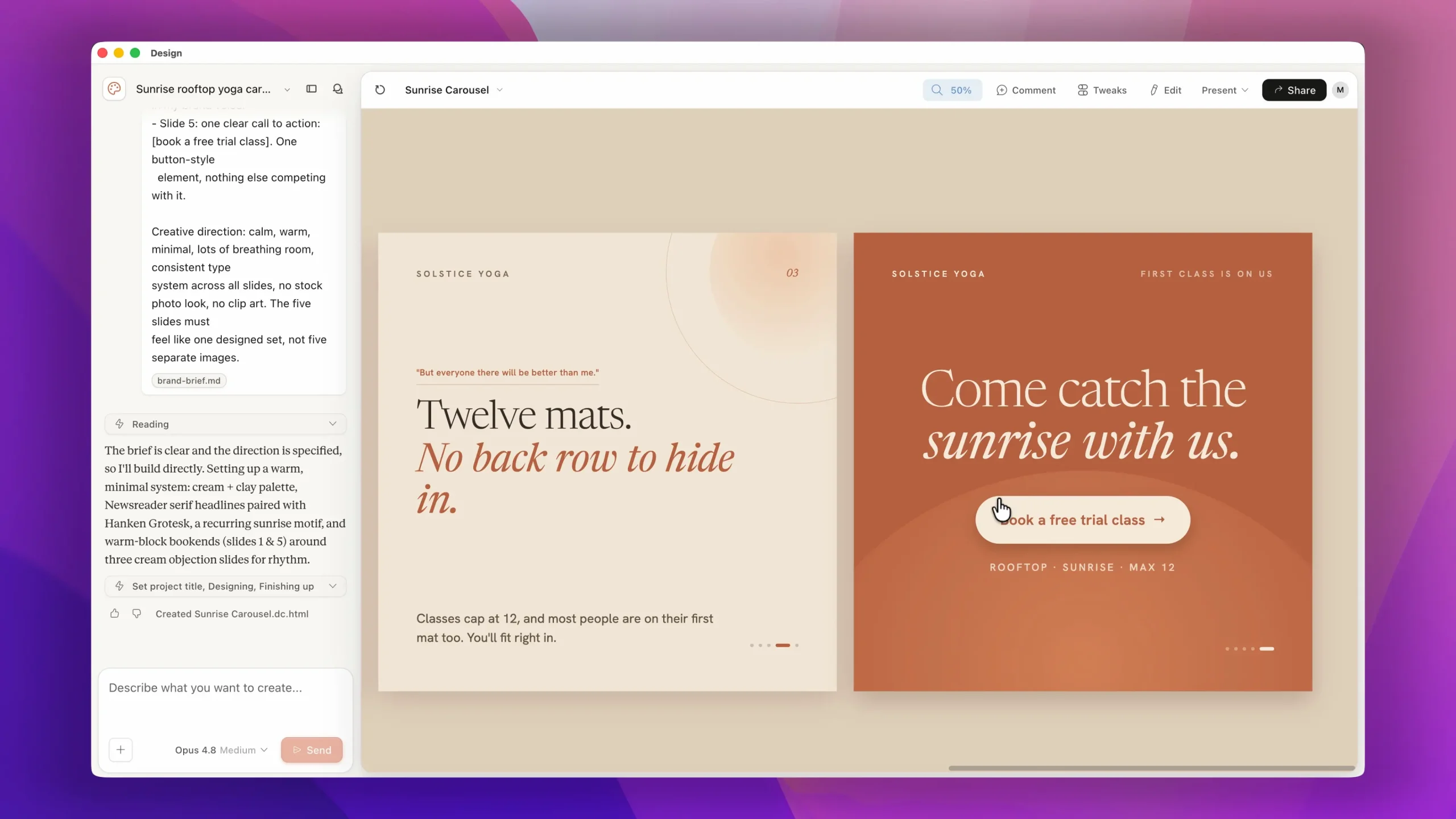
Slide one comes back with a headline you would actually stop scrolling for. The middle slides answer real objections. The last slide has one clear call to action.
If the style is not right, you are not stuck with it. You have three levels of control.
Level 1: just talk to it. "Try a version with photography instead of illustration. Make it feel more premium." It redesigns in seconds.
Level 2: show it what you want. Drag in a screenshot of a design you love, a competitor's post, or a page from a magazine, and say "match this visual approach but keep my message." Claude reads the typography, spacing, and color relationships and applies them to your content.
Level 3 is the one that changes your business, and it is a one time setup. Claude Design can build a design system from your existing brand. Upload your logo, a brand guide, or just point it at your website.
Claude pulls out your colors, fonts, and components and saves them as your system. From that point on, everything you create comes back on brand automatically.
3. Build a landing page with Claude Code
This one has the best visual payoff in the whole system. Go back to the app and open "Code" from the sidebar. This is Claude Code, the same idea as Cowork except built for making things that run, like web pages. Select the same business folder so it has a home.
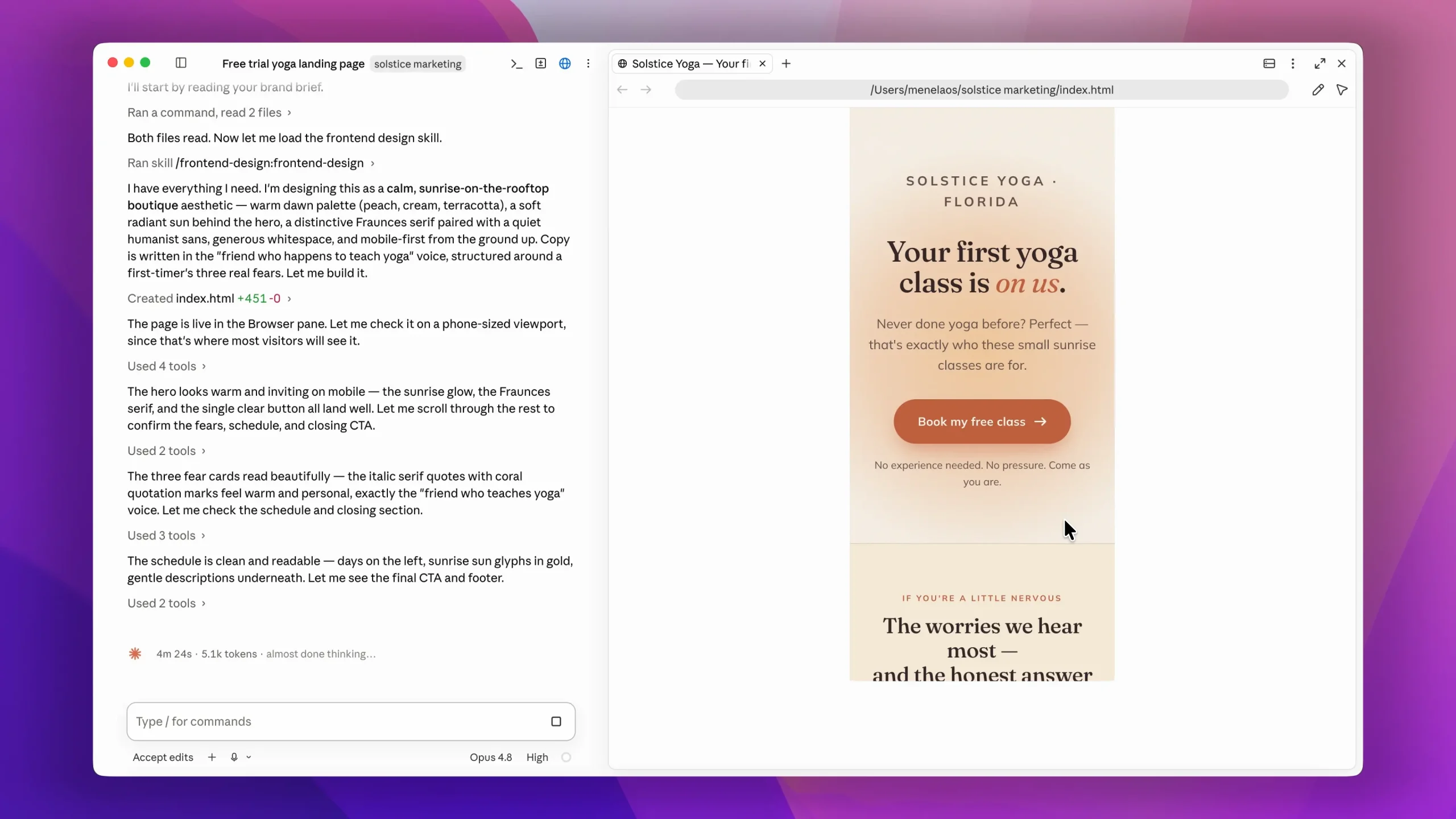
Before writing any prompts, install one thing: the official frontend design plugin by Anthropic. This is what helps Claude build websites that do not look like an AI made them. Click the plus button, browse plugins, search for frontend design, and install it.
Then the prompt tells Claude to read the brand brief and use the frontend design skill to build a single landing page for the free trial class. You just watch it work. It writes the headline, structures the sections, picks the colors and typography, and saves the page straight into your folder.
The result: a page that looks great on mobile, a hero section with the offer in plain words, a short section answering first timer fears, the class schedule, and one button. Nothing else competes for attention.
Want something different? Animations, images, a completely different layout? You just ask. If you want to go deeper here, our full tutorial on building websites with Claude Code includes ready made prompts, and the Claude Code guide for beginners covers the basics.
4. Handle real emails with Connectors
This is the moment Claude stops being a chat window and starts touching your real tools. Connectors let you plug Claude into the apps you already use: your email, calendar, files, and drive. From that point, it is not just talking about your work. It is doing it.
Take Gmail. Click the plus button, then "Connectors," then "Manage Connectors." Connect Gmail, select your account, and give Claude permission to access your emails. Claude can now read your inbox and write drafts for you. To be clear, it drafts. You always press send.
What does that actually get you? Three things.
First, your inbox catches up with itself. Ask Claude to scan the last seven days, find the customer messages you never replied to, and draft a reply to each one in your brand voice.
Second, and this is the one people underestimate, it handles the awkward emails. Someone wants to cancel. Someone is unhappy. Someone is asking for a discount. Those emails sit unopened for three days because you do not know what to say.
Claude drafts a reply that is warm, offers a real alternative, and sounds like you. It does it in about four seconds.
Third, it builds your funnels. Remember that landing page? Ask Claude for a three email welcome sequence for everyone who books a free trial.
One email confirms the booking and calms their nerves. One goes out the day before with what to bring and where to park. One follows the day after with a soft invitation to join. Subject lines and all, ready to load into whatever email tool you use.
Email is just one connector. The same idea works with your calendar, your drive, and your notes.
5. Run a mini SEO audit
Here is the twist that makes this one beginner friendly. You do not audit a whole website. That is overwhelming, and you will not act on it. You point Claude at one page, the page that matters most.
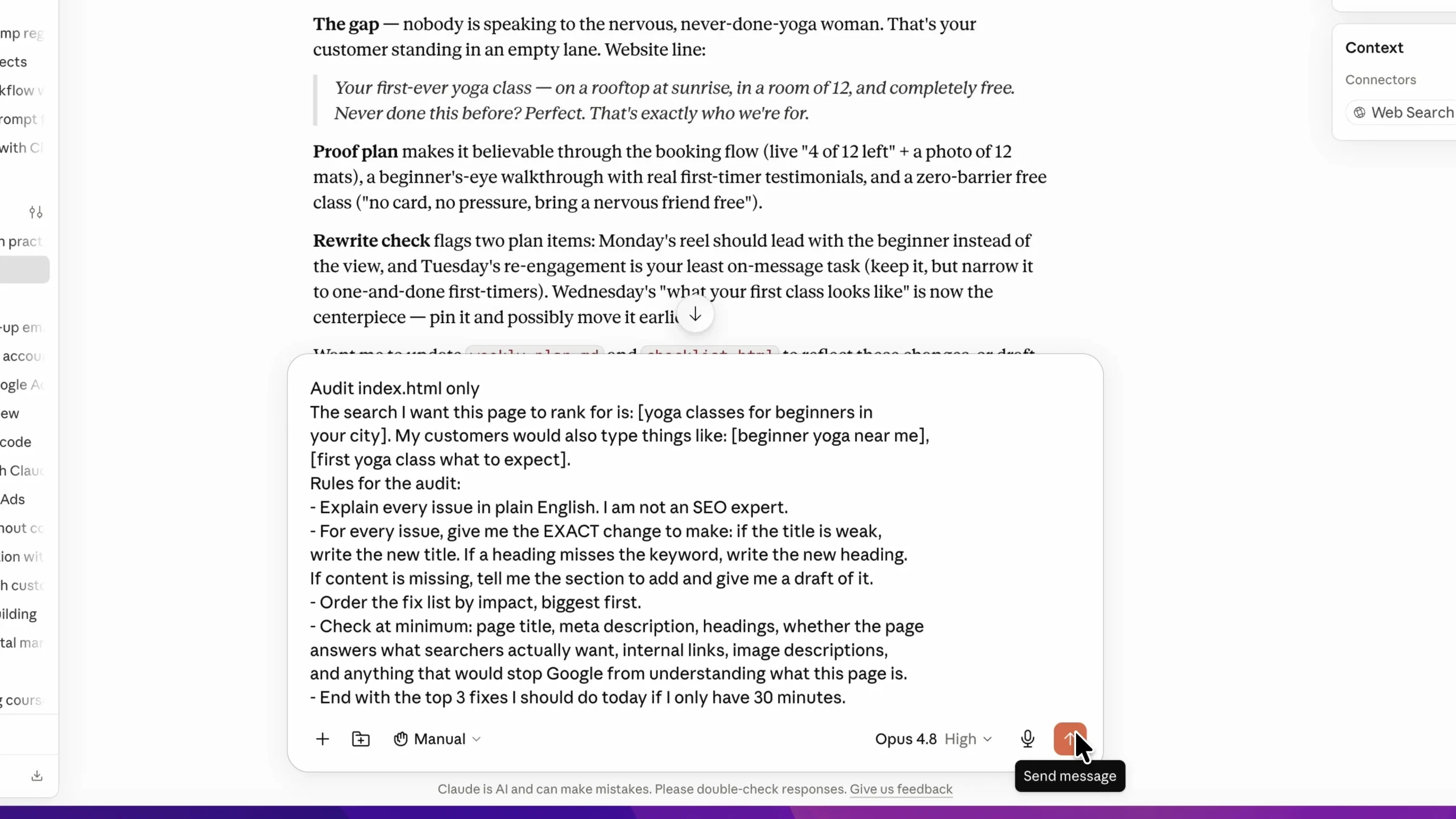
Most people build a page, publish it, and audit it a year later when it is not ranking. You audit yours before it ever goes live. It is sitting right there in your folder.
Run the SEO audit skill with a prompt like: "Audit this one page only. My target search is yoga classes for beginners plus my city. Explain every issue in plain English and give me a fix list ordered by impact, with the exact change to make for each fix."
"The exact change to make" is the phrase that separates this from a generic checklist. A few minutes later Claude comes back with the fixes and asks if you want to apply them straight into the page. Say yes.
The difference is immediate. Your location sits at the top where a searcher and Google both see it. Your heading works for people and search at the same time. It still sounds like you.
You can point this at any page. Your homepage, a blog post that used to rank and does not anymore, a product page that gets traffic but no sales. Paste the address instead of the file and Claude reads the live page.
Do one a week, and in a couple of months your whole site is covered. If you do this for clients, that same prompt becomes a free audit you can send a prospect before you pitch them.
6. Turn your plans into interactive tools
Most people only ask Claude for answers. You should also ask it to build you tools. Claude can create something you can see and use: a page, a document, or an interactive tool. Working in your project, it lands as a real file in your folder.
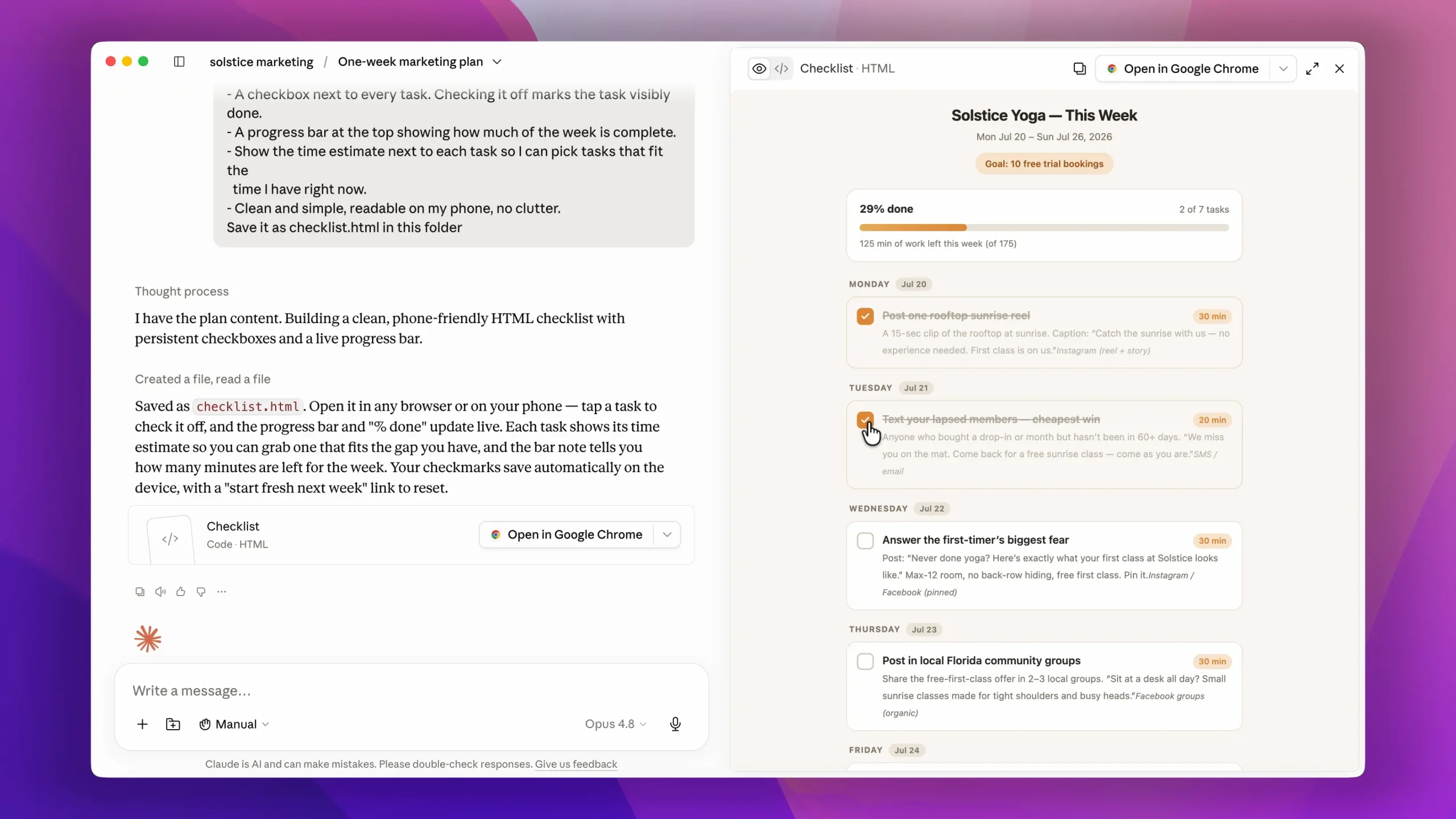
Remember the one week plan from task 1? It is sitting in the folder as text. So the prompt is: "Read my marketing plan and turn it into an interactive checklist I can use every day. A checkbox for each task, grouped by day, the time estimate next to each one, and a progress bar at the top."
A few seconds later there is a new file in the folder. Open it in your browser, tick off Monday's task, and the progress bar moves. That is a personal marketing dashboard, built for your own plan, in under a minute.
The same idea works for a content calendar, a price comparison table, or a simple calculator for your ad spend. Anything you can describe, Claude can build, and it all stays in your folder.
7. Research your competition
This is the task clients pay the most for, and it runs in two parts.
The first uses web search: "Find the yoga studios in my area, and for the top two tell me their prices, their intro offers, their review ratings, and most important, what customers complain about." That last part is gold, because complaints are a map of unmet needs.
Claude searches the live web and comes back with a real comparison. One studio's classes run packed. The other locks people into a 21 day cancellation notice. Neither offers a free first class.
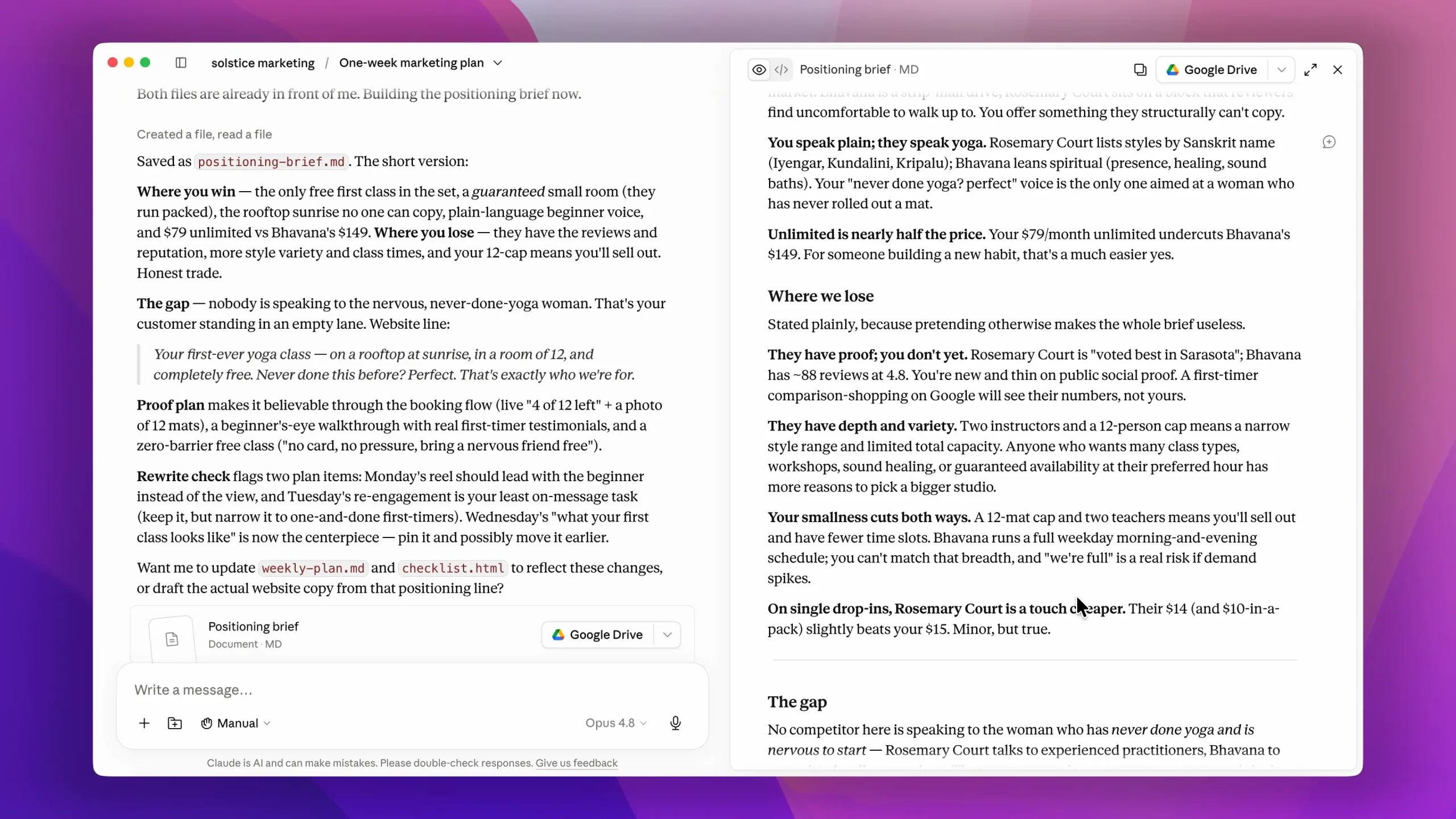
The second part is the competitive brief skill from the marketing plugin: "Read my brand brief. Here is the research. Now build me a positioning brief. Where do we win, where do we lose, and what is the one message no competitor is using that we can own?"
The gap comes back crystal clear. Every competitor's website talks to people who already do yoga. Nobody speaks to the nervous beginner. So the angle becomes: the yoga studio for people who have never done yoga, first class free on the rooftop at sunrise.
The end of that brief even goes back through the week one plan and points to the exact post to rewrite so everything falls behind one message.
8. Repurpose one piece into a week of content
Most small businesses do not have a content problem. They have a repurposing problem. One good blog post, video or newsletter can feed your channels for a week, but nobody has time to rewrite it five times.
So give that job to Claude. Drop a blog post or a video transcript into your folder and ask: "Read my brand brief and this post. Turn it into five Instagram captions, one LinkedIn post, a short newsletter, and two 30 second video scripts. Keep each one in my voice and give each a different angle."
For the yoga studio, one post about a first class turns into a caption that calms nerves, a behind the scenes post about the rooftop, a newsletter for existing members, and two short scripts the teacher can film on a phone.
Everything lands in your folder, ready to schedule. One idea, a whole week of content.
9. Put routine tasks on a schedule
The last step is the one that makes this a system rather than a set of prompts: let Claude do the recurring work without being asked.
Claude can run scheduled tasks. Pick a job you would otherwise forget, and tell Claude when to run it. For example: "Every Monday at 8am, check my competitors' websites and social pages for new offers or prices, and save a one page summary in my folder."
Other good candidates are a Friday inbox review that drafts replies to anything unanswered, or a monthly check of your landing page against the SEO fix list from task 5.
You come back to finished work instead of a to do list. You can also start or check on a task from your phone, so the system keeps running when you are away from your desk.
Frequently Asked Questions
Is Claude AI good for marketing?
Yes. Claude is strong at the writing and thinking side of marketing, such as plans, copy, emails, briefs and research, and with Cowork, Claude Design and Claude Code it can also produce finished files, graphics and landing pages. It works best when you give it context about your business first, as in this guide.
Which version of Claude is best for marketing?
Any current Claude model handles everyday marketing writing well. Use the most capable model on your plan for strategy, research and longer tasks, and a faster model for quick drafts and edits. The bigger difference comes from the paid plan features, like projects, Cowork and the marketing plugin, rather than the model.
What are the Claude skills for marketing?
Anthropic's marketing plugin adds ready made skills for campaign planning, SEO audits, competitor briefs and content drafting, which you run by typing a slash. You can also build your own skills for tasks you repeat, such as your weekly report or your content format.
How do I use Claude for my business?
Start by teaching Claude your business with a brand brief, then give it one real task at a time: a weekly plan, a landing page, a batch of social posts, or replies to customer emails. Keep everything in one project folder so each new task builds on the last.
Get the prompts and next steps
That is the full system, and it all lives in one folder. Teach Claude your business first, then plan the week, create the visuals, build the page, handle the email, fix the SEO, build your tools, study your competition, repurpose your content, and put the routine work on a schedule.
This way of working, one marketer running a whole system with AI, is what people now call vibe marketing.
Every prompt used in this guide is available on a free resource page, so you can copy and paste each one as you go.
If you want to build real skills around this, join the AI Builders Lab. You get a full library of AI related courses and an active community for support when you get stuck. You can also explore our roundup of the best Claude AI courses to keep leveling up.
Start with the brand brief. It takes ten minutes, and it is the one step that makes every other task in this system sound like you instead of everyone else.


