

- What it really means to build websites with Claude Code
- What you need before you start
- The two minute setup before you start
- How to Build Websites With AI (Steps)
- Another way to start: Claude Design
- Why the finished site did not look AI made
- Fixing things without any special prompts
- How to take the site live
- What this is worth if you build sites for clients
- Mistakes to avoid on your first build
- Frequently Asked Questions
- Next steps

I gave myself one afternoon to build a real website for a small coffee roaster. No code. No writing my own prompts. Just five prompts I had already saved and a handful of plain English answers.
The result did not look like an AI website. It looked like a design studio built it. Here is exactly how it happened, and how you can copy the same process today.
If you came here looking for how to start a website, this is the no-code way to build one. You will still need a domain name and hosting to put it online, which I cover at the end.
What it really means to build websites with Claude Code
Most people think you need to be a developer to use Claude Code. You do not. If you can answer a question and press Control V, you have every skill this process needs.
The trick is that you never write a prompt from scratch. You paste a prompt, Claude asks you simple questions about your business, and Claude does the building.
The other big difference is pacing. When you build websites with Claude Code in five visible stages, you see what is happening at every step. You can adjust early instead of getting one giant result at the end and hoping it is close.
That saves time. It also saves tokens, because you never pay to build a look you were going to throw away anyway.

You are the creative director. Claude is your studio.
What you need before you start
- A paid Claude plan. Claude Code is included in all of Anthropic's paid plans, starting with Pro. It is not part of the Free plan.
- Claude Code. I use the Claude desktop app, but Claude Code also runs in the terminal and on the web.
- The frontend design plugin. It is free and takes a minute to install (see the setup below).
- About an hour. Plus a little extra if you generate your own images.
You don't need to know how to code, and you don't need a design tool.
The two minute setup before you start
Open the Claude Code desktop app and create a brand new empty folder. I called mine "my website."
Empty matters. It means you can see exactly what Claude creates, file by file, as you go.
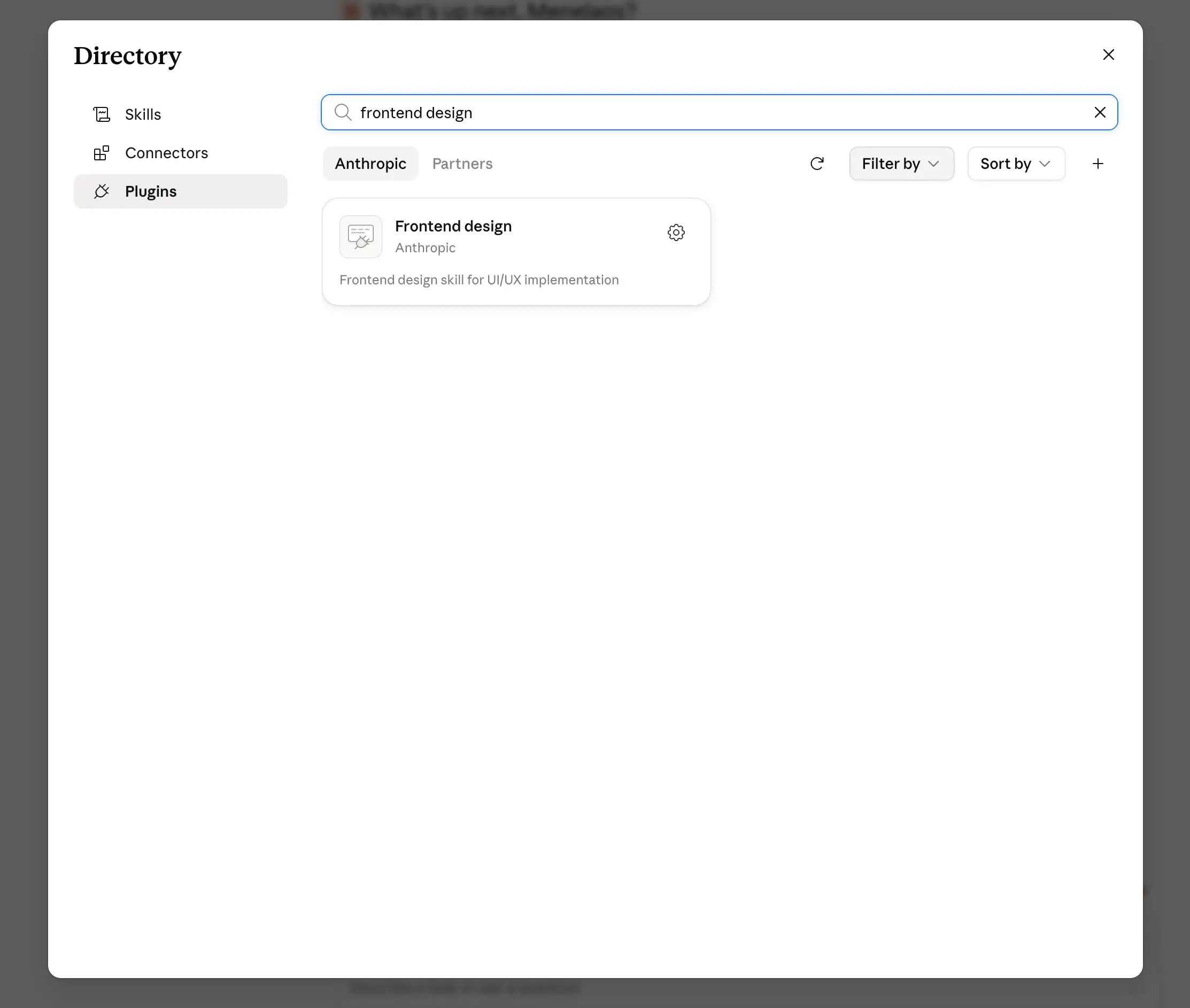
Next, turn on the frontend design skill for that project. This is the official skill from Anthropic that gives Claude real design taste, and the prompts in this process lean on it heavily.
Click the plus button, select plugins, then browse plugins. Search for frontend design and click install. That is the whole setup.
For the model, either Opus or Sonnet works. In my tests both produced similar quality, and Sonnet costs a lot less. I used Opus for this build because I wanted to push it.
If you are still new to giving AI clear instructions, our guide on prompt engineering explains why the wording inside these prompts matters so much.
How to Build Websites With AI (Steps)
Every stage is one prompt. You paste it, you answer a few questions, and the site grows in front of you.
- Answer questions and pick your design direction
- Build the full page structure
- Replace placeholder text with real copy
- Generate the images that match your design
- Run the polish pass and the AI tell audit
1. Answer questions and pick your design direction
I pasted the first prompt and hit enter. Claude did not build anything. It started asking me questions, one at a time, in plain language.
What is the business called and what does it do? I typed: Ember and Oak, a small batch coffee roaster with a tasting bar.
Who is the site for and what should visitors do? Coffee lovers in the neighborhood, and I want them to visit the bar or order beans.
What is the one thing a visitor should remember? That we roast everything ourselves in house, every week.
Then it asked for a logo or any websites I liked. You can paste links or screenshots. If you do not have a logo yet, just say none and the process handles it.
The next question is my favorite one, and it is the reason the whole thing works. Claude asks you to describe one real moment around the business. Not colors. Not fonts. A moment.
I wrote: early morning at the bar, steam rising off a fresh pour, warm light on wooden shelves full of coffee bags.
That single sentence is where the entire color palette comes from. It is also the thing that stops your site from looking like every other AI website on the internet.
The colors come from your world, not from a template.
After a couple more questions about opening hours and things to avoid, Claude asked permission to run a local preview server. That is just your site running on your own computer, so click always allow.
Then it built a preview page showing three complete design directions side by side. Real color palettes. Real font pairings. My actual headline set in each one, plus a short reason for each choice.
Claude marks the one it recommends, but you choose. This is the part most AI tools skip. You pick the direction before a single section gets built.
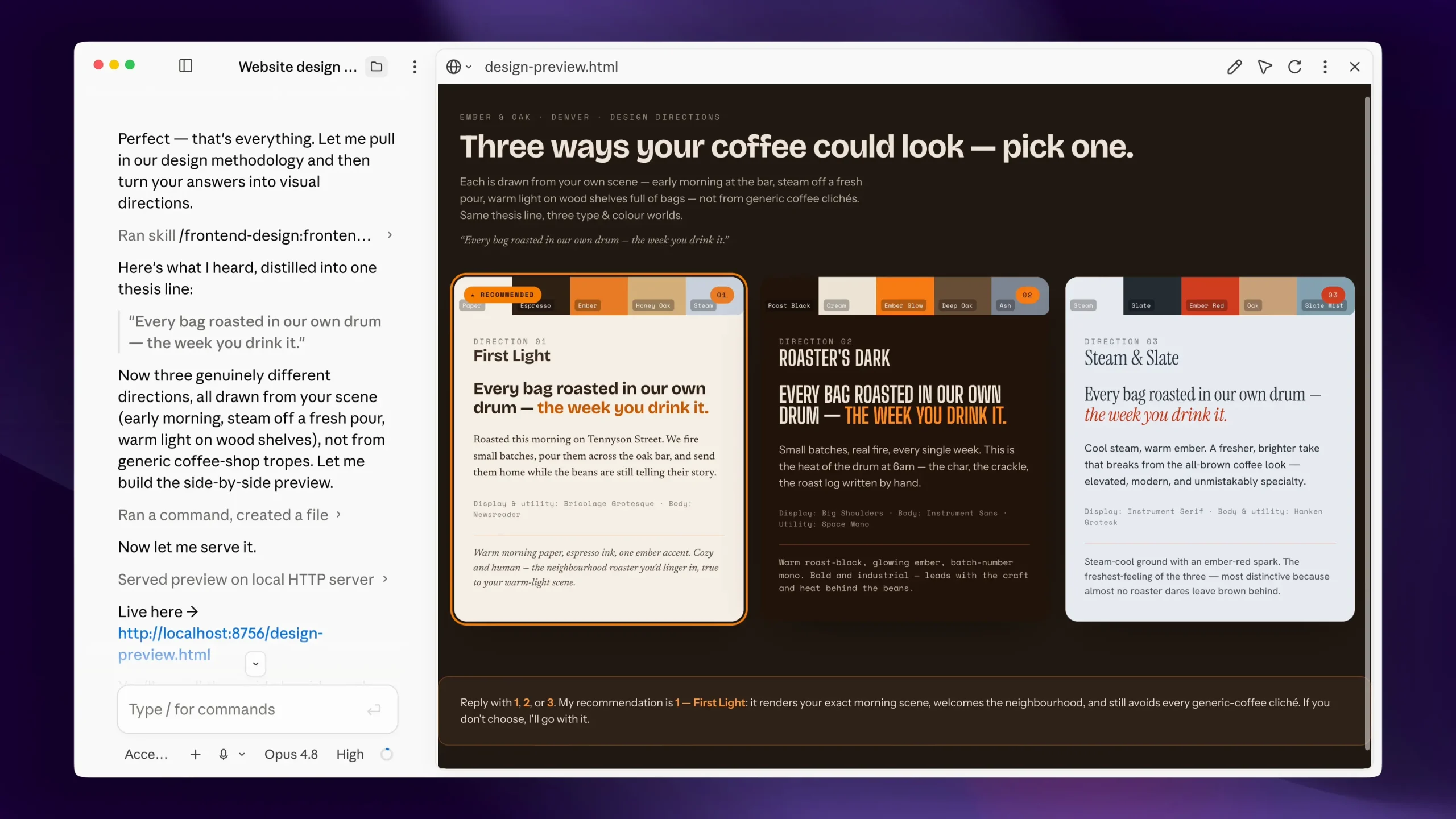
I liked the second one, a warm roasted palette with a cream accent, so I typed the number 2.
Claude then wrote a file called design.md into my folder. Think of it as the design rule book for the project. Every color, every font, every rule about what this site will never do.
Every step after this reads that file. That is why the site stays consistent instead of drifting halfway through.
The first version of the page was almost empty on purpose. Just the brand name and one big line, set in the real fonts on the real background. Premium sites say one thing first.
2. Build the full page structure
I copied the second prompt and pasted it in. This stage gives the page its skeleton.
It asked me one question first. Which motion style do I want: calm and smooth, premium and bold, kinetic, or minimal? It came with a recommendation for my type of business. I went with smooth and premium.
Claude then laid out the entire page from top to bottom. Hero at the top, story sections, a gallery, reviews, and a full visit section with opening hours, address, and a spot for the map.
That layout was not random. Claude read that we are a local business and built the sections a local business actually needs.
A product site would get feature moments and a buy section instead. Same prompt, different result, because the process adapts to what you told it.
At this stage you see gray boxes with labels like "hero," "the bar," and "morning light." Those are placeholders telling you exactly which image belongs where. The text is placeholder too.
That order is intentional. Structure first, words next.
3. Replace placeholder text with real copy
Same routine. Copy the third prompt, paste, enter.
Claude reads the design rule book and swaps every placeholder line for real copy. This is where most AI websites fall apart, because AI writing usually sounds like AI writing.
The prompt has strict rules baked in. Short headlines. Specific claims you could actually check. No words like premium, luxury, or journey.
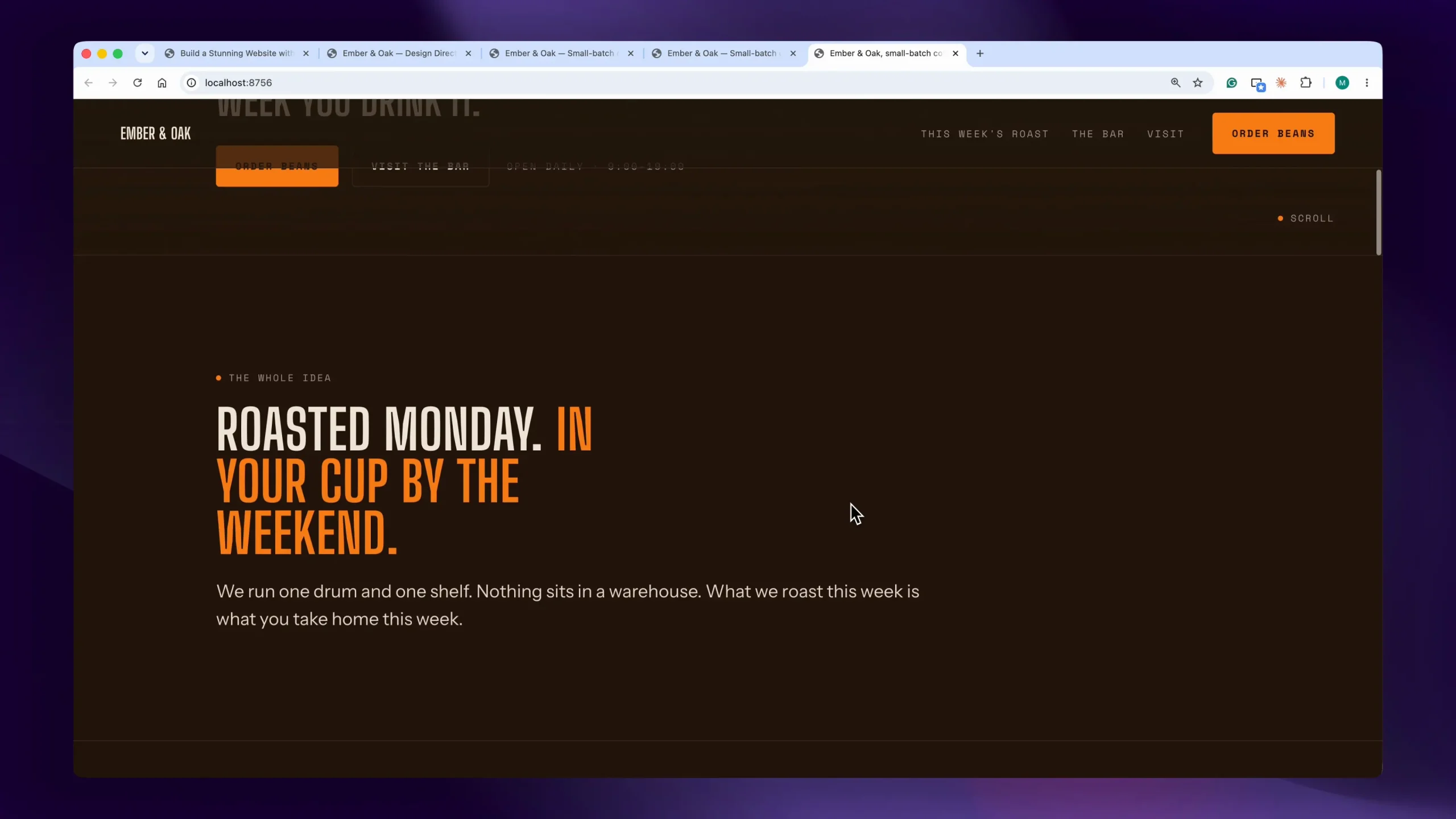
Here is the line it wrote for the hero section: "Roasted Monday. In your cup by the weekend."
That is the kind of line a copywriter charges real money for. Specific beats generic every single time.
If a line does not sound like you, say so. Tell Claude that a headline is too clever and to make it plainer. It rewrites only that line and leaves everything else exactly where it was.
4. Generate the images that match your design
This is the step people ask about most. I pasted the fourth prompt, and instead of images Claude gave me something more useful.
It produced a numbered list of image prompts, one for every image slot on the page. Each one came with the exact file name to save it as, the right aspect ratio, and a detailed description matched to our design.
They all share the same style line, the same lighting, and the same mood. That means the images look like one photographer shot them in one session.
That consistency is half of what makes a website look expensive. Mismatched stock photos are the fastest way to look cheap.
To create the images, I do not pay for a separate AI design subscription. I built a small app inside Google AI Studio that lets me generate images with Nano Banana Pro at high resolution, plus short clips with Veo when I need motion.
I only pay for the assets I actually generate, which for a whole website comes to pocket change.
Then I saved each file into the assets folder using the exact names Claude gave me and told it to continue. Suddenly it was a real website. Hero video playing, gallery full, map in place.
Working this way is a good example of how high paying AI skills are less about coding and more about knowing which tool does which job.
5. Run the polish pass and the AI tell audit
The final prompt does two things.
First, it adds the finishing touches that make a site feel expensive. Grain, motion, the way sections rise and settle as you scroll.
Second, and this is my favorite part, Claude audits its own work against a banned list. No gradient text. No glassmorphism. No rows of identical cards. None of the little tells that scream "an AI made this."
It walks the whole page and fixes anything that fails the test.
I refreshed one last time and scrolled. It did not look like an AI website. It looked like somebody paid a studio thousands of dollars.
Another way to start: Claude Design
If you would rather see and adjust the design visually before any code exists, you can start in Claude Design instead. Claude Design is Anthropic's visual design tool, and it is included in the same paid plans as Claude Code.
You describe the site, iterate on the sections until the layout looks right, and then send the design to Claude Code to build the real website. From there, the process is the same: copy, images, polish.
I prefer the five-prompt process above for client sites, because the questions in step 1 pull the design out of the business itself. Claude Design is a good choice when you already know exactly what you want the site to look like.
Why the finished site did not look AI made
Three things do the heavy lifting here, and none of them are magic.
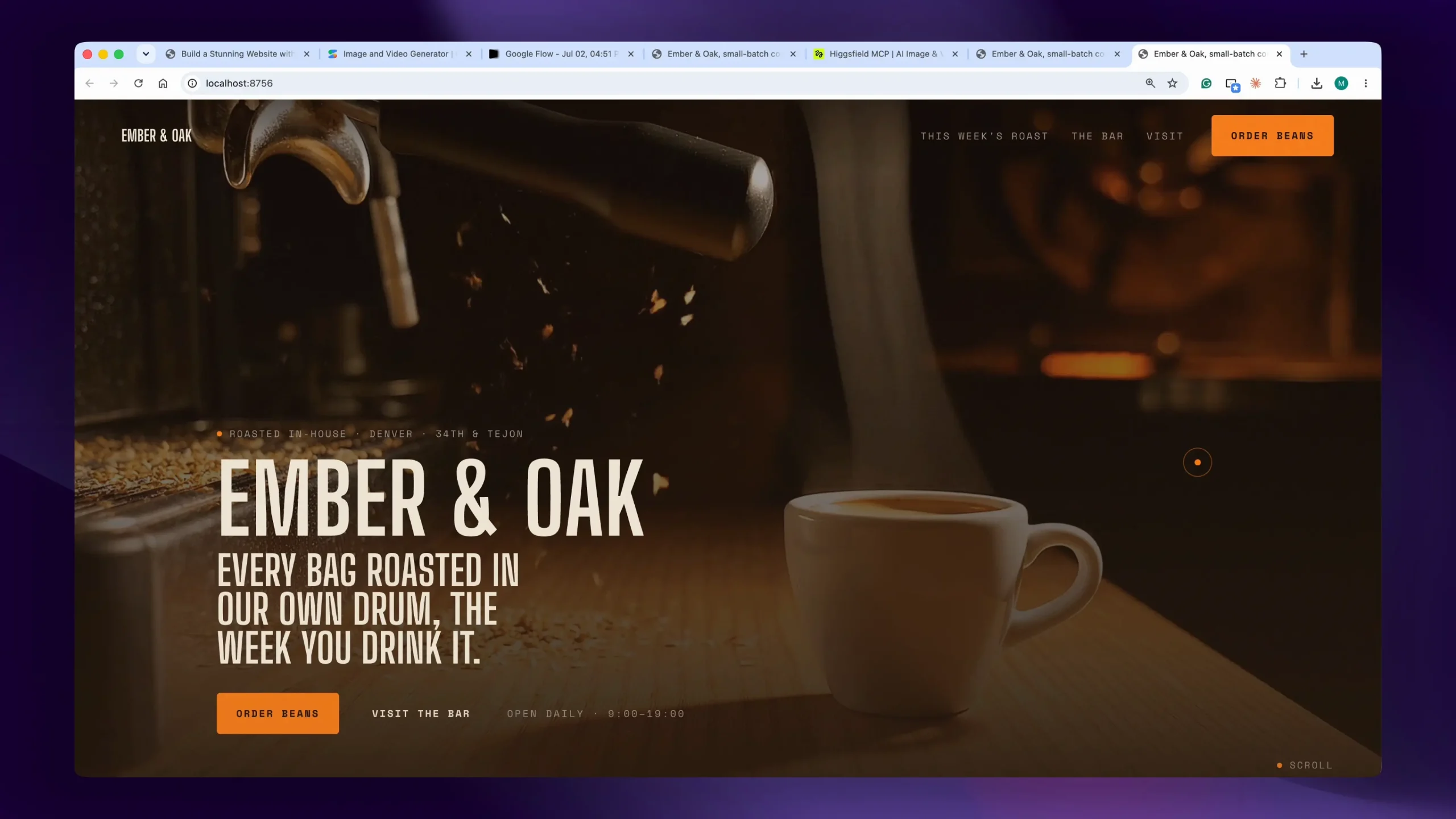
The first is the design rule book. Because design.md is written once and read at every later stage, the site cannot drift. One font set. One palette. One set of rules.
The second is that the palette comes from a real moment you described, not from a trend. Two different businesses running these same five prompts end up with completely different sites.
The third is the banned list. Most AI sites look alike because they reach for the same visual habits. Naming those habits and forcing a self check removes them.
If you want to understand the wider shift this fits into, our guide on how to learn AI covers the skills worth building first.
Fixing things without any special prompts
Once the five steps are done, you do not need clever prompting to change anything. You just describe what you want in plain words.
I typed: change the way testimonials are shown. A few seconds later I refreshed, and the spacing was cleaner while the design stayed exactly the same.
That is the real benefit of building in visible stages. Nothing is a black box, so nothing is scary to change.
Ask for one change at a time. Vague requests like "make it better" give you vague results.
How to take the site live
A website sitting on your computer is not a website yet. Getting it online needs two pieces.
The first is a domain name, which usually costs somewhere around $10 a year for a standard extension.
The second is hosting. For a simple static site like this one, platforms such as Vercel have a free tier that is more than enough.
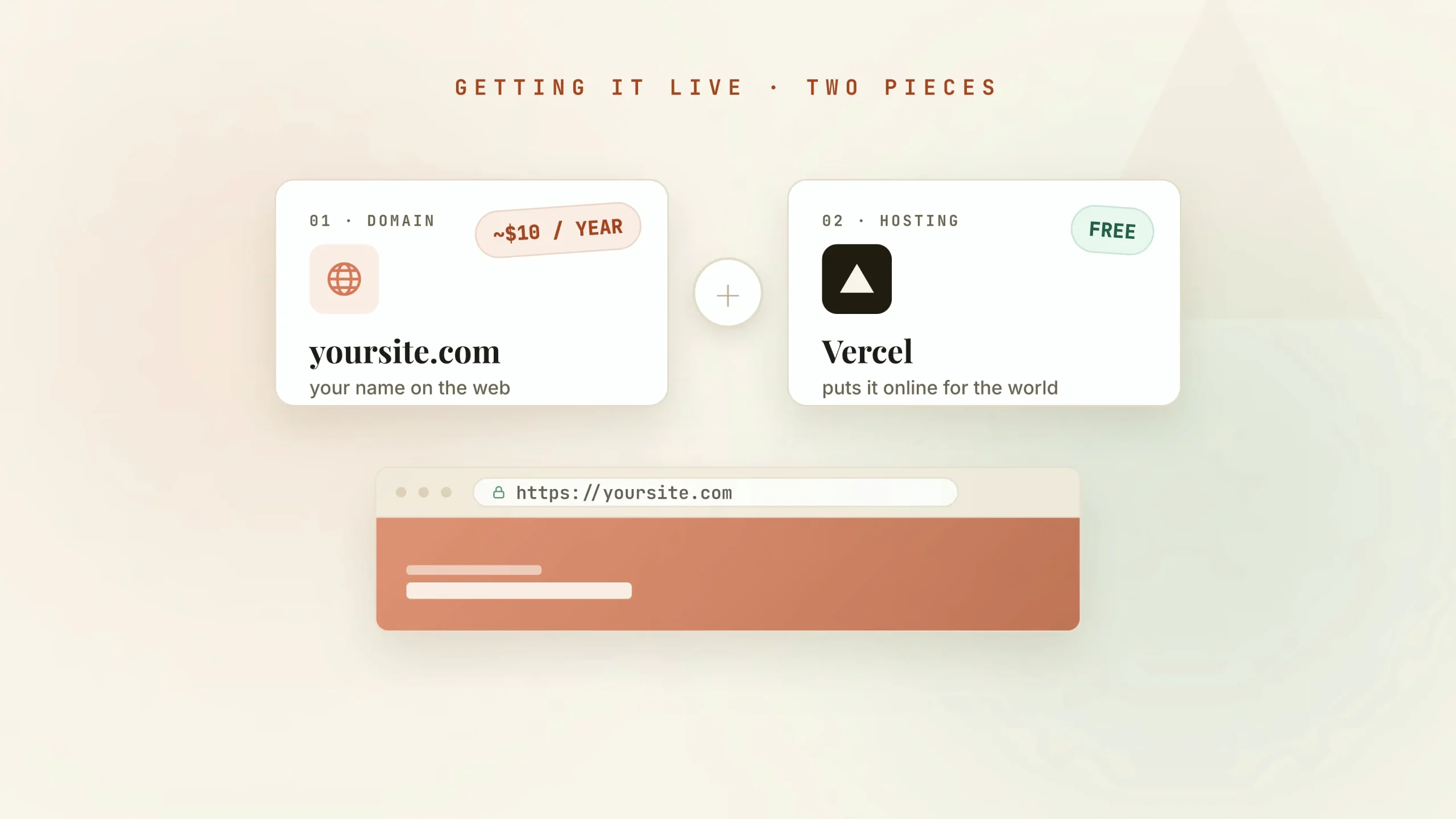
Netlify and Cloudflare Pages also have free plans for static sites like this one, so compare them before you choose.
You connect the two, upload your folder, and you are live.
If you are building for a client, register the domain and set up the hosting in the client's name, or transfer them once the site is paid for. That way the business owns its website, and you can hand over access cleanly.
If you want the full flow walked through, from this exact folder to a live site on your own domain, that is covered inside the AI Builders Lab. Members also get the ready made skill version of this process, where Claude asks the questions and runs all five steps automatically.
What this is worth if you build sites for clients
Local businesses pay hundreds, sometimes thousands, for exactly what I just described. A custom design. Real copy. Matching images. A site that loads fast and does not look like a template.
You can now deliver that in an afternoon, which changes the maths of the whole service.
If you are looking at this as income rather than a one off project, it sits neatly alongside the other options in our roundup of the best AI side hustles.
One project done well pays for the tools many times over, and the second site takes you half as long as the first.
Mistakes to avoid on your first build
Do not skip the frontend design skill. Without it, Claude writes perfectly working code that looks generic. The design taste comes from the skill.
Do not start in a folder that already has files in it. A clean folder keeps the output readable and stops Claude from working around old code.
Do not rush the moment question. A one word answer like "coffee" gives you a generic palette. A sentence with light, texture, and time of day gives you a real one.
Do not accept the recommended design direction out of habit. It is a suggestion, and you are the one who knows the brand.
Do not skip step four and drop in random stock photos. Mismatched images undo the work of the other four steps in about two seconds.
Do not jump ahead and paste all five prompts at once. The stages exist so you can catch problems while they are cheap to fix.
Frequently Asked Questions
Is Claude Code good for building a website?
Yes. Claude Code writes the files, runs a local preview, and changes anything you ask for in plain English, so you can build a complete, custom-designed website without coding. The quality depends on the process: giving it clear design direction and building in stages, as in this tutorial, is what stops the site looking generic.
Can Claude Code build a full website or a web app?
It can build a full multi-page website, and it can build web apps with logins, databases and forms too. Apps take longer and need more testing, because there is more that can break. For a first project, start with a website like the one in this guide.
How much does it cost to make a website with Claude Code?
You need a paid Claude plan, because Claude Code is not included in the Free plan. On top of that, you pay for a domain name and, depending on the host you choose, for hosting. AI-generated images cost a small amount per image if you create your own.
Next steps
You just saw a complete, custom designed website get built by answering a handful of plain English questions and pasting five prompts.
If you run a business, this is your new site. If you are a freelancer or a marketer, this is a service you can sell this week.
Open Claude Code, create an empty folder, and pick a business to build for. Even a fake one works for practice.
To get all five prompts and the ready made skill that runs the whole process for you, visit the AI Builders Lab.
Want to go deeper on the tool itself first? Our list of the best Claude courses is a good place to start.


