


Facebook marketing means using a Facebook business Page, organic posts and Meta ads to reach and sell to your customers. To get started, set up a Page, post consistently, grow your followers, then install the Meta Pixel and run your first campaign in Ads Manager with a clear objective such as Leads or Sales.
Facebook is one of the most popular social media platforms. With its large user base, businesses in any niche can use it to connect with their target audience.
If you want to use Facebook as a marketing platform to reach more customers, you must understand how it works.
In this Facebook marketing guide for beginners, I will explain the basics of Facebook marketing so you can use it to grow your business.
What Is Facebook Marketing and How Does It Work?
Facebook marketing is the process of using the Facebook platform to showcase your business to potential buyers. It can consist of a mix of both paid and organic marketing.
With organic Facebook marketing, you regularly post content to grow your following and keep your audience engaged.
With paid Facebook marketing, you set up various advertising campaigns to drive people to your site and eventually convert them into customers.

Benefits of Facebook Marketing For Businesses
There are many advantages to using Facebook to market your business. Below are a few of the most significant benefits:
Large audience: Facebook has billions of users worldwide, many of whom use the platform multiple times daily. By marketing on Facebook, your business has the potential to reach your target customers at scale.
Variety of ads: Facebook supports a wide range of advertising formats. You can create videos, images, carousels, and other types of ads to engage users in the most effective manner.
Advanced targeting: Facebook lets you get very precise with who you target with your ads. You can target users based on demographics, interests, past behavior, and other characteristics. The platform also makes it easy to remarket to previous customers.
How to Create a Facebook Marketing Strategy
- Setup a Facebook Business Page
- Create a Facebook Content Calendar
- Promote Your Business Page to Get Followers
- Learn About the Different Types of Facebook Ads
- Set Your Marketing Goals
- Identify Your Facebook Audience
- Set Up the Meta Pixel and Conversion Tracking
- Create Your First Facebook Paid Campaign
- Monitor Campaign Performance
- Start a Facebook Retargeting Campaign
1. Setup a Facebook Business Page
The first step to getting started with Facebook business marketing is to create a Facebook business page.
This page is your business's public-facing profile, where you can connect with customers, post content and updates, and share contact information.
Setting up a Facebook business page is straightforward, but you should ensure you configure it to take advantage of its many features.
Here is a quick overview of the steps needed to create a Facebook Business page.
Start by going to facebook.com/pages/create.

In the left-hand panel, you can enter a name and description for your business and select a category for your page. As you do, the preview page will update so you can see what it looks like.
After you enter the core page information, add a profile picture and a cover photo.
You also want to add contact information so that people know how to get in touch with your business.
Meta's own checklist for a new Page also includes choosing up to three categories, adding an action button such as Send Message or Book Now, and turning on Recommendations so customers can leave reviews.
2. Create a Facebook Content Calendar
A well-planned content calendar is essential for staying consistent and organized with your posts. Instead of looking for ideas each day, a content calendar helps you plan, schedule, and execute your content efficiently.
Setting up a calendar allows you to batch-create content, ensure a balanced mix of posts, and avoid last-minute stress.
Here’s what to consider when building your content calendar:
What to Post
Your content should be valuable, engaging, and relevant to your audience. Whether it’s educational, entertaining, or promotional, every post should serve a purpose.
Some ideas include:
- Educational posts – How-to guides, industry tips, and FAQs.
- Engaging content – Polls, questions, and behind-the-scenes looks at your business.
- Promotional posts – New products, special offers, or customer testimonials.
- Trending topics – Content related to current events, industry trends, or viral moments.
Your goal is to create high-quality content that grabs attention and encourages interaction.
When to Post
Timing is everything. Posting when your audience is most active increases visibility and engagement. While optimal posting times vary by industry, general research suggests that weekdays in the morning and early evening tend to work best.
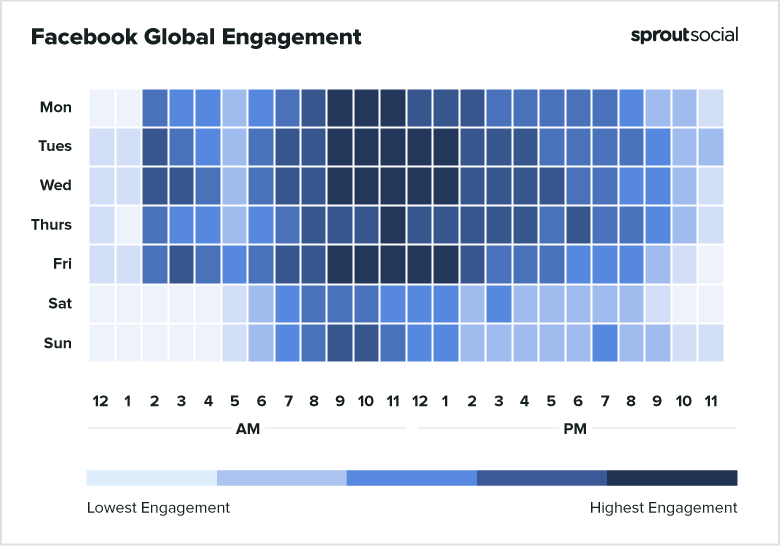
Check Facebook Insights to see when your audience is online and adjust your schedule accordingly.
How Often to Post
Consistency matters more than frequency. Posting too little can make you forgettable, while posting too much can overwhelm your audience.
A good rule of thumb:
- At least 3-5 posts per week for steady engagement.
- Daily posts if you have enough high-quality content to share.
Test different frequencies and monitor engagement to find what works best for your brand.
3. Promote Your Business Page to Get Followers
With your content calendar ready, it’s time to focus on growing your Facebook audience. Facebook Pages now have followers, not likes: people follow a Page, and they can still like, comment on and share its posts.
Why does this matter?
- More followers = more visibility. Your posts can appear in more users’ feeds.
- Social proof builds credibility. A high follower count signals trust and popularity, encouraging new visitors to take your business seriously.
- Greater organic reach. Posts that get early engagement are shown to more of your followers and to people who don't follow you yet.
Here are some effective ways to increase your followers:
Share High-Quality, Relevant Content: The best way to attract new followers is to post valuable, engaging content consistently. Short videos and Reels are especially useful, because Facebook shows them to people who don't follow your Page yet.
Run Promotions Within Meta's Rules: Giveaways can bring a burst of attention, but Meta's Pages, Groups and Events Policies say a promotion must not require or reward people for sharing, reposting or tagging others. Ask people to comment or answer a question to enter instead, and publish clear official rules.
Leverage Your Existing Audience: Invite friends to follow your Page (Meta lets you invite up to 200 friends), and ask customers and email subscribers to follow it. Share your Facebook Page link on your website, email signature, and other social media platforms.
You can also embed your Page on your website with Meta's Page Plugin. The old Like button plugin was retired in February 2026, so use the Page Plugin or a simple link instead.
Use Facebook Ads to Boost Visibility: The simplest option is to boost an existing post so that people who don’t follow your Page will see it. To grow followers directly, run an Engagement campaign with your Facebook Page as the conversion location, or a profile visit ad that sends people to your Page.
These ads can be inexpensive and are a reliable way to grow your Page faster.
4. Learn About the Different Types of Facebook Ads
Growing an organic Facebook following has many benefits, but there are limits to how much exposure you can gain.
Over the years, Facebook has modified its platform to emphasize paid ads more.
As such, Facebook Ads are generally the most impactful way to grow your business using the platform.
Our Facebook Marketing Course will teach you everything you need to do about running paid campaigns on Facebook.
Before you set up ad campaigns, you should know how the advertising platform works. Facebook offers a wide range of ad formats.
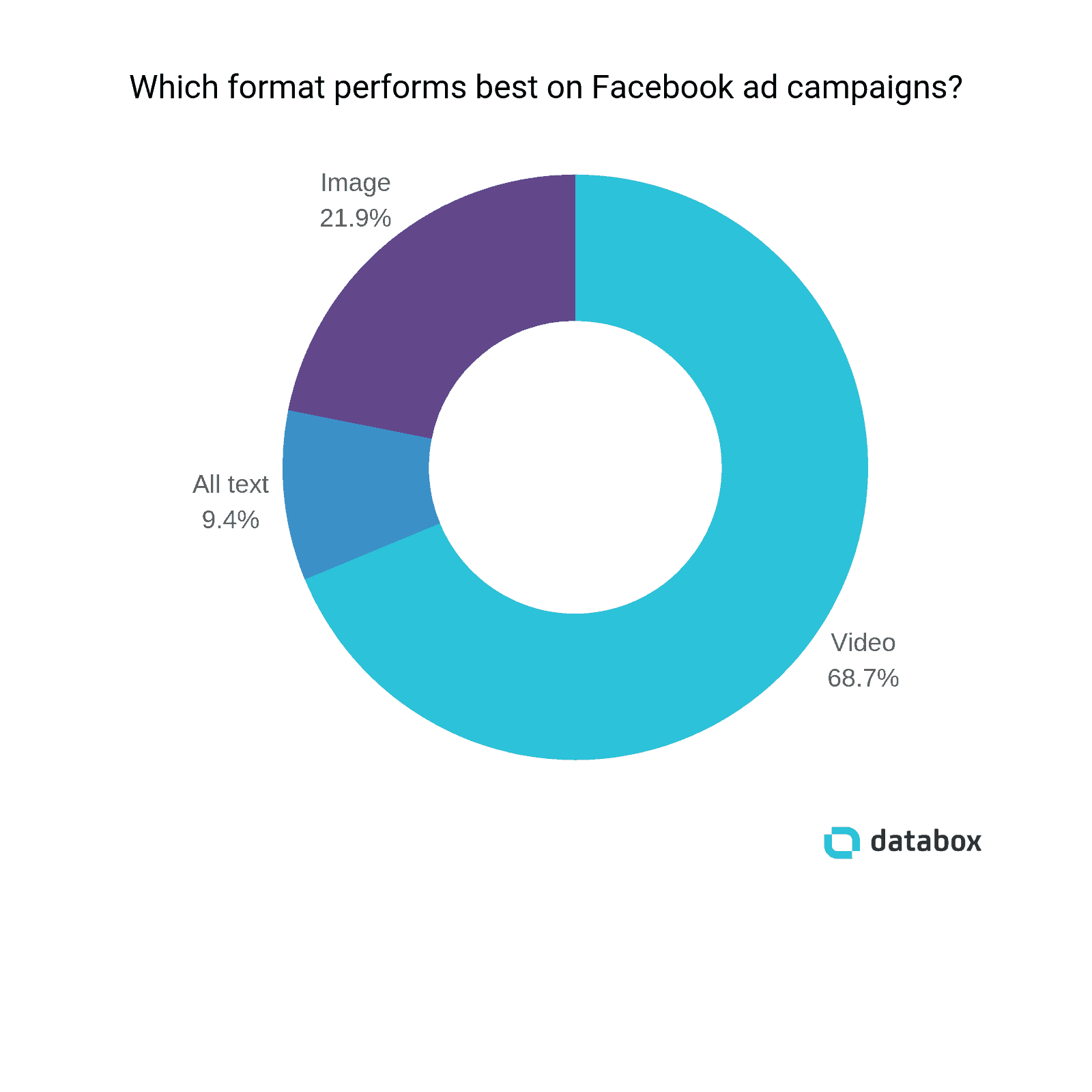
Some of the most popular ones include:
Image ads: These ads are simple and include a picture, descriptive text, and a call to action button. They are easy to set up as an effective part of your first Facebook strategy.
Video ads: These ads let you use short-form videos to capture and engage your audience. They are great for showing your products in action.
Carousel ads: These ads let you show images or videos. They are a great way to show off multiple products or show the same product from multiple angles. Each image can have its own link to send visitors to the appropriate page.
Catalog ads - These ads, previously called dynamic product ads and then Advantage+ catalog ads, show items from your product catalog. Meta now lets you use your catalog in any Sales campaign and automatically shows people the products they are most likely to be interested in.
Ad placements
Ad placements determine where your ads appear across Meta's apps. Meta groups them like this:
- Feeds: Facebook Feed, Instagram Feed, Threads, Facebook Marketplace, and the Facebook right column on desktop
- Stories, Status and Reels: Facebook and Instagram Stories and Reels, Messenger Stories, and WhatsApp Status
- In-stream ads for reels on Facebook
- Search results on Facebook and Instagram
- Apps and sites through Meta Audience Network
For your first campaigns, Meta recommends Advantage+ placements, which let it choose where your ads perform best. Each placement supports certain formats and sizes, so check your creative fits before you launch.
Facebook Marketplace
In addition to Facebook Ads, you should also understand Facebook Marketplace.
This peer-to-peer market is built into the Facebook platform. It allows users to sell most types of items.

Facebook Marketplace focuses on connecting local buyers and sellers, but you can still sell your items to people nationwide.
There are no fees for local sales. If you ship an item, Meta charges individual sellers a selling fee of 10% per shipment, with a minimum fee of $0.80.
Adding your items to the market is a great way to get organic exposure for your business. Facebook also makes it easy to run ad campaigns for your marketplace listings.
5. Set Your Marketing Goals
Now that you know how Facebook advertising works, setting your marketing goals is the next step in building a Facebook marketing strategy.
Setting a clear target will help you plan better. It will also give you a way to measure the effectiveness of your strategy.
You can set all sorts of goals for your Facebook marketing. The most appropriate will depend on your business's goals.
Here are some of the common goals companies set when building their strategy:
Drive website traffic: Facebook lets you get people to your website to learn more about your products or services.
Generate leads: You can use Facebook to direct people to your site to give you their contact information or sign up for your email newsletter.
Drive sales and revenue: The most obvious use of Facebook marketing is to turn interested parties into customers for your business.
Increase brand awareness: Facebook is highly effective for getting your brand in front of your target audience for the first time. Once they are aware of your business, you can market to them using a variety of channels.
Re-engage past customers: Facebook’s targeting options make it easy to remarket to people who have previously bought from your business.
No matter what goals you set for your Facebook strategy, you need to set specific, measurable objectives. Otherwise, you will not know if your campaigns are successful.
Facebook includes numerous performance metrics in its reporting dashboard. We will discuss how to use these to measure your marketing success further below.
6. Identify Your Facebook Audience
Facebook’s audience options are one of its biggest benefits.
Audiences are the groups of people that you target when running an advertisement campaign on Facebook.
They allow you to select a particular group of users for your marketing campaigns. This ensures that your ads reach the people most relevant to your business.
Some of the aspects you can use when building your audience are:
- Location
- Age
- Gender
- Education
- Work
- Financial
- Life Events
- Interests
- Behaviors
- Connections
Facebook also offers more powerful audience targeting in the form of custom and lookalike audiences.
Custom audiences allow you to build an audience based on your data. This data can be collected from offline customers or from online interactions on your site or Facebook profile by the Meta Pixel.
Lookalike audiences consist of people who have never interacted with your business. You can create these audiences based on your custom or previous site visitors.
With a lookalike audience, Facebook will look for people similar to those you use as the source audience.
The idea behind lookalike audiences is that if your business works well with a certain kind of user, it will also work well with similar people.
These can be highly effective in growing your customer base after you identify the specific interests of your users.
7. Set Up the Meta Pixel and Conversion Tracking
The next step of your Facebook business marketing strategy is to add the Meta Pixel (formerly the Facebook Pixel) to your website.
The Meta Pixel is a piece of tracking code that collects data. It enables the creation of custom audiences and retargeting campaigns.
The pixel works by placing cookies on your site that allow Facebook to track the various actions people take such as completing a purchase.
Facebook refers to these actions as events. In total, there are 17 standard events that the pixel tracks:
- Purchase
- Lead
- Complete registration
- Add payment info
- Add to cart
- Add to wishlist
- Initiate checkout
- Search
- View content
- Contact
- Customize product
- Donate
- Find location
- Schedule
- Start trial
- Submit application
- Subscribe
Along with the pixel, Meta recommends setting up the Conversions API, which sends the same events from your server. Using both makes your conversion tracking more reliable, especially when browsers block tracking, and Meta removes the duplicates.
Doing so will ensure that you capture all conversions so that you can accurately monitor your campaign performance.
8. Create Your First Facebook Paid Campaign
You can create your first Facebook campaign once you get the pixel and conversion tracking enabled.
Here are the components you will need to configure:
How a campaign is structured
Every Meta ad campaign has three levels. The campaign sets your objective. The ad set sets your audience, budget, schedule and placements. The ad is the creative people see. You can have several ad sets in a campaign and several ads in each ad set, which makes testing easy.
Choose an objective
Each campaign needs an objective. This tells Meta what you want to achieve so it can show your ads to the people most likely to take that action.
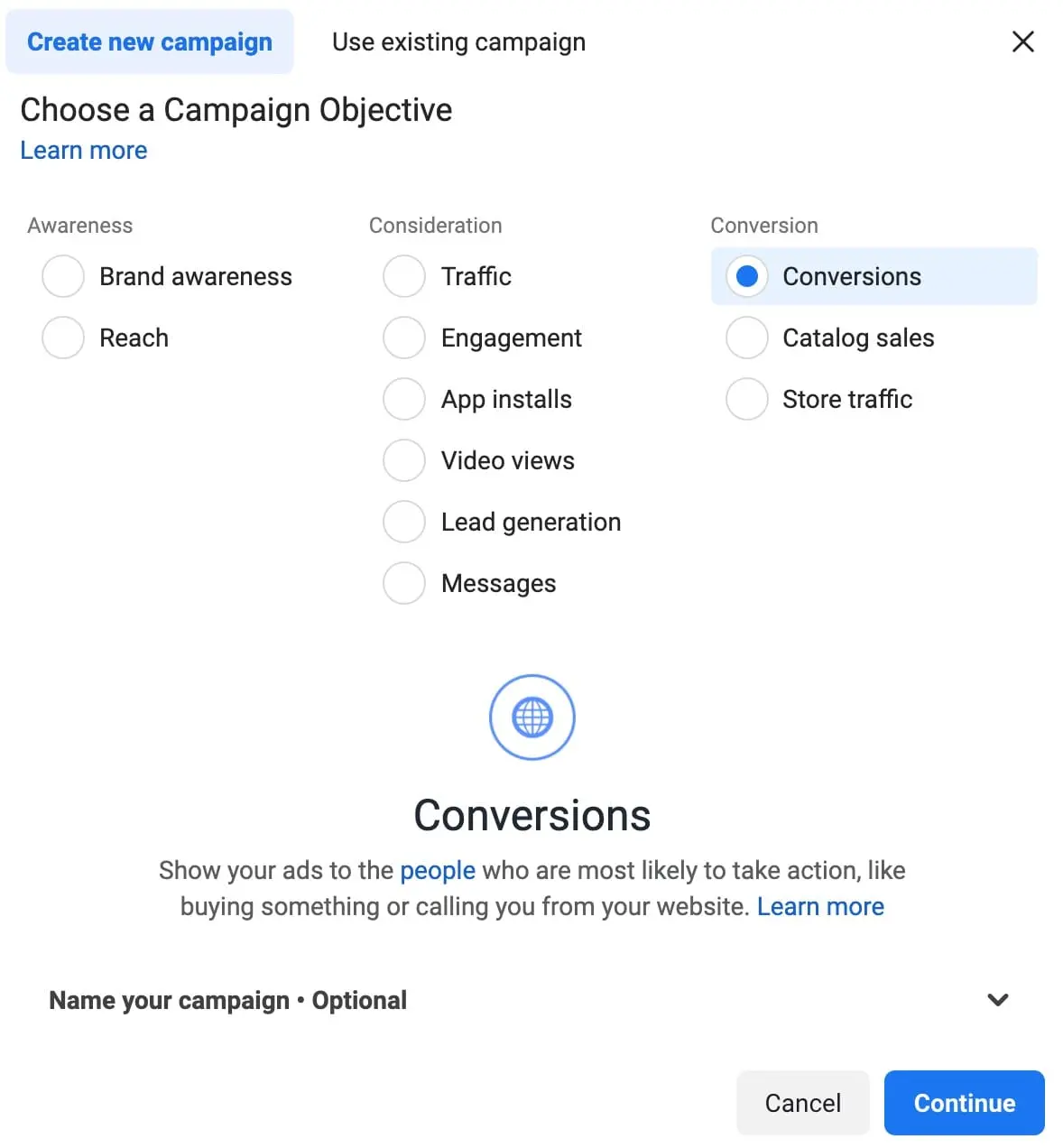
Meta has six campaign objectives:
- Awareness: reach as many relevant people as possible
- Traffic: send people to your website, app or Page
- Engagement: get messages, video views, post engagement or Page follows
- Leads: collect sign-ups and contact details
- App promotion: get app installs and in-app actions
- Sales: get purchases and other valuable actions on your site
If your goal is customers, choose Leads or Sales rather than Traffic or Engagement, so Meta optimizes for the people who actually convert.
Select an audience
Next, you need to select your target audience. For your first campaign, you can define the targeting manually or use a custom audience if you’ve already gathered visitor data from the pixel.
Determine the budget
The budget is the amount that you want to spend. You can set it at the campaign level, called Advantage+ campaign budget, and let Meta spread it across your ad sets, or set a budget for each ad set. Either way, you choose a daily or a lifetime budget.
With a daily budget, Meta paces your spend around the amount you set per day. Some days it spends a little more or less, but over time the daily average matches your budget.
With a lifetime budget, you select a time period for the campaign and a total amount to spend over it, and Meta paces delivery across that period.
Choose a bid strategy
For most beginners, the default Highest volume strategy is the right start: Meta tries to get the most results for your budget. Once you know what a result is worth to you, you can set a cost per result goal or a return on ad spend (ROAS) goal.
Schedule
You can set start and end dates for the campaign, and with a lifetime budget you can choose the days and times your ads run.
Create your ad
After you configure these settings, you can create your ad. Meta suggests formats based on your objective.
After choosing an ad format, you can upload your creative assets. The format you select will determine the design requirements for the assets, such as the resolution and ratio of the images and the number of characters in the text.
9. Monitor Campaign Performance
Once your campaign is up and running, it is essential to monitor its ongoing performance.
The reason for this is simple. You won’t know if your campaigns are achieving their objectives if you do not check to see how they are doing.
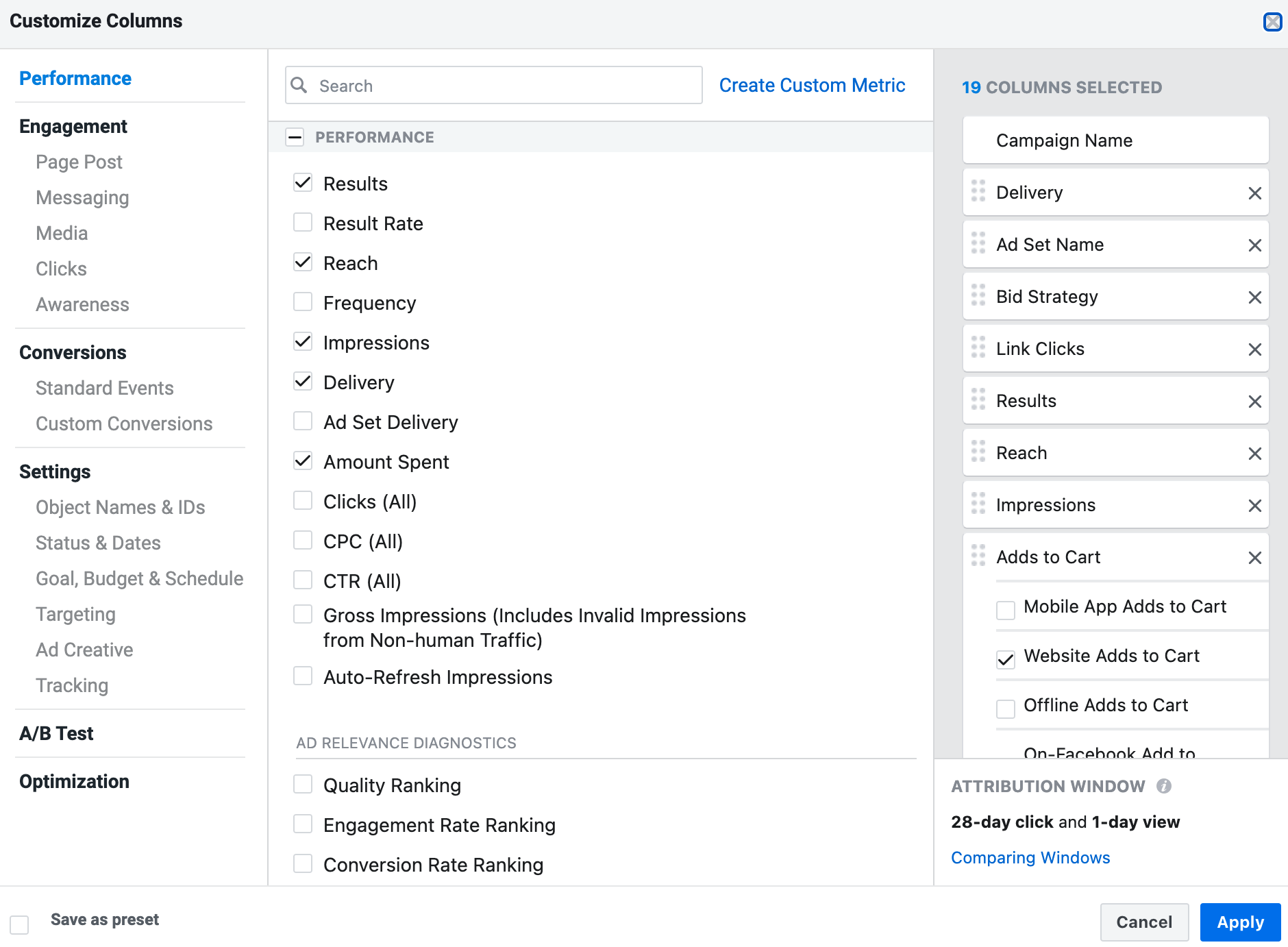
Some of the most important metrics to track include:
- Impressions: The number of times your ads appear on the screen.
- Cost per click (CPC): The average amount spent for each person who clicks your ad.
- Click-through rate (CTR): The percentage of people that click your ads after seeing them.
- Reach: The number of people who saw your ads at least once.
- Results: The total number of conversions. What counts as a conversion is determined by your campaign settings.
- Cost per result: The average amount spent per result.
If your campaigns are not performing as intended, you can make changes to boost their performance.
For example, if you notice that your campaigns have a high number of impressions but a low CTR, it is a sign that your ads are not engaging or that you’re targeting the wrong people.
If your ads generate a good amount of clicks but do not result in any sales, it could be a sign that you need to optimize your website.
10. Start a Facebook Retargeting Campaign
The final step in your Facebook strategy is setting up a retargeting campaign.
These campaigns specifically target the people that have already visited or bought from your site.
Previous visitors will be more receptive to your marketing because they already know your business.
Additionally, past buyers are more likely to buy from you again, and you can build brand loyalty by continually engaging these people.
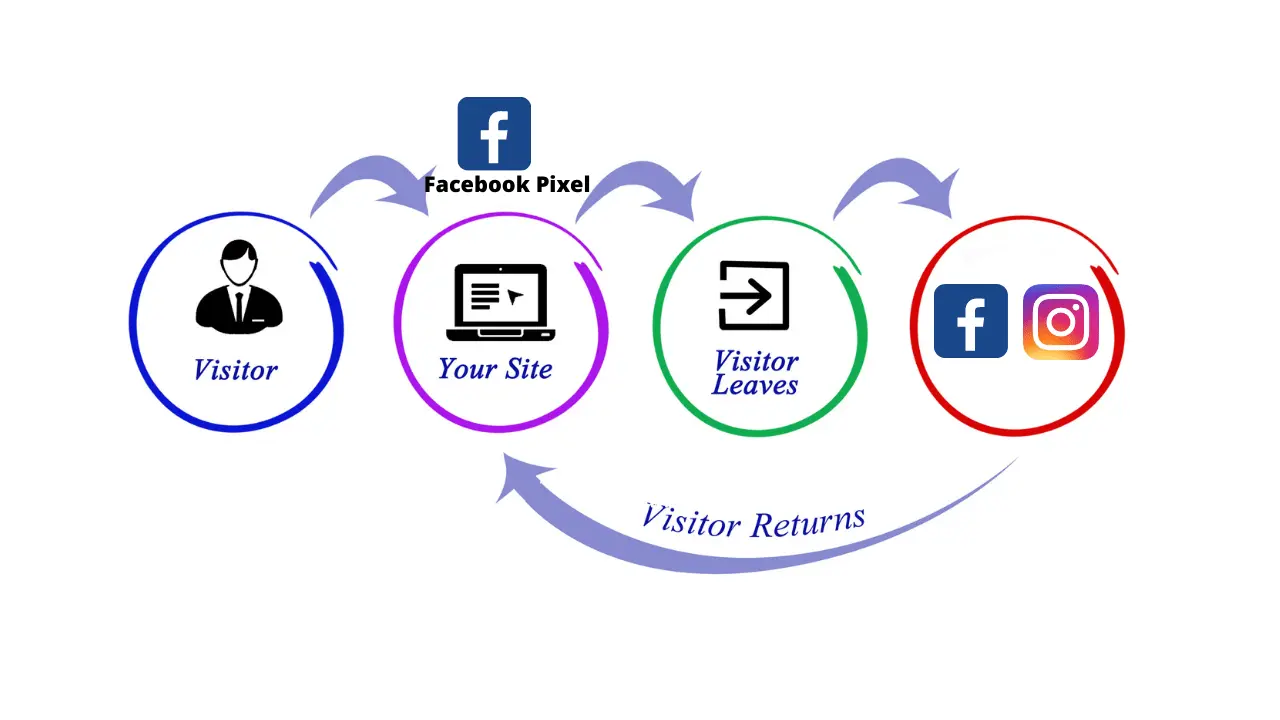
It is a good practice to have an active remarketing campaign. This ensures that you do not miss out on interested traffic.
If you let too much time go between messaging visitors, they can easily forget about your business.
To run a retargeting campaign, you must install the Meta Pixel on your site. Our guide to Facebook retargeting walks through the setup. This will allow Facebook to track and tag your site visitors to serve ads from your retargeting campaign.
Another approach is to create a retargeting campaign using a list. With this method, you upload a list of targets (usually their email addresses), and Facebook will show them ads from your campaign.
Pixel-based retargeting is typically more effective and efficient as Facebook automatically determines who to target.
How to Learn Facebook Marketing
The steps above outline the basics of Facebook marketing. To maximize your effectiveness as a Facebook marketer, you should gain a complete and thorough understanding of how the platform works.
Fortunately, there are plenty of resources to help you do so.
One of the best options is dedicated Facebook marketing courses.
Facebook Ads courses compile everything you need to know about using Facebook for marketing into a single, easy-to-follow resource.
The best are taught by experienced instructors who can offer unique experiences and insights into using the platform successfully.
In addition to courses, Meta offers official Meta certifications through its Blueprint program.
These are some of the most respected digital marketing certifications in the digital marketing space.
To earn one, you pass an exam with a score of 700 or higher. Meta says exams cost the equivalent of USD 99 to 150, and certifications range from Digital Marketing Associate for beginners to Media Buying Professional.
Facebook Ads specialists are expected to know the ins and outs of Facebook marketing, and earning one (or multiple) of the certifications proves your competency.
Frequently Asked Questions
Should I start with organic Facebook marketing or paid ads?
Start with a complete Page and a few weeks of regular posts, so people who see your ads find an active business. Then add paid ads, because organic reach alone grows slowly. Most businesses use both: organic posts to build trust, and ads to reach new customers.
Is $10 a day enough for Facebook ads?
Yes, $10 a day is enough to learn how Facebook ads work and to test your first audiences and ads. It is usually too little to scale a campaign, so start small, find what works, and increase the budget on the ads that bring results.
Is Facebook still good for marketing?
Yes. Facebook is still one of the largest social platforms, and Meta's ad system can reach people on Facebook, Instagram, Messenger, Threads and WhatsApp from one Ads Manager account. It works best for businesses that can show their product visually and target a clear audience.
Conclusion
New social media platforms emerge, but Facebook isn’t going anywhere soon.
Knowing how to create a Facebook strategy for your business will allow you to capitalize on the platform's full potential.
Use the steps in this guide as a starting point and explore the extra resources we’ve included to begin mastering the art of Facebook marketing.


