

The site structure of an ecommerce website is very important. It has to be easy to navigate and crawl (by search engines) and it’s the starting point to offer a great experience for your users.
A big ecommerce website may have a lot of pages, and it’s necessary to have a solid structure so that users can find what they want in the least possible number of clicks.
Why Ecommerce Site Structure Matters?
A good ecommerce site structure has a number of hidden benefits to offer:
Crawling and indexing: A clear structure helps search engine crawlers discover all of your category and product pages and understand how they relate to each other. Google says it analyzes the links between your pages to find your most important content, so a logical hierarchy tells it which categories and products matter most. This, in turn, can have a big impact on your SEO efforts.
Site links: Site links are shown in the search engine results pages (SERPS) when someone searches for your company name on Google.
In the case of an ecommerce store, sitelinks will show your main categories, like this example from Best Buy.
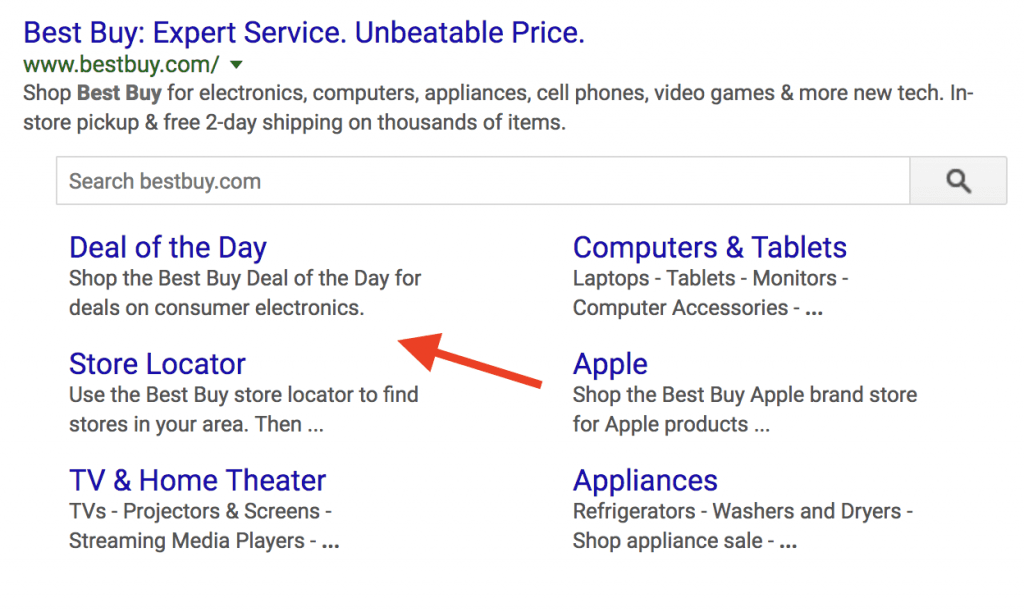

Sitelinks are great for SEO. Not only they can attract more clicks to the most important pages of your website but they are also good for branding.
The problem is that you cannot specify which pages of your website to include as sitelinks.
It’s up to Google to decide which pages to show as sitelinks, and there is no setting to add or remove them.
A poor site structure will minimize your chances of getting sitelinks in the SERPS while a good site structure will help Google pick up the right pages to show as sitelinks along with your title and description.
More conversions: The ultimate goal of every online shop is to generate more sales.
To make sales, you have to ‘push’ your potential customers into the sales funnel, which may include a number of other conversions (sign up for newsletter, leads, etc).
A well-organized and defined site structure is crucial for this process to work as planned.
Visitors should easily find what they want without having to click many times and without spending more time on a page than needed.
8 Steps to Creating the Site Structure for Your Ecommerce Store
Let’s see the steps for creating a structure for your ecommerce shop.
Step 1: Create a Hierarchical Structure With No More Than 3 Levels
An ecommerce website should have a hierarchical structure.
Your home page is at the top of the hierarchy and below you can have 2 or 3 levels before you reach the bottom of the hierarchy, which is your product pages.
To help you visualize how a hierarchical structure looks like, have a look at the following diagram.
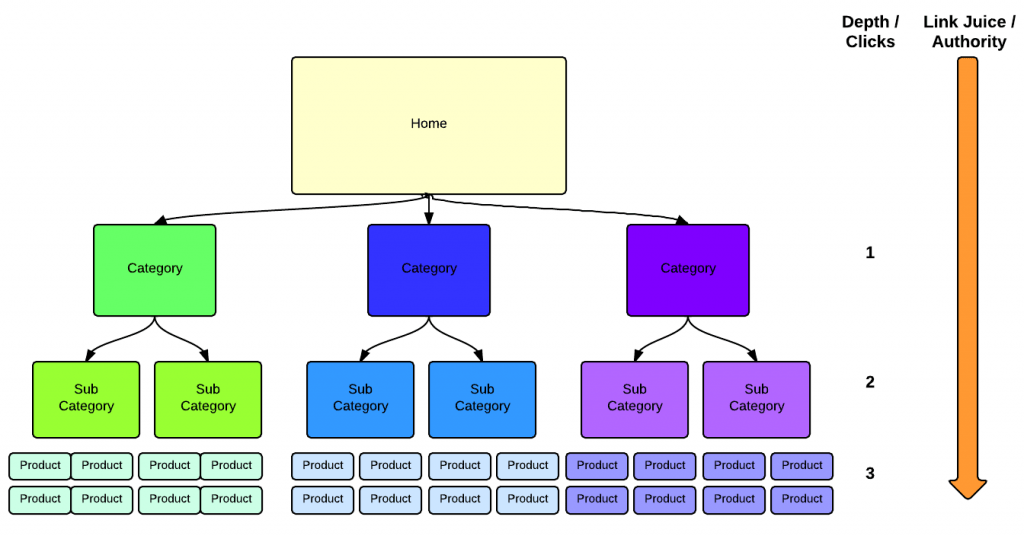
Source: Kissmetrics
The home page is at the top of the hierarchy, followed by the main categories (level 1), sub categories (level 2) and finally the product pages (level 3).
Here is an example for a store that sells electronics:
| Level | Page | Example URL |
|---|---|---|
| Home | Home page | example.com |
| 1 | Main category | example.com/tablets/ |
| 2 | Subcategory | example.com/tablets/android/ |
| 3 | Product page | example.com/samsung-galaxy-tab-s9/ |
Small stores with only a few products can skip the subcategory level and link products straight from the main categories.
The best way to decide on how to create your structure is to take into account the outcome from your keyword research process.
If you are new to keyword research, read our keyword research guide before continuing to the next steps. Search volumes show you which categories and subcategories people actually look for.
Keyword research is not only necessary for optimizing your titles and descriptions but it can provide you with ideas on how to structure your website.
Step 2: Create a Simple Menu That Replicates the Site Structure
The navigation i.e. the menus of the shop, should reflect the structure. If you get the structure right, your navigation will be easy to understand and follow.
Here are a few things to take into account when deciding on your navigation structure and menus:
Keep it simple: When designing the menu structure, always keep in mind to keep it as simple as possible.
Avoid adding pages to the menu that are not needed or creating fly-out submenus when it’s not necessary.
As a rule of thumb, each page on your website should be accessible from the homepage in no more than 3 clicks. This is a common guideline, not a Google rule, but it keeps both shoppers and crawlers close to your products.
Use side menus: When users select a particular category from the main menu, you can show them a landing page with a side menu to help them find the products they want.
Have a look at how the WooCommerce website is structured.
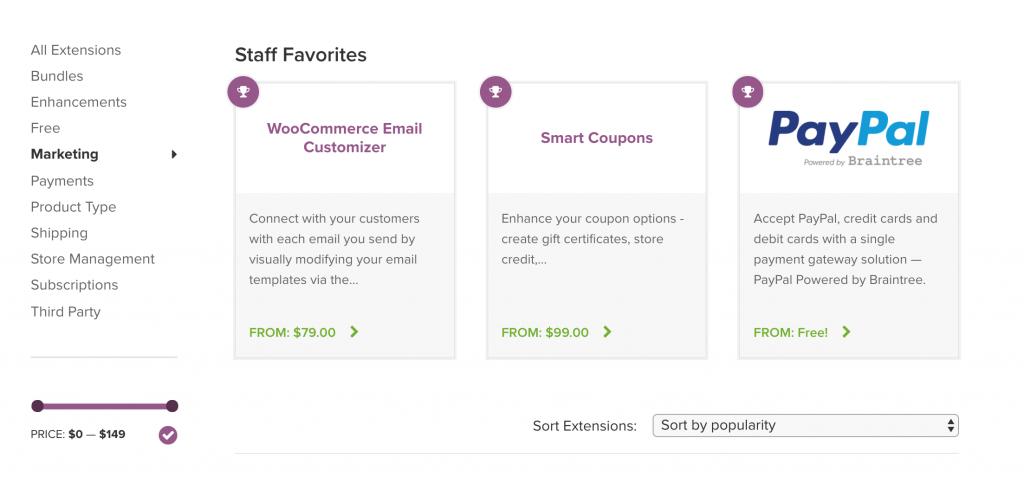
When you choose a category from the main menu, they show you a landing page with all products in that category with several filters (like price) to narrow down your selection.
The other options are also available so that you can choose to change the category without having to go back to the menu.
Step 3: Consider Creating a Separate Menu for Desktop and Mobile
The majority of your traffic likely comes from mobile.
This means that you should give special attention to how mobile users navigate your website.
Replicating the desktop menu (as is) is not a good option because of the limited screen space available on the mobile device.
What you should do instead is to create a separate menu for mobile and include ONLY those options that are really necessary for navigation purposes.
Pages like privacy policy, about us, etc. can be grouped together, thus giving more space on the menu for the important pages (category and product pages).
Have a look at woocommerce website again from your desktop and mobile.
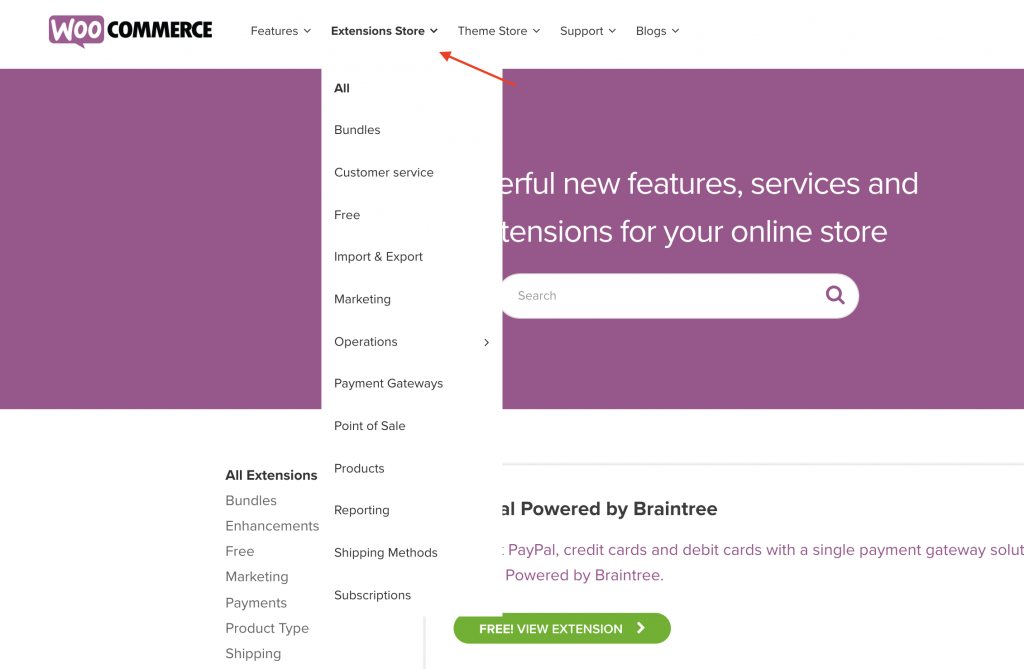
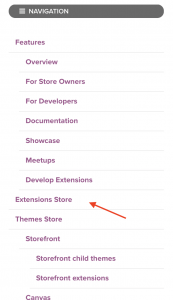
On the desktop, they have a full list of products under the Extensions Store menu:
While on mobile, they only show the Extensions store option since displaying the full list of products would create a mess and this is not user friendly.
Step 4: Optimize Your URL Structure
Having an SEO-friendly URL structure helps both users and search engines navigate a website.
The site structure and URL structure are closely related since both have to represent each other accurately.
For example, if you have an ecommerce store selling electronics and have a section for Tablets, then your site structure can be like this:
Home page / Tablets / Android / Ipad
And your URL structure like this:
www.example.com/tablets/android and www.example.com/tablets/ipad
When a word is removed from the URL, the page www.example.com/tablets should display all available tablets.
Use the following guidelines to optimize the URL structure of your ecommerce website:
- Keep your URLs as short as possible.
- Separate words in the URL with hyphens (-), not underscores. Google treats hyphens as word separators.
- Avoid extra characters that are not needed, such as numbers that don’t mean anything to the user.
- Include attributes of your products in the URL. For example, if you are selling “black iPads with 64 GB of storage”, your product URL can be /ipad-64gb-black.
- Use only lowercase characters and avoid spaces.
In general, include product attributes in the URL that may be used as search keywords.
Your platform decides part of the URL for you. Shopify, for example, adds /collections/ to category URLs and /products/ to product URLs, while WooCommerce lets you change the category and product bases under Settings, Permalinks. Pick a pattern before you launch and keep it.
Make your URLs HTTPS
Having a secure website is very important, especially for ecommerce websites.
Google uses HTTPS as a lightweight ranking signal, and the padlock is another way to gain shoppers’ trust.
Important: If you decide to change your URL structure, you must be careful not to lose your SEO and rankings.
The best approach is to use 301 redirects to let users and search engines know that the URL of a page has changed. Our technical SEO guide covers the checks to run after a change like this.
Step 5: Add a Breadcrumb Menu to All Your Pages
A breadcrumb menu is shown at the top of a page and it consists of a number of internal links that allows visitors to quickly navigate back to the previous section or the home page of your website.
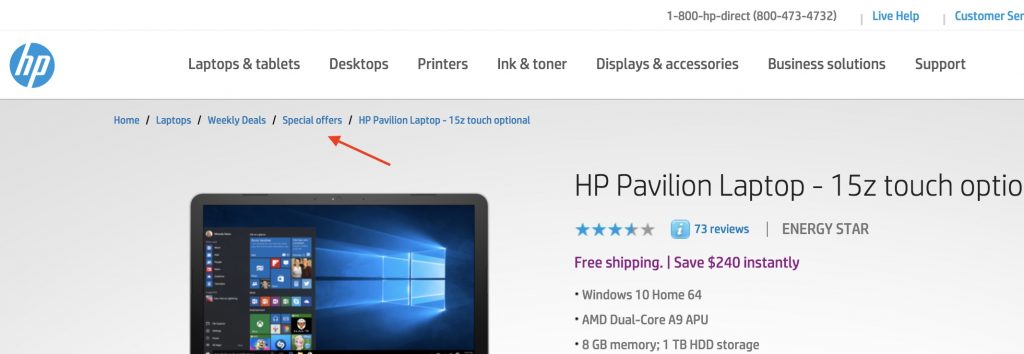
This is extremely useful when users search for a specific product and go back and forth between the categories and products.
It is also useful when users land on a specific product page since they can use the breadcrumb to see what other products are in the same category.
Step 6: Link Categories, Subcategories, and Products Together
Menus only reach the top of your hierarchy. Internal links connect the rest, so every product can be found by shoppers and crawled by search engines. Google says it analyzes the links between your pages to understand your ecommerce site structure and find your most important pages.
Make sure that:
- Every category page links to its subcategories, and every subcategory links to its products.
- Every product page links back to its category (the breadcrumb does this for you).
- Product pages link to related or complementary products.
- Your home page links to your most important categories and best-selling products.
- Blog posts and buying guides link to the categories and products they mention.
For more ways to use links, read our guide to internal linking best practices.
Step 7: Control Faceted Navigation (Filters)
Filters for size, color, price, and brand are great for shoppers, but every combination can create a new URL. A store with a few hundred products can end up with thousands of filter URLs that show almost the same products.
This wastes your crawl budget and can create duplicate content. To avoid it:
- Decide which filter pages deserve to rank. A filter people search for, such as “black running shoes”, can become its own indexable subcategory with a unique title and description.
- Keep the rest out of the index. Most platforms let you mark filter URLs as noindex, point them to the main category with a canonical tag, or block them from crawling.
- Don’t link to endless filter combinations from your menus.
To learn how Google finds and indexes the pages on your site, read how crawling and indexing work.
Step 8: Create a User Sitemap
For all types of websites, it’s always a good practice to create a user-sitemap page.
A user sitemap is different from the XML sitemap that is submitted to search engines.
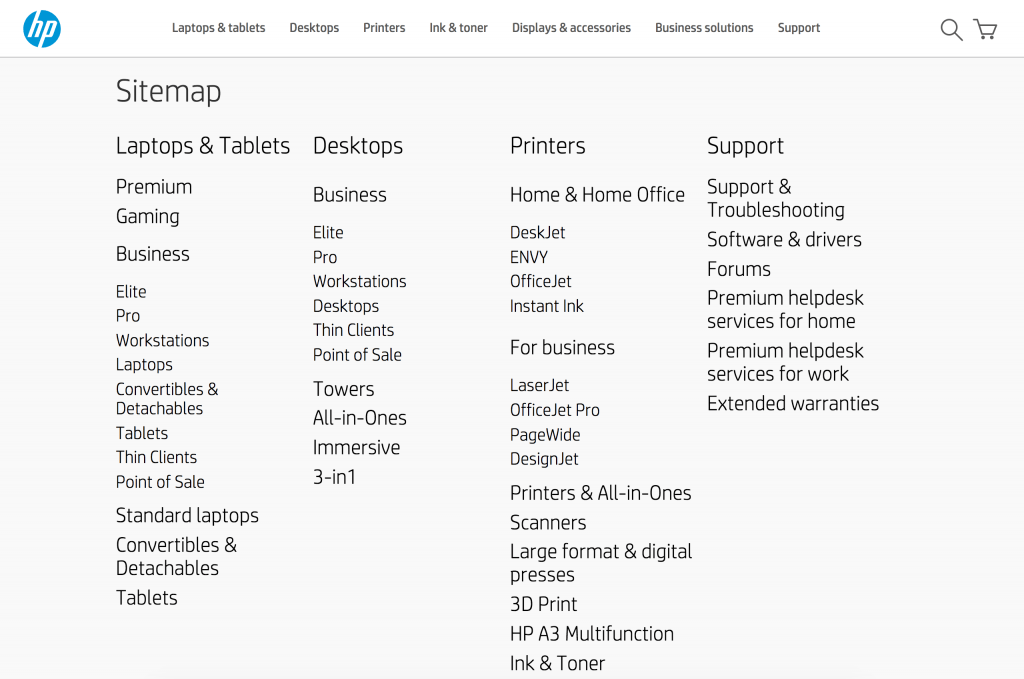
A good user-sitemap page should display all important categories and subcategories of a website on a single page so that users can easily find what they want.
Here is a nice example from HP’s online store.
The User sitemap can be added as an option in the footer.
From experience, when you create the user-sitemap page, it will help you understand if your website is well structured or if you need to make any structural changes to improve it.
Conclusion
Ecommerce websites can quickly grow in size and if you don’t have a solid structure from the beginning, you can easily get lost.
A well-defined structure will help users find what they want fast (in less than 3 clicks), and search engine crawlers can crawl, understand, and index your website more efficiently.
When thinking about your shop site structure, consider the following:
- Create a hierarchical site structure
- Your menu should match your site’s hierarchy. Use sidebar menus to aid navigation.
- Give special attention to your mobile version and ensure the user experience is optimized for mobile. If necessary, design a separate menu for desktop and mobile.
- Optimize your URLs
- Add a breadcrumb menu to all pages.
- Link categories, subcategories, and products together.
- Keep filter URLs under control so crawlers focus on the pages that matter.
- Create a user-sitemap and add it to your footer.
Finally, if you already have an ecommerce website with indexed pages and you decide to change the structure and URLs, make use of 301 Redirects so that you don’t lose any of your rankings and domain/page authority.
If you want to learn SEO for your own store step by step, our SEO Courses Bundle covers keyword research, on-page SEO, technical SEO, and link building.
Ecommerce Site Structure FAQ
How many levels should an ecommerce site have?
Most stores work best with 2 or 3 levels below the home page: main categories, subcategories, and products. Very small stores can use just categories and products.
Should product URLs include the category?
It’s not required. Short product URLs (example.com/product-name/) never break when you move a product to another category, while category-based URLs (example.com/category/product-name/) show the hierarchy. Choose one pattern and use it consistently, and let breadcrumbs show the hierarchy either way.
Is a flat or a deep site structure better for SEO?
A flat structure, where every product is a few clicks from the home page, is usually better. Deep structures bury products many clicks away, which makes them harder for shoppers and crawlers to reach.
How do I fix the structure of an existing store?
Map your current categories, merge thin or duplicate ones, and plan the new hierarchy on paper first. When URLs change, add 301 redirects from every old URL to its new one.