


Google Ads is Google’s advertising platform. Businesses bid to show ads on Google Search, YouTube, Gmail, and millions of partner websites, and Google runs an instant auction every time someone searches to decide which ads appear and in what order. In most campaigns, you only pay when someone clicks your ad.
At Reliablesoft, we’ve managed Google Ads campaigns for dozens of clients, helping them achieve a significant return on their investment.
In this guide, I will teach you the basics of how Google Ads works, how to set up your first campaign, and what it costs, so you can start using it for your business.
What are Google Ads?
Google Ads is an advertising platform that allows you to advertise your business on Google and its partners’ websites.
You have undoubtedly seen these ads in action, whether searching for something or visiting one of your favorite websites. They are marked as “Sponsored”, and users who click on your ad are taken to your website, landing page, or app.
Google’s vast data and extensive targeting options make it possible to get your ads in front of the right audience, and because Google is the most popular search engine in the world, there are opportunities to reach people in any niche.
To start advertising, you open a Google Ads account, create a campaign, set a budget, and choose who you want to reach. There is no minimum spend.

Where do Google Ads Appear?
Google offers a variety of ad types that can appear in several places.
Google Search Ads
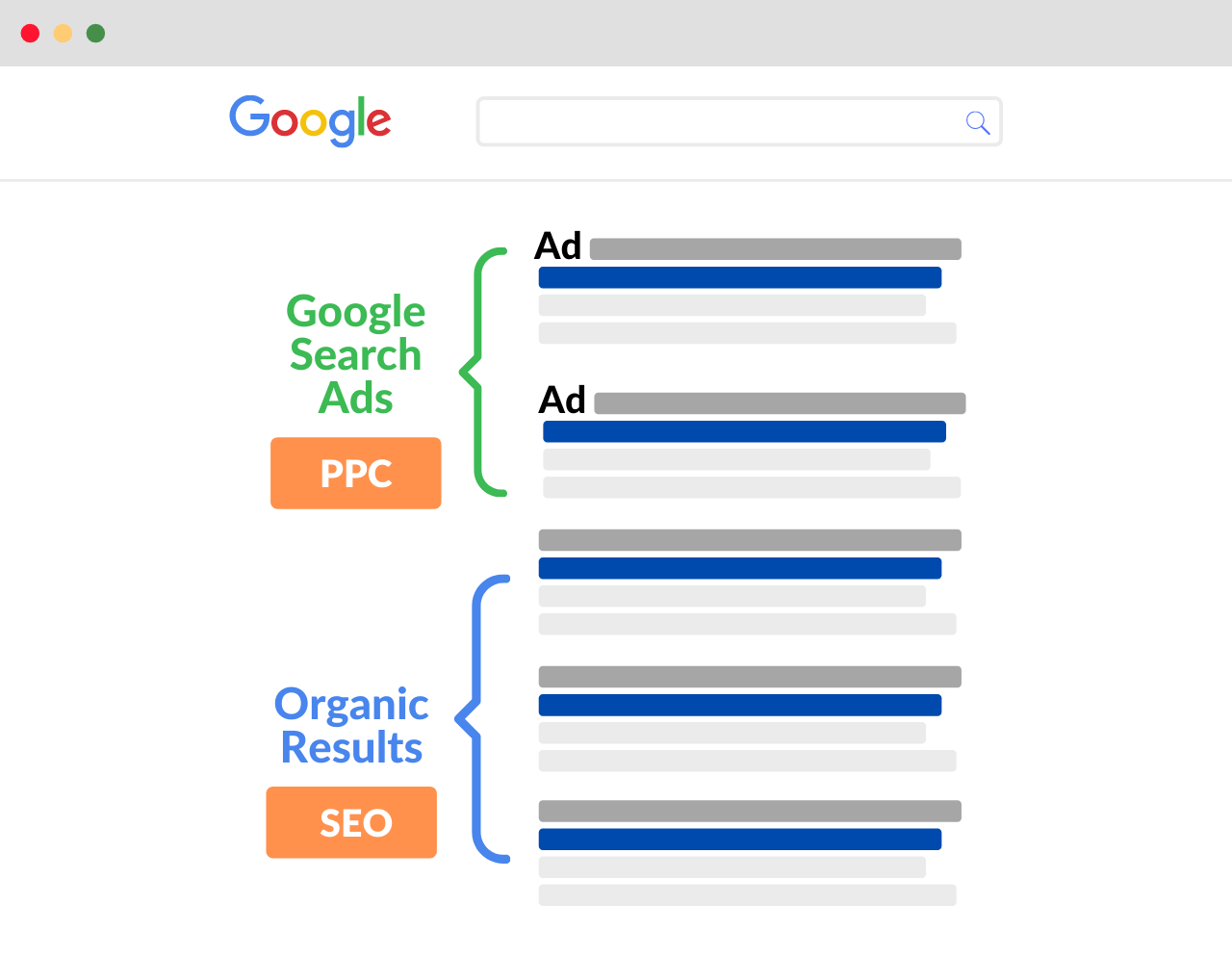
Search ads appear on Google’s search results pages, above and below the organic results. They can also appear on Google Maps and on partner sites in the Google Search Network.
Google Display and Demand Gen Ads
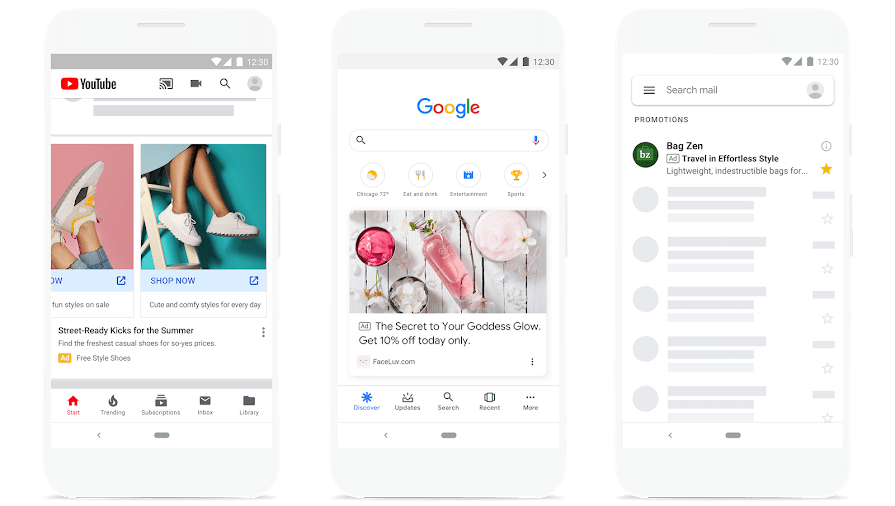
Display ads are image ads that appear on millions of websites and apps in the Google Display Network. Demand Gen ads are visual ads that appear on YouTube, Google Discover, and Gmail.
Google Shopping Ads
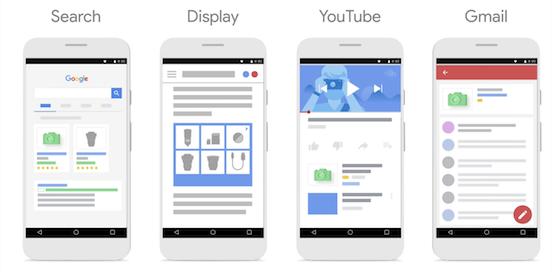
Shopping ads show a product image, price, and store name. They appear in Google search results, in the Shopping tab, and across Google’s partner sites.
Google Video Ads

Video ads appear on YouTube, before, during, or after other videos, in YouTube search results and feeds, and in YouTube Shorts. They can also appear on partner websites and apps.
Related Resources
- Search Engine Marketing - Find out how Google Ads fits into search engine marketing alongside SEO.
- Benefits of PPC - A detailed explanation of Google Ads benefits for businesses.
How Do Google Ads Work?
Let's start with a simple overview of how Google Ads works for advertisers and users:
Advertisers create campaigns and choose who they want to reach. For search ads, this means selecting the search terms, also known as keywords, that you want your ads to show for.
When someone searches, Google runs an auction among all the eligible ads and shows the winners. The advertiser is charged based on how the campaign is set up, usually only when someone clicks the ad.
When a user clicks on an ad, they are directed to the advertiser’s landing page, which is the web page the advertiser chose when creating the ad.
If all goes well, some of these visitors become customers. The goal is for the value of these sales to exceed the cost of the ads, resulting in a profit.
Now, let’s take a more in-depth look at how all this works.
- Google Ads Auction System
- Google Ads Bidding
- Google Ads Account Structure
- Google Ads Campaign Types
- Google Ads Ad Groups and Ads
- Google Ads Keyword Match Types
- Google Ads Assets
Related Resources
- Best Google Ads Courses - a list of the best online courses to learn Google Ads fast.
Google Ads Auction System
Google Ads uses a pay-per-click (PPC) model. This is the basis for pricing your ads and for deciding which ads show when several advertisers compete for the same users.
Every time someone searches, Google runs a live auction to decide which ads are shown and in what order.
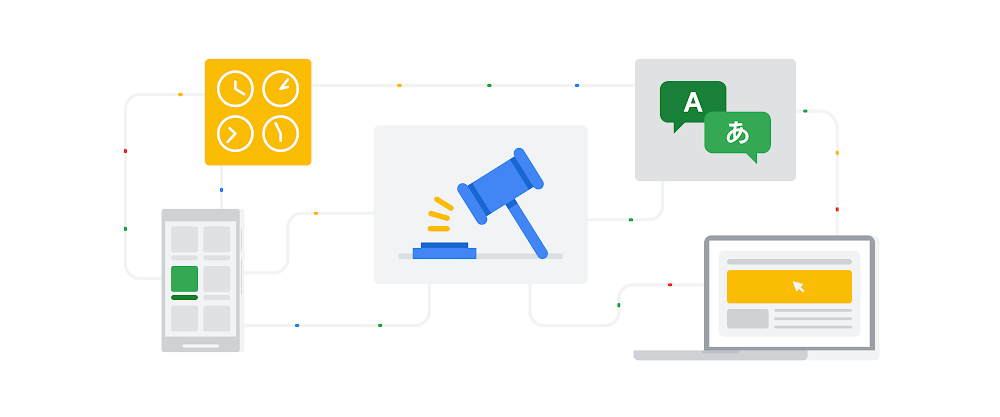
The value Google uses to decide whether your ad shows and where is called Ad Rank. According to Google, Ad Rank is based on:
- Your bid: The most you are willing to pay for a click.
- The quality of your ads and landing page: How relevant and useful your ad and website are to the person searching.
- Ad Rank thresholds: The minimum quality an ad needs to show at all.
- The competitiveness of the auction: How close the Ad Ranks of competing advertisers are.
- The context of the search: The person’s location, device, time of search, and the search terms themselves.
- The expected impact of assets: How much extra information like sitelinks or phone numbers is expected to improve your ad.
Ad Rank is often simplified as “bid multiplied by Quality Score”, but that is not the whole picture. What it does mean is that a higher bid is not the only way to win: even if a competitor bids more, you can win a higher position at a lower price with more relevant keywords, ads, and landing pages.
Quality Score
Quality Score is a diagnostic tool that shows how the quality of your ads compares with other advertisers. It is reported for each keyword on a scale from 1 to 10.
There are three components used to calculate your Quality Score:
1. Expected Clickthrough Rate
How likely your ad is to be clicked when it shows. Clickthrough rate is the percentage of people who click your ad after seeing it. Google rates it as above average, average, or below average.
2. Ad Relevance
How closely your ad matches the intent behind a search. The more closely your keywords, ads, and landing page match what people are searching for, the better.
3. Landing Page Experience
How relevant and useful your landing page is to people who click your ad. A page that loads fast, is easy to use, and gives people what the ad promised scores better.
Google Ads Bidding
Bidding determines how much you are willing to pay to reach people.
Depending on the campaign, you can pay in different ways:
- Cost per click (CPC): You pay when someone clicks your ad. This is the most common option.
- Cost per thousand impressions (CPM): You pay for every 1,000 times your ad is shown. Used for awareness campaigns.
- Cost per view (CPV): You pay when someone watches your video ad or interacts with it. Used for video campaigns.
You can set your bids in two ways:
Manual bidding
With manual CPC bidding, you set the maximum bid for each ad group or keyword. This gives you granular control, so you do not overspend on low-performing keywords, but it takes more time to manage.
Automated bidding
With automated bidding, Google uses AI to set a bid for every auction based on the goal you choose. Google now recommends automated bidding for most campaigns.
The main automated bid strategies are:
- Maximize conversions: Google sets bids to get the most conversions within your budget.
- Target CPA: You set a target cost per acquisition, and Google sets bids to get as many conversions as possible at or below it.
- Maximize conversion value: Google sets bids to get the highest total conversion value (for example, revenue) within your budget.
- Target ROAS: You set a target return on ad spend, and Google sets bids to reach it.
- Maximize clicks: Google sets bids to get as many clicks as possible within your budget.
- Target impression share: Google sets bids to show your ad in a chosen position, for example at the very top of the page, for a chosen share of searches.
Conversion-based strategies only work if you measure conversions, so set up Google Ads conversion tracking before you use them.
Google Ads Account Structure
Google Ads follows a simple hierarchical structure that makes it easy to manage your account.

Here is how it looks in order:
Campaigns
Campaigns are the top level of your account. Ad groups, ads, keywords, and audiences all sit inside a campaign. Each campaign has its own settings, including:
Budget
Your budget is the average amount you want to spend per day. Google spends more on days with more search activity and less on quieter days.
On any given day, your campaign may spend up to twice your average daily budget. Over a month, though, you will never be charged more than 30.4 times your average daily budget (the average number of days in a month).
For example, with a daily budget of $10, you might see a day with $7.50, one with $20, and another with $12.50, but your monthly charge will not exceed $304.
Locations
This setting lets you choose the physical locations where your ads can show, such as countries, regions, cities, or a radius around your business. You can also exclude locations.
Devices
You can adjust bids for computers, mobile phones, tablets, and TV screens. A -100% adjustment stops your ads from showing on that device type. Note that automated bid strategies manage device bids for you.
Google Ads Campaign Types
The campaign type decides where your ads can appear and what they look like. Choose it based on your goal:
| Your goal | Campaign type to start with |
|---|---|
| Leads or sales from people searching for what you offer | Search |
| Online sales of products from a store | Shopping or Performance Max |
| Reaching customers across every Google channel from one campaign | Performance Max |
| Local visits and calls to a physical business | Search with location targeting, or Performance Max with store goals |
| Brand awareness | Video or Display |
| Creating demand with visual ads | Demand Gen |
| App installs | App |
Search Campaigns
Search ads are text ads that appear on Google search results pages when people search for the keywords you target. They are highly effective because they reach people at the moment they are looking for something specific.
Google also offers AI Max for Search campaigns, an optional setting that uses Google AI to match your ads to more relevant searches beyond your keywords and to adapt your ad text to each search.
Performance Max Campaigns
Performance Max is a goal-based campaign type that gives you access to all Google Ads inventory from a single campaign: Search, YouTube, Display, Discover, Gmail, and Maps. You provide your goals, budget, and assets (text, images, videos), and Google’s AI decides where and to whom to show your ads.
Shopping Campaigns
Shopping campaigns promote your products with an image, price, and store name. You don’t write the ads. Instead, Google creates them from the product data you upload to Google Merchant Center, which you then link to your Google Ads account.
Display Campaigns
Display campaigns show image ads across the Google Display Network, a network of millions of websites and apps. They are useful for awareness and for remarketing to people who have already visited your website.
Demand Gen Campaigns
Demand Gen campaigns (formerly Discovery campaigns) show visual image and video ads on YouTube, Discover, and Gmail. They are designed to reach people while they are browsing and create interest before they search.
Video Campaigns
Video campaigns show video ads on YouTube and on partner websites and apps. Some are designed for brand awareness, and others for conversions.
App Campaigns
App campaigns promote your mobile app across Search, Google Play, YouTube, Discover, and the Display Network. You provide some text, images, and a budget, and Google automatically creates and optimizes the ads.
Google Ads Ad Groups and Ads
The next level of your account is ad groups. These sit inside a campaign and contain a set of ads and the keywords or audiences they target.
Keep each ad group focused on one theme, such as one product or service. That makes it easier to write ads that closely match the keywords in the group, which improves your Quality Score.
Ads
Ads are what people actually see. Their format depends on the campaign type.
For Search campaigns, the standard format is the responsive search ad. You provide up to 15 headlines of up to 30 characters and up to 4 descriptions of up to 90 characters, and Google automatically tests combinations to find the ones that perform best. Each ad also has a final URL (your landing page) and two optional display path fields.
The older expanded text ads, with a fixed set of three headlines and two descriptions, have been retired and can no longer be created.
Display and Demand Gen ads combine images, videos, headlines, and descriptions. Shopping ads show products from your catalog, including the price, image, and product name.
Google Ads Keyword Match Types
Keywords are the search terms people use to find something on Google.
Every ad group in a Search campaign targets a list of keywords that you choose.
When you add a keyword, you also choose its match type. Match type determines which searches your ads can show for.
For example, if you add the keyword “shoes”, do you only want your ads to show for “shoes”? Or also for “black shoes”, “men’s shoes”, and “size 11 shoes”?
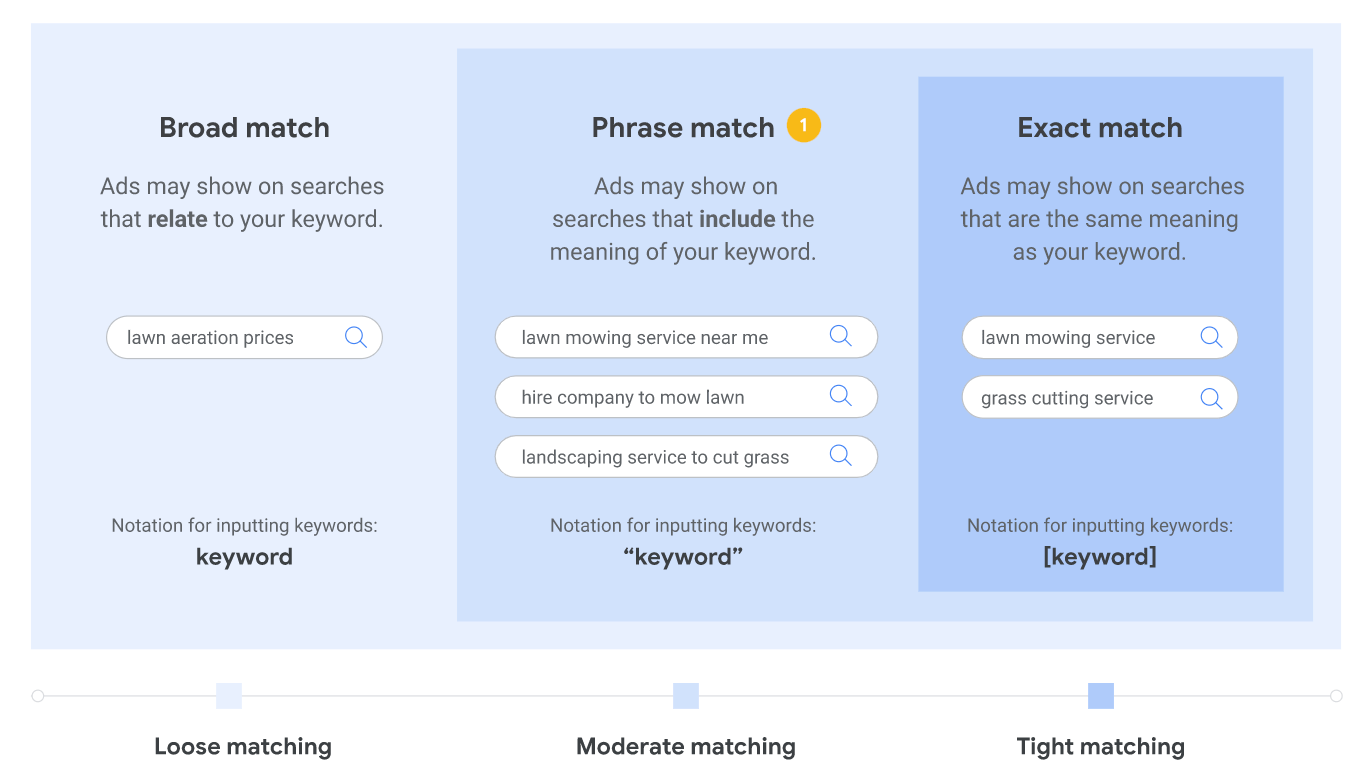
There are three match types:
1. Broad match
This is the default match type. You add the keyword without any symbols.
With broad match, your ads can show for searches related to your keyword, even if they don’t contain it. For example, the keyword “shoes” could show your ads for “sneakers” or “footwear”. Broad match works best together with a conversion-based automated bid strategy.
2. Phrase match
With phrase match, your ads can show for searches that include the meaning of your keyword. You set it by putting the keyword in quotes, for example “running shoes”.
Your ads could show for “men’s running shoes” but not for “men’s shoes”.
3. Exact match
With exact match, your ads show only for searches with the same meaning as your keyword. You set it by putting the keyword in brackets, like [black running shoes].
Searches with the same meaning also count. For example, [lawn mowing service] could also show your ad for “grass cutting service”.
You can also exclude searches with negative keywords. If you are a clothing company that doesn’t sell hoodies, you can add “hoodies” as a negative keyword so your ads don’t show for those searches.
Google Ads Assets
Assets (formerly called ad extensions) add extra information to your ads, making them bigger and more useful to searchers.
Here are the most common types:
Sitelink assets - Add links to specific pages of your website below your ad.
Callout assets - Add short text such as “Free delivery” or “24/7 customer support”.
Structured snippet assets - Highlight specific aspects of your products or services, such as a list of brands or service types.
Call assets - Add a phone number or call button so people can call you directly.
Location assets - Show your business address, a map, and directions.
Promotion and price assets - Highlight sales, offers, and prices.
Image assets - Add images to your text ads.
Lead form assets - Let people submit their details directly from your ad.
App assets - Add a link to download your app.
Assets are free to add, and their expected impact is part of Ad Rank, so it pays to add every type that is relevant to your business.
How to Set Up a Google Ads Campaign
Here is how to set up your first campaign in five steps:
Create a Google Ads account and choose your goal. Sign up with your business details and website, then pick the objective of your campaign, such as sales, leads, website traffic, or local store visits.
Choose a campaign type. Use the table above to pick the campaign type that fits your goal. If you are new to Google Ads, a Search campaign is the easiest place to start.
Set your budget and bidding. Choose an average daily budget you are comfortable with and a bid strategy. Set up conversion tracking first if you want to use a conversion-based strategy.
Choose your targeting and keywords. Select the locations and languages you want to target, then add keywords that match what your customers search for, plus negative keywords for searches you don’t want.
Create your ads and publish. Write your responsive search ads, add assets like sitelinks and callouts, add your payment details, and publish the campaign. Google reviews ads before they start running.
Once your campaign is live, check the search terms report regularly, add negative keywords, and pause keywords that spend without converting.
How Much Does Google Ads Cost?
Google Ads has no minimum spend and no setup fee. You decide how much you want to spend by setting an average daily budget, and you can pause or stop a campaign at any time.
What you actually pay per click depends on your industry, the competition for your keywords, and the quality of your ads. Competitive keywords in industries like legal, insurance, and finance cost much more per click than less competitive ones.
Keep in mind how budgets work: on a busy day, Google can spend up to twice your daily budget, but over a month you will not be charged more than 30.4 times your average daily budget.
You can also get some visibility on Google for free, for example with a Google Business Profile. Read our guide on how to advertise on Google for free to learn how.
Google Ads Performance Metrics and Terminology
Measuring and improving your results is an important part of advertising success. When you know where your ads are doing well and where they are not, you can make changes to get better results.
Here are the most important Google Ads metrics you should know:
Impressions - The number of times your ad is shown.
Clicks - The number of times people click your ad.
Clickthrough rate (CTR) - The percentage of impressions that lead to a click: Clicks / Impressions.
Cost - How much you have spent on a campaign, or across all campaigns.
Average CPC - The average amount you’ve paid per click: Cost / Clicks.
Conversions - Actions you’ve defined as valuable, such as a purchase, a sign-up, or a phone call.
Conversion rate - The percentage of clicks that lead to a conversion. For example, if a campaign generated 100 clicks and 5 sales, the conversion rate is 5 / 100 = 5%.
Cost per conversion (CPA) - How much you pay on average for each conversion: Cost / Conversions.
Return on ad spend (ROAS) - The conversion value (usually revenue) you earn for every dollar you spend on ads: Conversion value / Cost. For example, if you spend $1,000 on a campaign that generates $3,000 in revenue, your ROAS is 300%. ROAS measures revenue, not profit, so a campaign also needs to cover your product costs to be profitable.
Google Ads FAQ
Is $20 a day enough for Google Ads?
It can be enough to start, especially for a local business in a market with low competition. What matters is how many clicks $20 buys in your industry. If your average cost per click is high, $20 a day will only buy a few clicks, so start with a small set of tightly targeted keywords.
Why did Google Ads charge me more than my daily budget?
Google can spend up to twice your average daily budget on a single day when there is more traffic. Over a month, it balances out, and you will not be charged more than 30.4 times your average daily budget.
Is Google Ads free?
No. Creating an account is free, but you pay for your ads, usually per click. There are free ways to appear on Google, such as organic search and a Google Business Profile.
Is Google Ads worth it?
For most businesses whose customers search on Google, yes, provided you track conversions and manage your campaigns carefully. Read our full answer: Are Google Ads worth it?
Key Learnings
Google Ads is a great way to reach your target audience, because people use Google, YouTube, and Google’s partner websites for almost everything.
Google Ads works using an auction. When someone searches, Google runs an instant auction to decide which ads show, based on your bid, the quality of your ads and landing page, the context of the search, and the expected impact of your assets.
Your account starts at the campaign level and works its way down to ad groups, ads, and keywords.
Each campaign has important settings, including:
- Budget
- Bid strategy
- Locations
- Campaign type
The main campaign types are:
- Search
- Performance Max
- Shopping
- Display
- Demand Gen
- Video
- App
The most important metrics to monitor include:
- Impressions
- Clicks and clickthrough rate
- Average CPC
- Conversions and conversion rate
- Cost per conversion
- ROAS
This covers the basics of how Google Ads works and should give you a foundation to start creating campaigns for your business. To go further, take one of the best Google Ads courses, get a Google Ads certification, or read how to become a PPC expert.


