

What Is a Dofollow Link?
A dofollow link is a hyperlink that allows search engines to follow it and pass authority from one domain to another. Adding dofollow links in your content is like telling search engines that you trust the linked page's content.
This transfer of authority, often referred to as "link juice" or "link equity," can positively impact the linked site's search engine rankings.
By default, all links are dofollow unless they have a "nofollow," "ugc," or "sponsored" value in their rel attribute. There is no dofollow attribute: any link without one of those values is a "follow" link, and you do not need any special code to create one.
Here is an example of a dofollow link that points to my home page:
<a href="https://www.reliablesoft.net">Reliablesoft</a>How to Create a Dofollow Link in HTML
A dofollow link is a normal HTML link. Write an anchor tag with the destination in the href attribute and the clickable text between the tags:
<a href="https://www.example.com/page/">Descriptive anchor text</a>That is all it takes. You will sometimes see rel="dofollow" in tutorials and plugins, but it is not a real value. Search engines ignore it, and the link is followed because nothing tells them otherwise.
A link stops being dofollow when you add one of three values to its rel attribute:

<!-- Dofollow: no rel value needed -->
<a href="https://www.example.com/">Example</a>

<!-- Nofollow: you do not want to vouch for the page -->
<a href="https://www.example.com/" rel="nofollow">Example</a>

<!-- Sponsored: a paid link, advert or affiliate link -->
<a href="https://www.example.com/" rel="sponsored">Example</a>

<!-- UGC: a link in a comment or forum post -->
<a href="https://www.example.com/" rel="ugc">Example</a>
You can combine values in one attribute, separated by a space, for example rel="nofollow sponsored". Values like noopener and noreferrer, which WordPress often adds automatically, are about browser security and do not affect whether a link is followed.
DoFollow vs. NoFollow Links
The main difference between dofollow and nofollow links is how search engines treat them. Dofollow links pass authority and can positively influence rankings. Nofollow, sponsored and ugc links ask search engines not to, and Google treats all three as hints: its documentation says such links "will generally not be followed", not that they never are.
From a user perspective, there is no difference. Both types of links still work and take users to the linked page.
| Link type | HTML | Use it for | How Google treats it |
|---|---|---|---|
| Dofollow | No rel value | Normal links to pages you trust | Followed, can pass authority |
| Nofollow | rel="nofollow" | Links you do not want to vouch for, when the other values do not apply | A hint not to follow |
| Sponsored | rel="sponsored" | Paid links, ads and affiliate links | A hint not to follow |
| UGC | rel="ugc" | Links in comments, forum posts and other user content | A hint not to follow |
Why should you care if a link is a dofollow or nofollow?
Both dofollow and nofollow links can impact your SEO in different ways. The most important are:
- Getting dofollow links from relevant, trusted websites is one of the strongest signals that can help your pages rank higher on search engine results pages (SERPs).
- The external links on your own site are dofollow by default. That is fine for pages you trust, but Google asks you to mark paid links as sponsored and links in user comments as ugc. Buying or selling dofollow links is against Google's spam policies.
- When running link building campaigns, nofollow links still have value: they can send visitors, build awareness of your brand, and Google may still use them as a hint.
How To Check If A Link Is DoFollow?
The easiest way to check if a link is a dofollow, is by viewing the source code of a page and examining the <a> element. Here is how to do this:
- Visit the website that contains the link you want to check.
- Highlight the word(s) that make up the link.
- Right-click and select INSPECT. This will show you the hyperlink code.
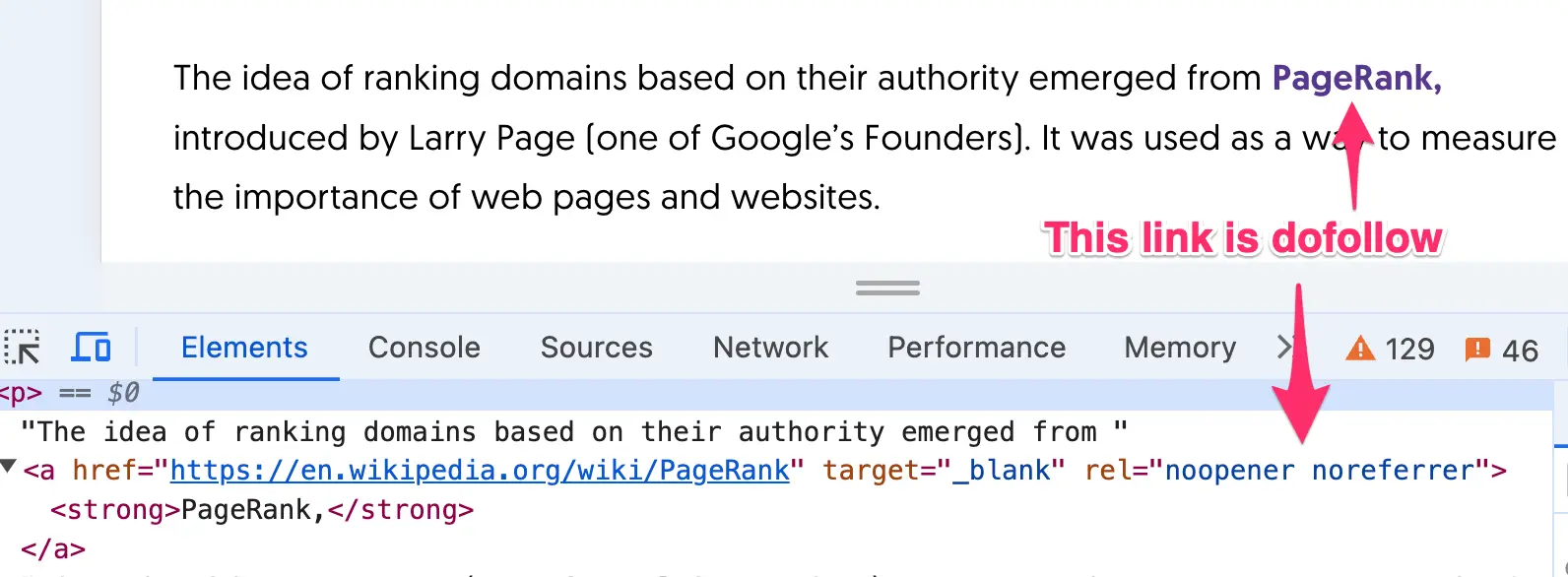
- Look inside the <a> tag for the presence of the rel="sponsored", rel="nofollow", and rel="ugc" attributes.
- If none of these values are present, the link is a dofollow ("follow") link.
- If one is present, the link is nofollow, sponsored or ugc, depending on the value.
Here is an example of how a dofollow link looks:
And how the same link looks when it's a nofollow link:
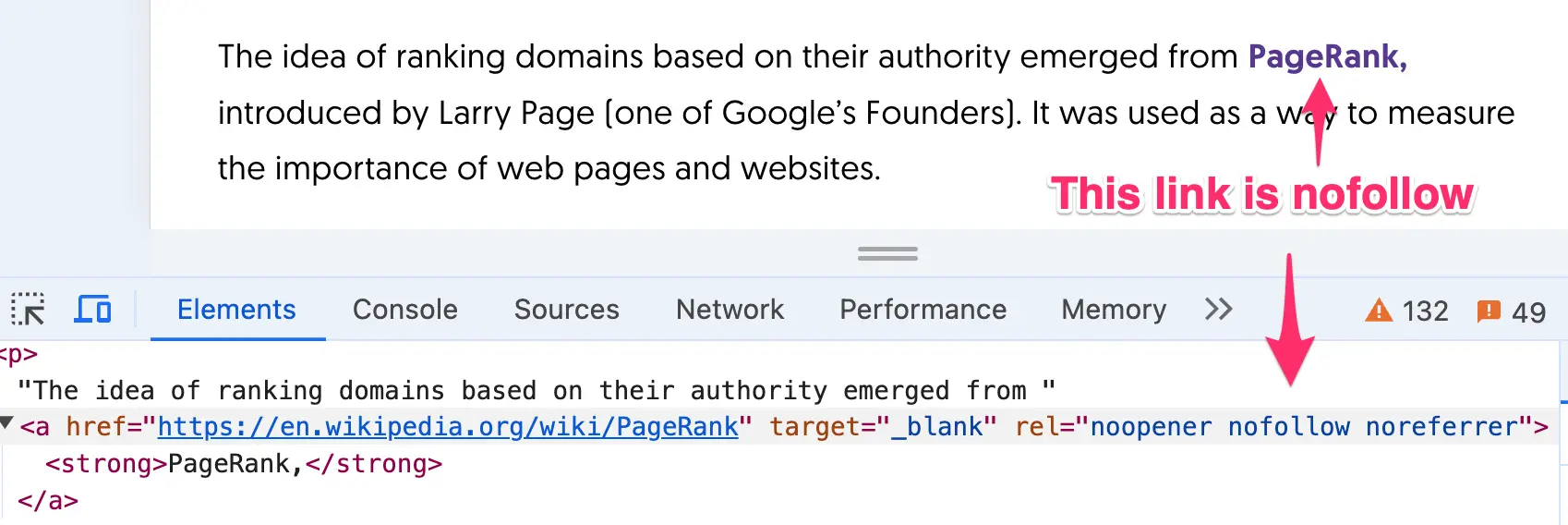
Notice that the "rel=" attribute can contain combinations of values. Noopener and Noreferrer values are NOT related to dofollow or nofollow links.
DoFollow Links Best SEO Practices
For dofollow links pointing from other websites to yours (known as backlinks), follow these practices:
Try to acquire links from websites that are relevant to your industry and well trusted in it. These links carry more weight and can significantly boost your SEO. SEO tools estimate this with scores like "domain authority", which is a third-party metric that Google does not use, so treat it as a rough guide.
Don't participate in link schemes but try to get dofollow links naturally by publishing content that naturally attracts links, such as in-depth guides, original research, and high-quality infographics.
Network with influencers, bloggers, and industry leaders. Personal connections can lead to natural backlinks from their sites.
To check your website links, read: Who Links to My Site or Any Site?
For dofollow links pointing from your website to others (known as outbound or external links), follow these practices:
Ensure the sites you link to are reputable and provide valuable information.
Only link to content that is directly related to your article.
Ensure the anchor text is descriptive and relevant to the content you’re linking. This helps search engines understand the context.
Limit the number of outbound links. Too many outbound links can distract your readers. Focus on a few high-quality links that enhance your content.
Mark paid and affiliate links with rel="sponsored" and links in user comments with rel="ugc".
Regularly check your website for broken links to ensure they still lead to relevant, high-quality content.
Learn More About Links And SEO
Concepts like dofollow and nofollow links are difficult to understand for SEO beginners. To get started with SEO, read our SEO Basics Guide. It's suitable for people without prior experience and will teach you basic and advanced SEO concepts.


