


- How Does ChatGPT Recommend Businesses?
- Can You Pay or Register Your Business With ChatGPT?
- How to Check If ChatGPT Recommends Your Business
- How to Get ChatGPT to Recommend Your Business: 8 Steps
- Local vs Online Businesses: What's Different?
- How Long Does It Take to Get Recommended by ChatGPT?
- What Doesn't Work
- Key Learnings
- FAQ

You can't pay ChatGPT to recommend your business, and there is no form to register or list it. ChatGPT recommends businesses it can find through web search and trusted sources, such as business listings, review sites and your own website. To get recommended, you need to be easy to find, described the same way everywhere, and well reviewed by real customers.
I've seen this work for my own business. When people ask ChatGPT for digital marketing courses under $150, it lists the Reliablesoft Academy course next to Google, HubSpot and Udemy, with the correct price:
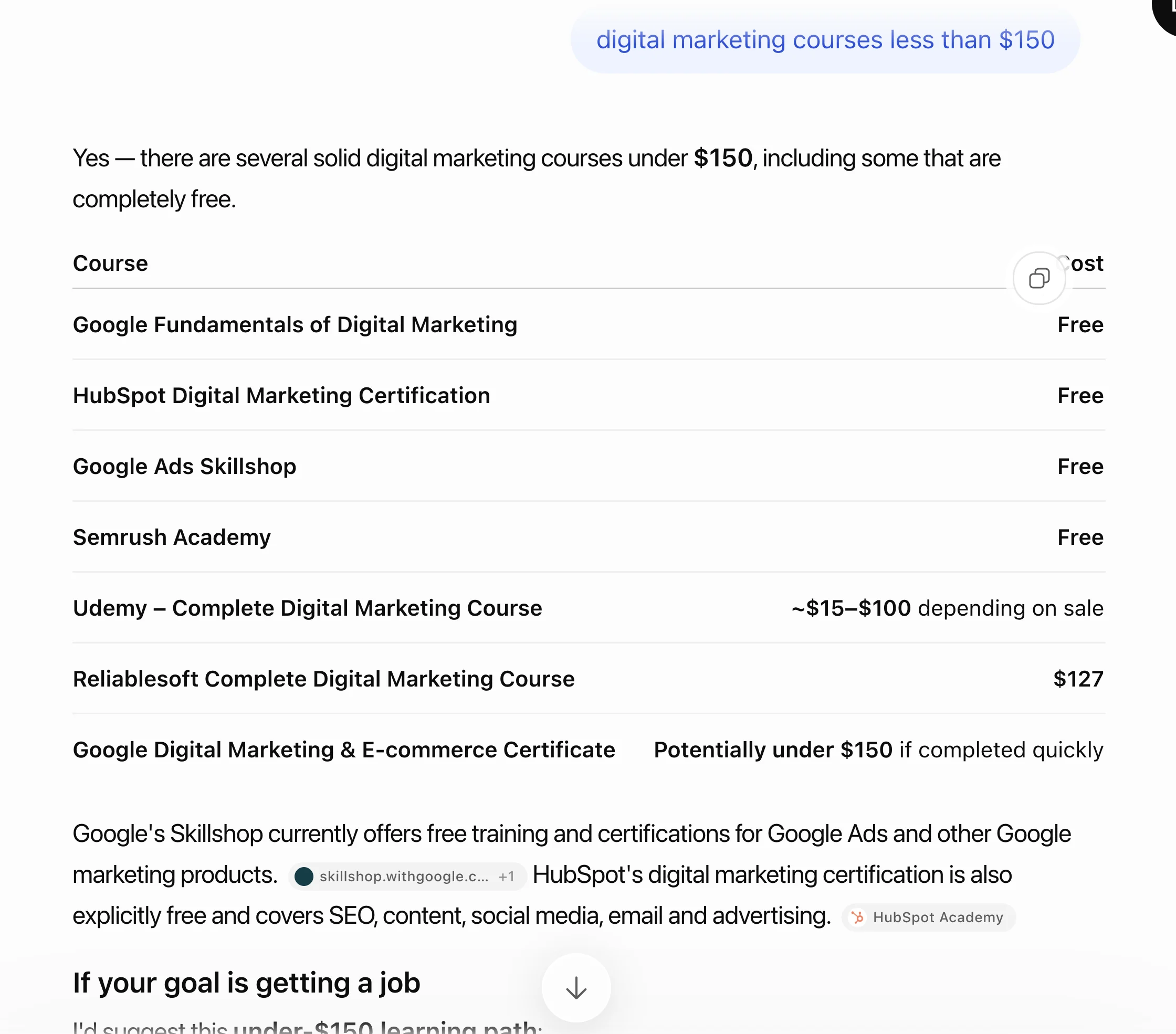
We didn't pay for that and we didn't submit anything to OpenAI. It's the result of the same steps I'll show you below.
In this guide, you will learn:
- How Does ChatGPT Recommend Businesses?
- Can You Pay or Register Your Business With ChatGPT?
- How to Check If ChatGPT Recommends Your Business
- How to Get ChatGPT to Recommend Your Business: 8 Steps
- Local vs Online Businesses: What's Different?
- How Long Does It Take to Get Recommended by ChatGPT?
- What Doesn't Work
How Does ChatGPT Recommend Businesses?
ChatGPT recommends businesses in two ways: from what it learned during training, and from a live web search it runs when your question needs current information. For "best", "near me" and "which company should I use" questions, the live search does most of the work.
OpenAI explains how this works in its help article on searching the web with ChatGPT:

- It rewrites the question into searches. "Who's the best roofer near me?" becomes searches like "top rated roofers Austin TX".
- It adds your approximate location. ChatGPT uses the location from your IP address (or your device, if you share it) to find local results.
- It uses search partners. OpenAI names Microsoft and Shopify as providers it shares these searches with.
- It uses business listings. For nearby businesses, it can share your location with third-party providers of business listings.
- It can show booking options. For restaurants, it shows reservation times from OpenTable, Resy and Yelp.
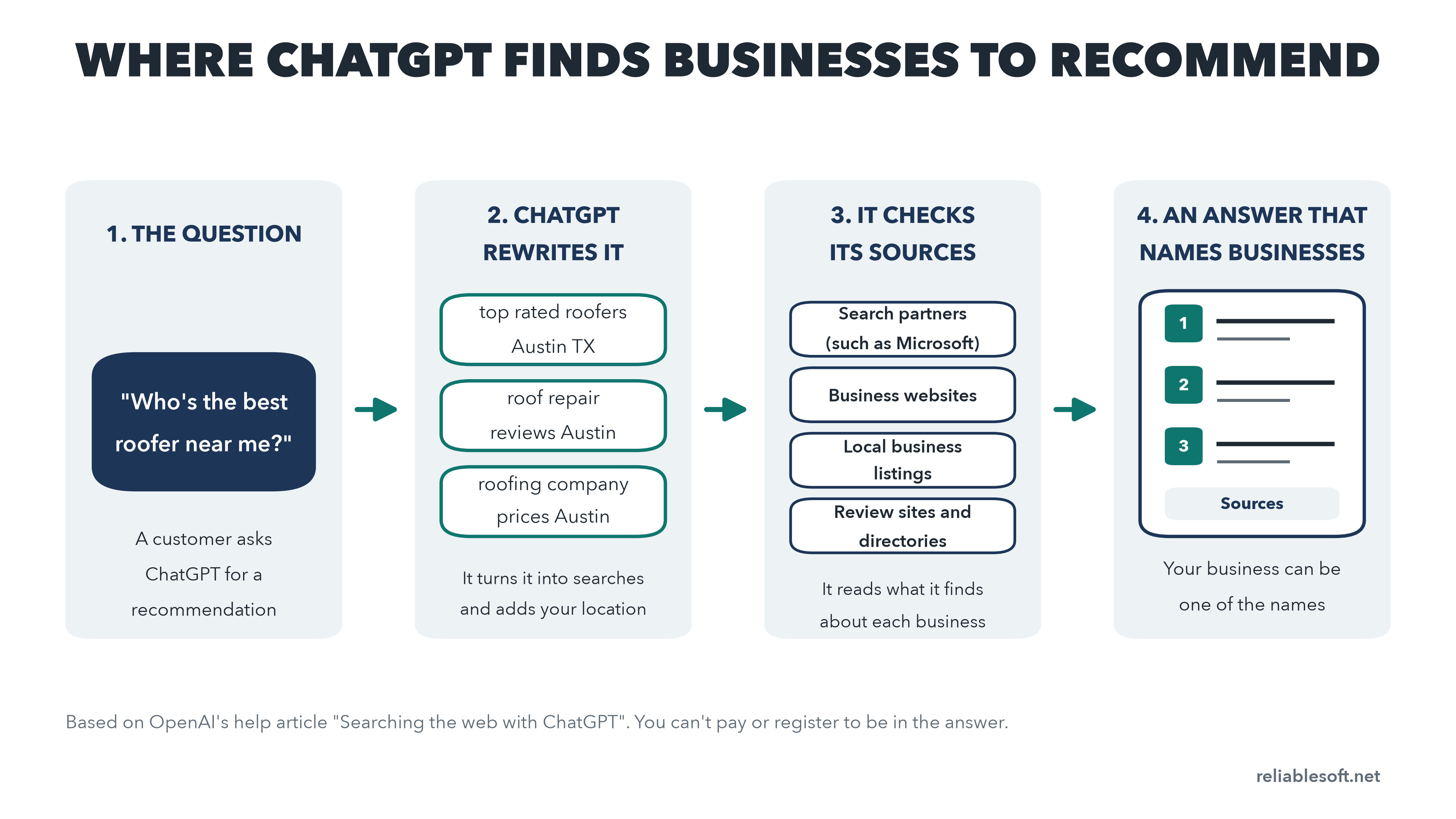
Then ChatGPT reads what it found and writes an answer. The businesses that show up again and again across good sources, with clear information and strong reviews, are the ones it names.
Two things are worth separating here:
| Being recommended | Being cited | |
|---|---|---|
| What it means | ChatGPT names your business in its answer | ChatGPT links to your page as a source |
| Typical question | "Best accountant for freelancers in Chicago" | "How much does a tax return cost?" |
| What drives it | Listings, reviews, other sites that mention you, your service pages | Clear, useful content on your website |
You want both. Being cited builds trust in your brand, but being recommended is what brings customers. This guide focuses on recommendations. For citations, follow my AI SEO tutorial.
Can You Pay or Register Your Business With ChatGPT?
No. There is no way to register or list your business in ChatGPT's answers, and you can't pay to be recommended.
OpenAI now sells ads in ChatGPT, but they are kept apart from the answers. OpenAI says ads run on separate systems and advertisers can't shape, rank or change ChatGPT's responses. An ad shows up as a labeled ad, not as a recommendation. (If you want to test ChatGPT ads, they are part of my paid ads management plans.)
The one thing you can submit is a product feed, if you sell products. Through ChatGPT's merchant program, stores can share their catalog so products appear in shopping results. If you sell on Shopify or Etsy, OpenAI says your catalog is already included. Shopping in ChatGPT is live in the US.
Everyone else has to earn their place, which is good news: a small business with the right signals can beat a much bigger competitor.
How to Check If ChatGPT Recommends Your Business
Before you change anything, find out where you stand. It takes about 30 minutes.
- Write down 10 to 20 questions your customers ask. Think like a buyer, not like a marketer: "best family dentist in Denver", "affordable web designer for a small business", "is X or Y better for...". Include your city if you serve a local area.
- Ask them in a clean session. Use a Temporary Chat or a logged-out browser window. ChatGPT's memory and your past chats change the answers, so testing from your own account makes you look better than you are.
- Note who gets named. Are you in the answer? In what position? Which competitors keep appearing?
- Open the sources. Below each answer, ChatGPT shows the sources it used. Write them down. These are the websites ChatGPT trusts for your industry, and they become your to-do list in step 6 below.
- Repeat once a month. Use the same questions so you can compare.
You can also see visits that ChatGPT sends you. In Google Analytics 4, look for traffic from chatgpt.com. I explain how to set this up in the AI visibility tracking section of my AI SEO tutorial.
And ask new customers how they found you. More and more will say "I asked ChatGPT", and your analytics won't always show it.
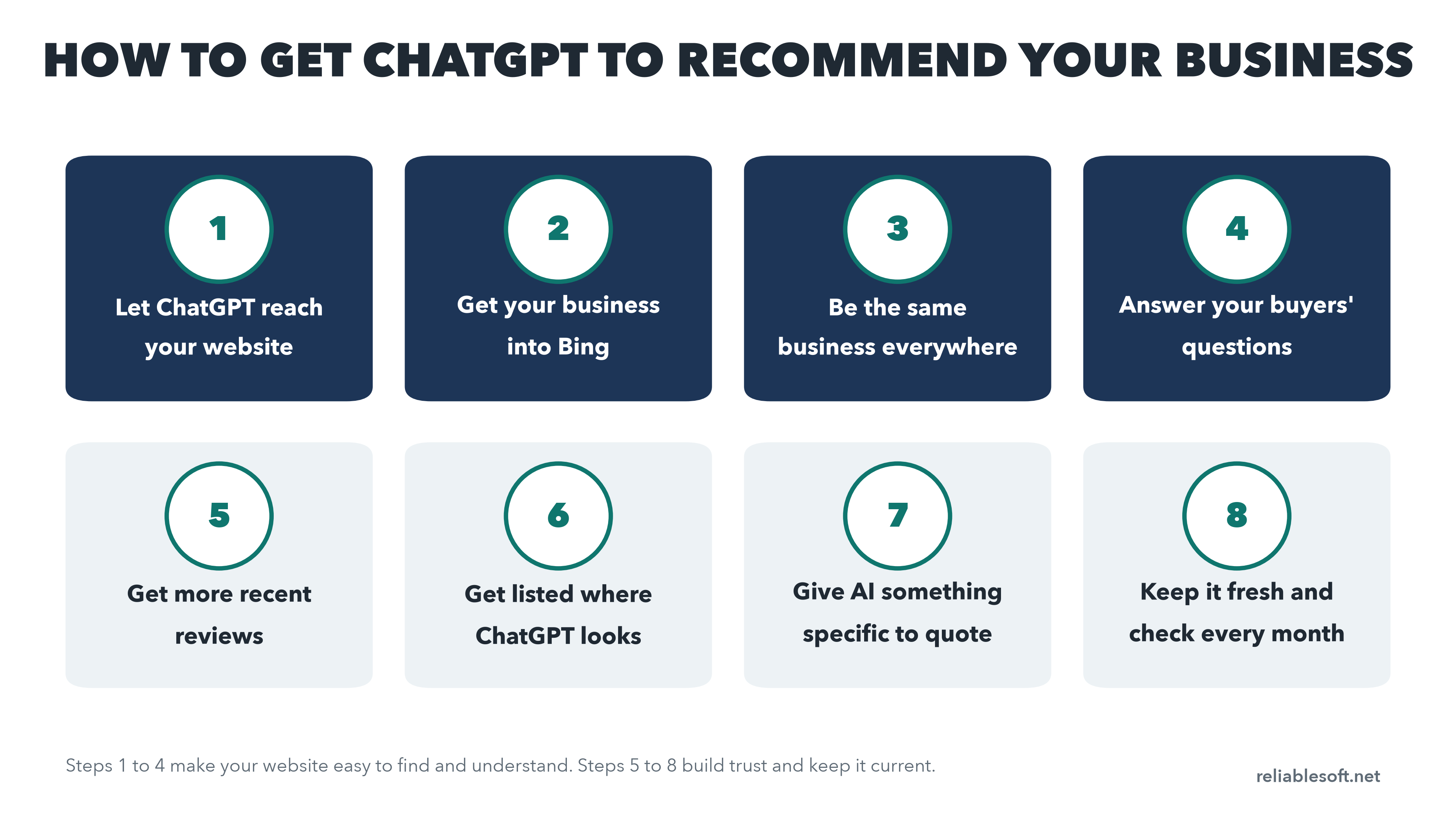
How to Get ChatGPT to Recommend Your Business: 8 Steps
1. Let ChatGPT Reach Your Website
If ChatGPT can't read your website, it can't use it. OpenAI's search crawler is called OAI-SearchBot, and it is separate from GPTBot, the crawler that collects content for training. You can block training and still allow search.
Check three things:
- Your robots.txt file doesn't block OAI-SearchBot. If you're not sure how to read it, see my guide to robots.txt disallow and allow rules.
- Your firewall or CDN isn't blocking AI bots. Cloudflare, for example, has settings that block AI crawlers. Make sure the search bots you want are allowed.
- Your key information is in the page text. Services, prices, areas you cover and contact details should be written on the page, not only shown in images, PDFs or pop-ups.
These are basic technical SEO checks, and you only have to do them once.
2. Get Your Business Into Bing
Microsoft is one of the search partners OpenAI names, and Microsoft runs Bing. Yet many businesses have never checked how Bing sees them.
- Add your website to Bing Webmaster Tools. It shows which pages Bing has indexed and, through the AI Performance report, how often Copilot cites them. Here's how to use Bing Webmaster Tools.
- Claim your listing on Bing Places if you serve customers locally. You can import your details from your Google Business Profile in a few minutes.
3. Be the Same Business Everywhere
ChatGPT pieces together who you are from many sources. If your website says one thing, your Google Business Profile another and an old directory a third, it has less confidence in all of them.
Make these details identical everywhere:
- Business name (exactly the same spelling)
- Address and phone number
- Website address
- A one-sentence description of what you do and who you serve
- Opening hours and the areas you cover
Start with your website, Google Business Profile, Bing Places, Yelp, Facebook and the main directories in your industry. Then search for your business name and fix any old listings with outdated details. My local SEO guide walks through this step by step.
4. Build Pages That Answer Your Buyers' Questions
When ChatGPT searches for "best roofer in Austin", it looks for pages that clearly say what you do, where, for whom and at what price. Many small business websites have one vague "Services" page. That's not enough.
Give each main service its own page, and on each one answer the questions buyers actually ask:
- What exactly is included?
- How much does it cost (or at least a price range)?
- How long does it take, and how does the process work?
- Who is it for, and who is it not for?
- How do you compare with the alternatives?
Put a short, direct answer right under each question, then add the detail. A Search Engine Land analysis of 15 websites found that 72.4% of the blog posts ChatGPT cited had a short, self-contained answer of about 20 to 25 words right after a question heading.
Publishing your prices is one of the biggest wins here. When someone asks ChatGPT "how much does X cost in my city", the businesses that state their prices clearly are the easiest to recommend.
5. Get More Recent Reviews
Reviews are one of the strongest signals for local and service recommendations. Review sites are among the sources ChatGPT reads for these questions, and answers often describe a business the way its reviews do.
- Ask every happy customer. Send a direct link to your Google review page (and Yelp, or the review site that matters in your industry) right after the job is done.
- Recent beats old. A steady flow of new reviews says more about you today than a pile of reviews from five years ago.
- Reply to every review, including the bad ones. A calm, helpful reply shows how you treat customers.
- Never buy or fake reviews. Besides breaking the rules of every review platform, fake reviews are the fastest way to lose the trust you're trying to build.
6. Get Listed Where ChatGPT Looks for Your Industry
Go back to the sources you wrote down when you checked ChatGPT's answers. That list tells you exactly where ChatGPT looks in your industry.
You'll usually find three types of sites:
- Directories and review sites: Yelp, TripAdvisor, Angi, Houzz, Avvo, G2, Clutch, Capterra, depending on your industry. Create or complete your profile on the ones that keep appearing.
- "Best of" lists: articles such as "10 best plumbers in Phoenix" or "best CRM for small business". Contact the authors, show them why you belong on the list, and offer details they can check.
- Local and industry websites: local news, your chamber of commerce, industry associations and blogs. A mention there tells ChatGPT that real people know your business.
This is off-page SEO with a clear target: instead of chasing any mention, you go after the exact sites ChatGPT already trusts.
7. Give AI Something Specific to Quote
Vague claims like "we offer the best service" give ChatGPT nothing to work with. Specific facts do.
Add facts that only you can give:
- How long you've been in business and how many customers you've served
- Prices, packages and what they include
- Real results: "We cut our clients' energy bills by an average of 18%"
- Certifications, awards and memberships, with links to check them
- Short case studies with the customer's name (with permission)
Write your business name in the same sentence as the fact. "Smith Plumbing has fixed more than 4,000 leaks in Phoenix since 2009" is easier to quote than a list of numbers with no name near them.
8. Keep It Fresh and Check Every Month
ChatGPT's answers change as the web changes. A competitor gets a burst of new reviews, a new "best of" list is published, a directory updates its rankings.
Once a month:
- Run your list of customer questions again in a clean session.
- Update prices, services, opening hours and team pages when anything changes.
- Check that your listings still match your website.
- Add new reviews, case studies and results to your website.
Local vs Online Businesses: What's Different?
The steps are the same for everyone, but where you put your effort depends on how you sell.
| Type of business | Focus on | Example question |
|---|---|---|
| Local business (dentists, plumbers, restaurants, lawyers) | Google Business Profile, Bing Places, Yelp, reviews, a page for each location and service | "Best emergency plumber near me" |
| Online service (agencies, consultants, courses, software) | Clear service and pricing pages, comparison pages, G2, Clutch or Capterra profiles, "best of" lists, LinkedIn | "Best bookkeeping software for freelancers" |
| Online store | A complete product feed (or Shopify or Etsy), product reviews, detailed product pages | "Best running shoes for flat feet under $150" |
Our own example at the top of this page is an online business. Reliablesoft Academy sells courses online, so local listings don't matter much for it. What matters are clear course pages with the price on them and other websites that mention the courses.
How Long Does It Take to Get Recommended by ChatGPT?
Some changes work quickly, others take months:
- Days to weeks: fixing a blocked crawler, getting into Bing, correcting wrong listings and adding clear prices. ChatGPT searches the web live, so once your pages are reachable and indexed, it can use them.
- A few months: building up recent reviews, new service pages and mentions on the sites ChatGPT trusts.
Keep in mind that answers vary from one person to the next. Location, the exact wording of the question and the person's chat history all change the result. Don't judge your progress from one answer. Look at your list of questions over a few months.
What Doesn't Work
A lot of the advice online is guesswork. Skip these:
- llms.txt files. Creating one won't get you recommended. Google says it doesn't use them, and there's no sign they help in ChatGPT.
- Special schema "for AI". Structured data can help search engines understand your pages, but there is no special markup that makes ChatGPT recommend you.
- Telling ChatGPT about your business. Typing "remember that my company is the best" only changes your own chats. It doesn't change what other people see.
- Fake reviews and paid mentions. They break the platforms' rules and destroy trust when they're spotted.
- Stuffing pages with keywords. ChatGPT understands meaning. Write for people.
Want this done for you? I offer an AI SEO audit for $500 that checks how ChatGPT and Google's AI describe your business and tells you exactly what to fix first. Ongoing work starts at $500 a month. See my AI SEO services.
Key Learnings
You can't pay or register to be recommended by ChatGPT. It runs live web searches, through its own crawler and search partners such as Microsoft, and recommends the businesses that the best sources agree on.
Start by checking what ChatGPT says today, in a clean session, and write down the sources it uses. Then make your website easy to reach and understand, get into Bing, keep your details identical everywhere, publish clear service and pricing pages, and build a steady flow of recent reviews.
Use the sources ChatGPT shows as your list of sites to be on, give it specific facts to quote, and check your questions again every month.
FAQ
Why Does ChatGPT Recommend My Competitors and Not Me?
Usually because they show up in more of the places ChatGPT looks: more recent reviews, listings on the directories it trusts, mentions in "best of" lists, or clearer service and pricing pages. Look at the sources under the answer to see what they have that you don't.
Does Ranking on Google Help With ChatGPT?
Yes, indirectly. Google isn't one of the search partners OpenAI names, but the things that make you rank on Google (a website that's easy to crawl, clear content, good reviews and mentions on trusted sites) are the same things ChatGPT looks for. Businesses that do well in Google usually have a head start.
Does ChatGPT Use Google Business Profile?
Not directly. But the details in your Google Business Profile get copied by many directories and listing sites, and ChatGPT uses third-party business listings for local questions. Keep your profile complete and accurate, and make sure it matches your Bing Places listing and your website.
Do ChatGPT Recommendations Change for Each Person?
Yes. The answer depends on the person's location, how they word the question and, if memory is on, what ChatGPT knows about them. That's why you should test a list of questions in a clean session instead of relying on one answer.
Does This Work for Gemini, Perplexity and Google's AI Mode?
Mostly, yes. Each tool has its own sources (Google's AI Mode and Gemini use Google's index, Copilot uses Bing), but they all reward the same things: a website they can read, consistent business details, real reviews and mentions on trusted sites. The steps in this guide help with all of them.
Resources to Learn More
- AI Search Engines - the main AI search tools and what each one is best for.
- Local SEO Guide - how to get found by customers in your area, step by step.
- AI SEO Services - an AI SEO audit and monthly AI SEO, done for you.


