



AI SEO is the practice of getting your website and your brand cited, mentioned and recommended in AI-generated answers, such as Google's AI Overviews and AI Mode, ChatGPT, Microsoft Copilot, Perplexity and Claude.
It builds on traditional SEO rather than replacing it. Google says its AI features are rooted in the same ranking and quality systems as normal search.
What changes is the goal. Instead of only ranking a page and winning the click, you want to become one of the sources the AI trusts enough to use.
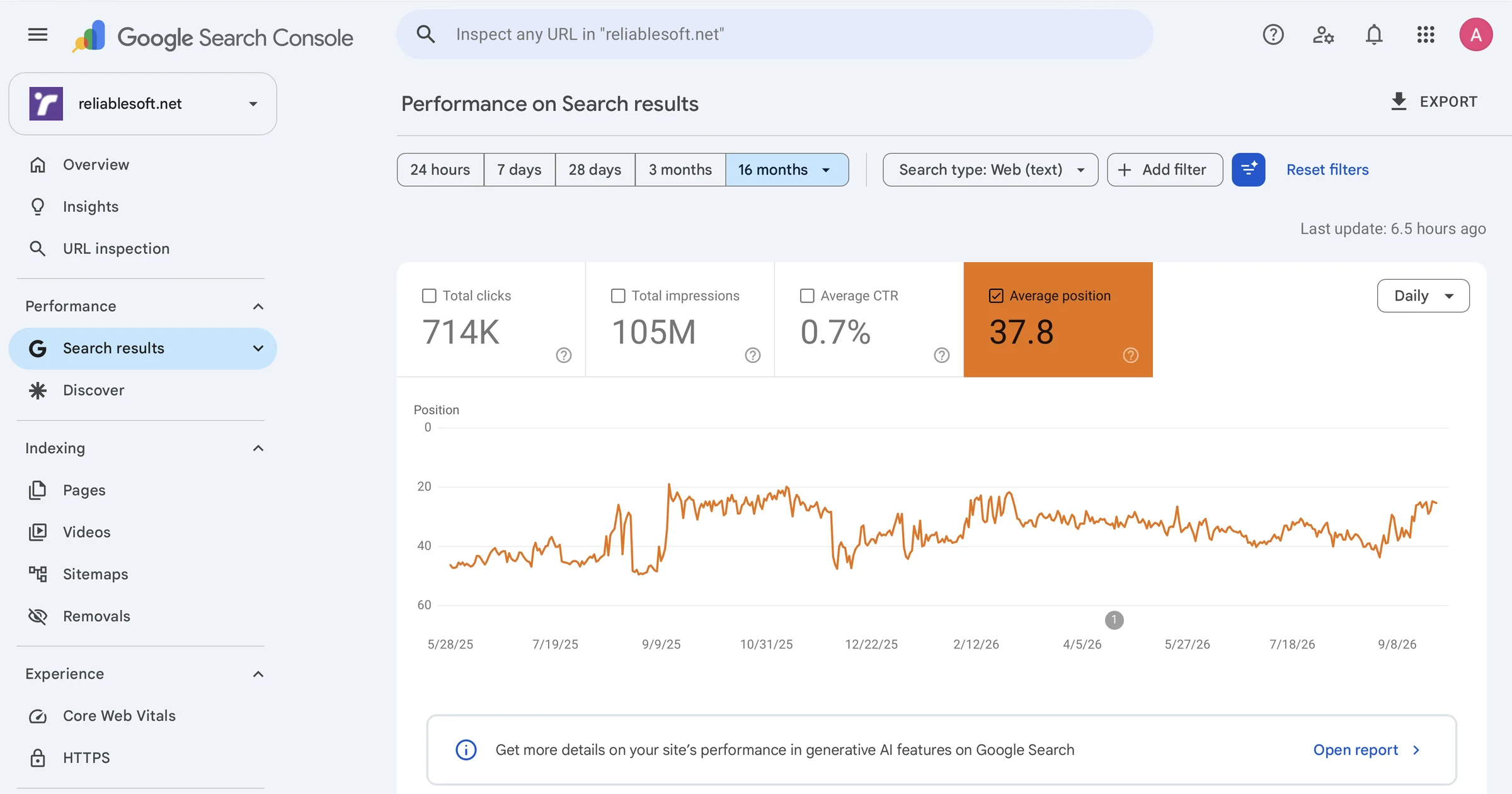
Here is why I take both seriously. My website got 714,000 clicks from Google in the last 16 months. That is classic SEO, and it still works.
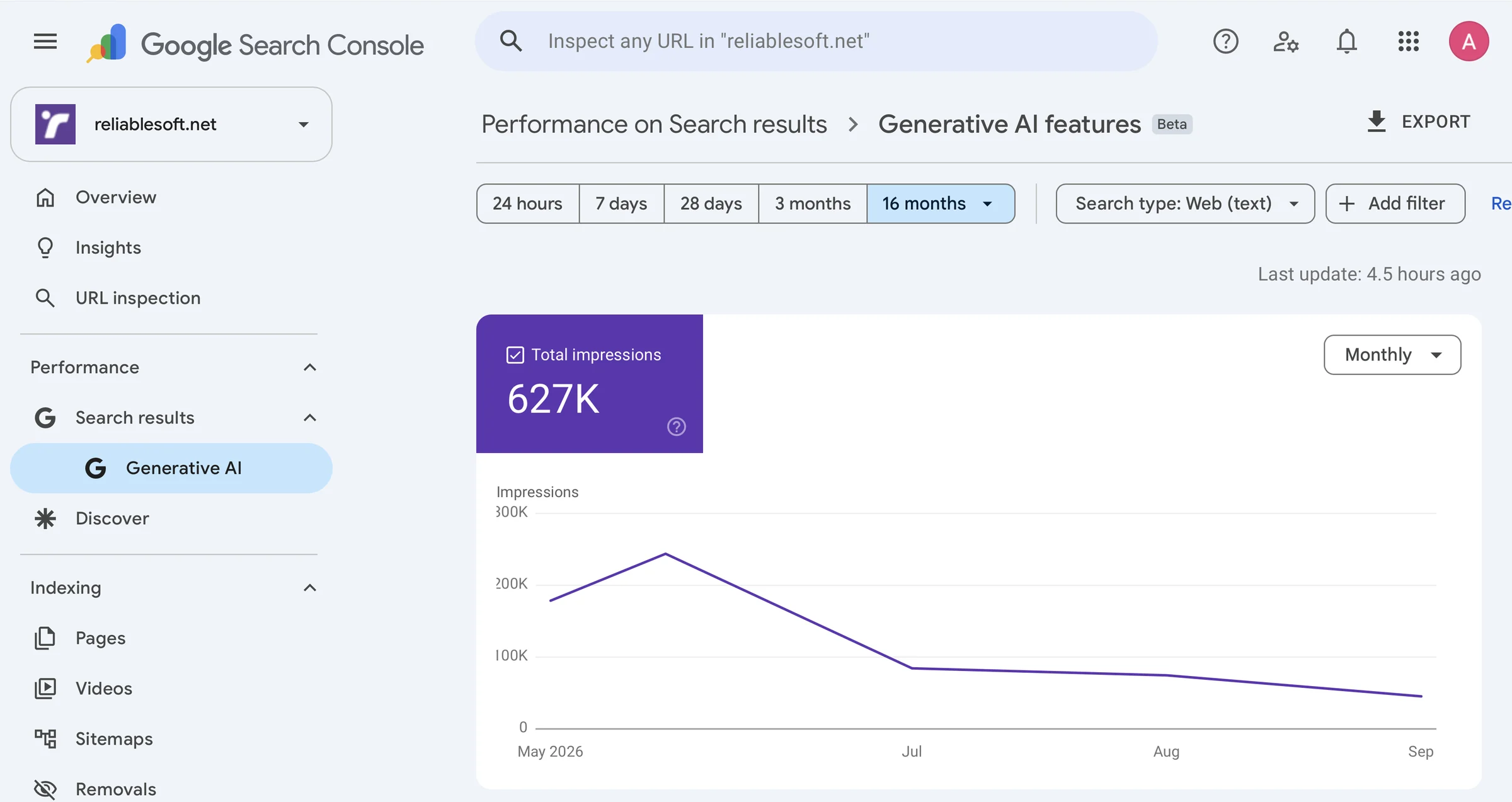
At the same time, since May, when Google started reporting it, our pages have appeared in Google's AI Overviews and AI Mode more than 627,000 times.
And when people ask AI Mode or ChatGPT for a digital marketing course, Reliablesoft Academy courses are part of the answer.

In this tutorial, you will learn:
- What Is AI SEO?
- What Is AI SEO Called Now? (GEO, AEO and LLMO)
- AI SEO vs Traditional SEO
- How AI Search Works
- How AI Decides Which Websites to Cite
- How to Do AI SEO: Step-by-Step Tutorial
- How to Track Your AI Visibility
- AI SEO Myths: What You Don't Need to Do
- Can SEO Be Done by AI?
- AI SEO Checklist
- AI SEO FAQ
You don't need to be technical, and you don't need to start over. Most of this builds on the SEO you already know.
What Is AI SEO?
AI SEO means optimizing your content and your brand so that AI-powered search tools find it, understand it and choose it as a source when they write an answer.
In traditional search, Google shows a list of links and the person picks one. In AI search, the tool reads several pages for the person and writes a new answer, with links to the sources it used.
Your page is no longer only a result. It becomes the source behind the answer.
You will also see "AI SEO" used for a second thing: using AI tools to do SEO work, such as keyword research, content outlines or meta descriptions.
Both meanings are covered in this guide. Most of it is about the first one, because that is where the new work is. The second one has its own section further down: Can SEO be done by AI?
What Is AI SEO Called Now? (GEO, AEO and LLMO)
AI SEO goes by several names. They all describe the same goal, being visible in AI-generated answers, with slightly different emphasis:
| Name | Stands for | What it focuses on |
|---|---|---|
| AI SEO | Artificial intelligence search engine optimization | The umbrella term for visibility in AI search |
| GEO | Generative engine optimization | Getting content selected and cited when an AI writes ("generates") a new answer |
| AEO | Answer engine optimization | Being the direct answer to a question, not just one of the links |
| LLMO / LLM SEO | Large language model optimization | How AI models understand and describe your brand |
| AI search optimization | Same idea, plain-English name | Visibility across AI search tools in general |
The term GEO comes from a 2023 research paper by Princeton and IIT Delhi researchers that tested which content changes make a source more visible in AI answers. I come back to its findings in step 5.
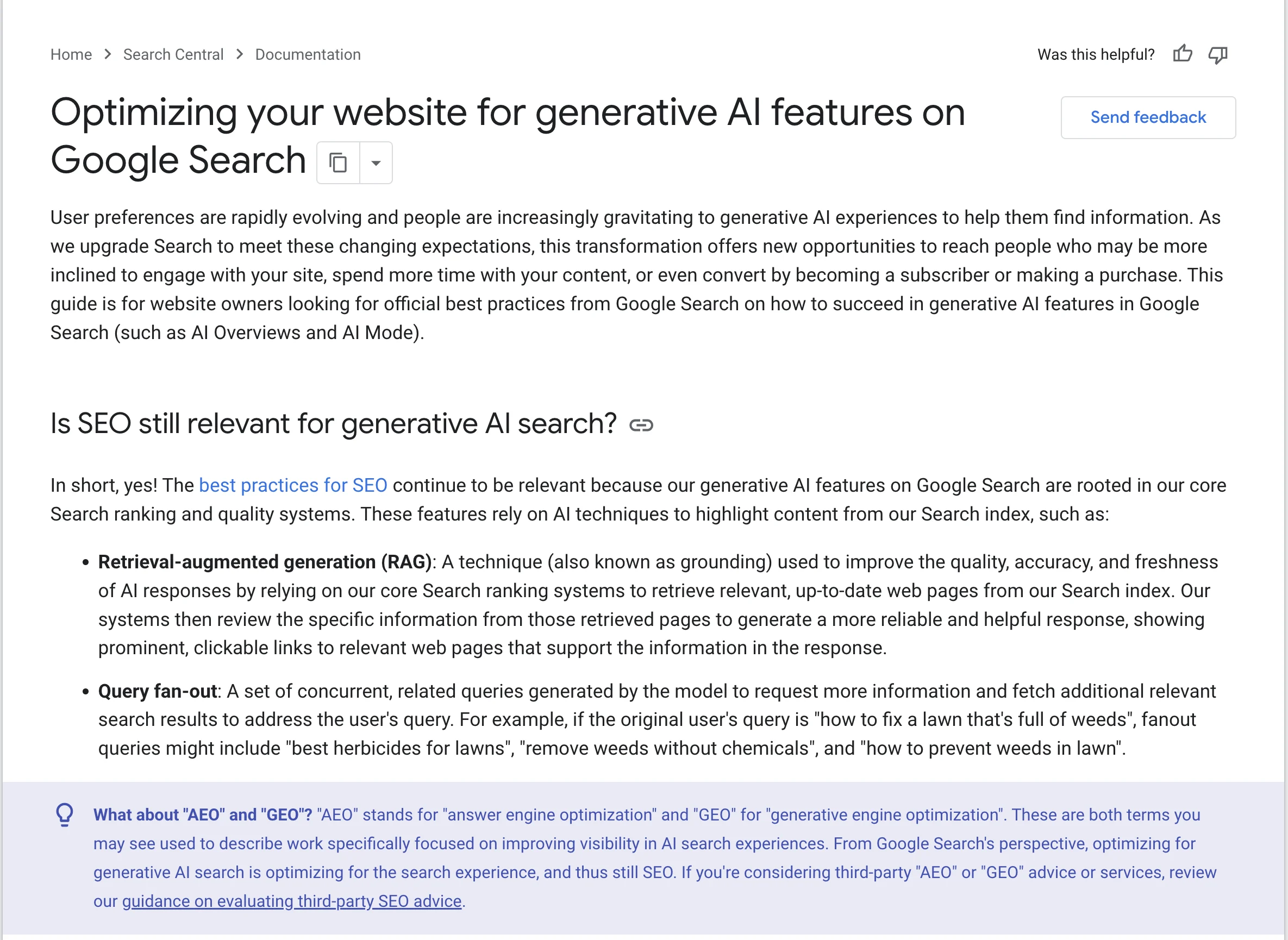
Don't let the names confuse you. Google's position is clear: in its guide to optimizing for generative AI features, it says that optimizing for generative AI search "is optimizing for the search experience, and thus still SEO."
So when someone sells you "GEO services" as something completely separate from SEO, be careful. The foundations are the same.
AI SEO vs Traditional SEO
The foundations are shared, but the goal and the way you measure success are different:
| Traditional SEO | AI SEO | |
|---|---|---|
| Goal | Rank a page and win the click | Be cited, mentioned or recommended inside the answer |
| Where you appear | The list of search results | AI Overviews, AI Mode, ChatGPT, Copilot, Perplexity, Claude |
| Unit of success | Rankings, clicks, traffic | Citations, brand mentions, quality of the visits you do get |
| How queries work | One keyword, one results page | One question split into many smaller searches |
| What wins | Relevance, quality, links | The same, plus clear answers, original information and a recognizable brand |
| How you measure it | Search Console, rank trackers, analytics | Search Console's Generative AI report, Bing's AI Performance report, prompt tests, AI referrals in analytics |
| What stays the same | Your pages must be crawlable and indexed, technically sound, and genuinely helpful | |
In a zero-click world, fewer people click. But the people who do click from an AI answer have usually read a summary or a comparison already, so they tend to arrive closer to a decision.
How AI Search Works
Traditional search finds pages, ranks them and shows a list of links. AI search adds two steps that change how you should think about your content.
1. Query fan-out. When you ask an AI search tool a question, it doesn't run one search.
It splits your question into many smaller, related searches and runs them at the same time. Google calls this "query fan-out."
Say a small business owner asks AI Mode, "What's the best CRM for a small business?" Behind the scenes, the AI might also search for "free CRM for small business", "HubSpot vs Pipedrive" and "CRM that works with Gmail."
2. Grounding. The AI then reads the pages it found for all of those searches, picks out the most useful parts and writes one new answer, with links to the sources it used.
Google calls this retrieval-augmented generation (RAG), or grounding. It relies on its normal search index and ranking systems to find those pages.
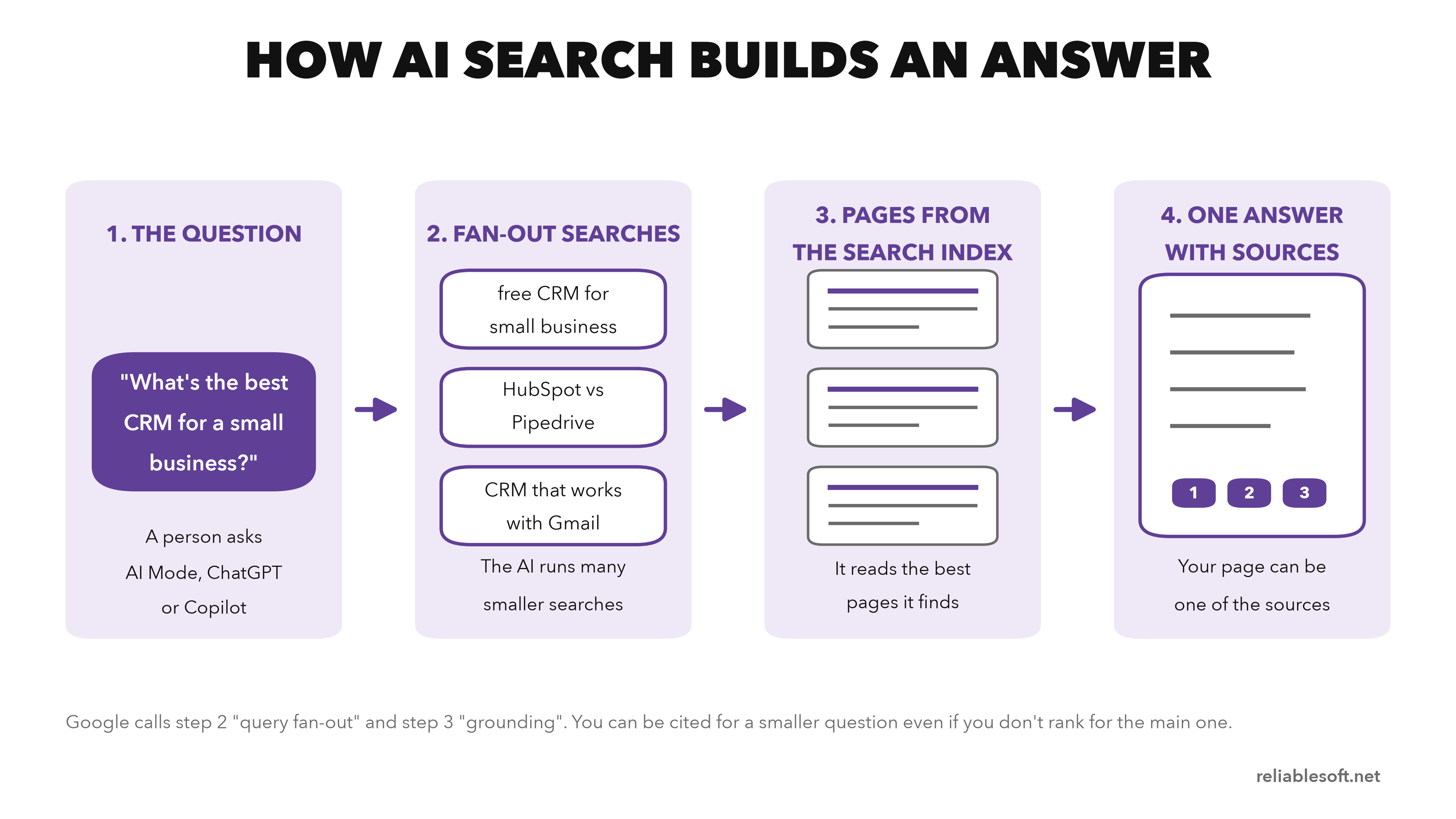
There are two big lessons here:
- Your website may not be "the result" anymore. It becomes one of the sources behind the answer.
- You don't have to rank first for the main keyword. Because of query fan-out, a page that answers one smaller, specific question really well can still be pulled into the answer.
To understand how search engines find and rank pages in the first place, read how search engines work.
How AI Decides Which Websites to Cite
AI tools try to give accurate, safe answers. Before they use a page, they are effectively asking one question: "Can I trust this source?" They answer it in four ways.
1. Your page has to be findable. AI tools can only cite what their search index contains.
For Google's AI features, that means a page that is indexed and eligible to show a snippet in normal search. If a page doesn't rank anywhere, it is very unlikely to be cited.
2. AI understands entities, not just keywords.
Entities are things that exist in the real world: brands, people, products, places and ideas. AI connects them into a web of knowledge.
Your job is not to repeat a keyword ten times. It is to make it obvious who you are, what you do and what you are an expert in.
3. AI trusts what the wider web agrees on. If your brand is mentioned again and again in real discussions, reviews, forums and industry sites, AI builds a stronger link between your name and your topic.
4. AI prefers content that is easy to extract. If your key point is buried in a long wall of text, it may never get used. Clear, structured, direct content can be lifted into an answer with confidence.
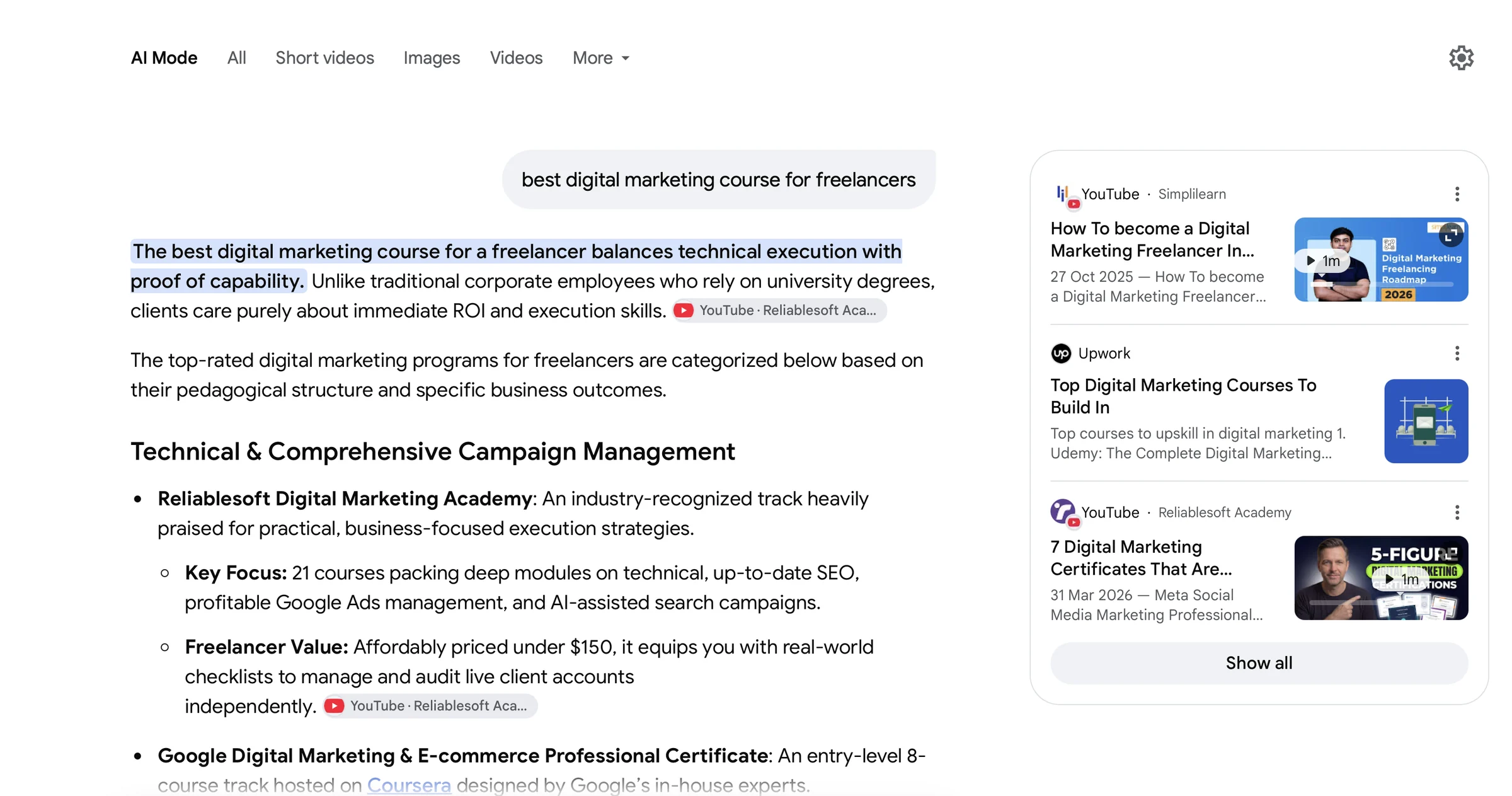
This is what it looks like when it works. Asked for the best digital marketing course for freelancers, Google's AI Mode cites a Reliablesoft Academy video and lists Reliablesoft Academy first:
Each AI platform finds its sources in a slightly different place, which affects what you need to allow and where you can measure results:
| Platform | Where answers come from | Crawler to allow | Where to measure |
|---|---|---|---|
| Google AI Overviews and AI Mode | Google's search index | Googlebot | Search Console, Generative AI report |
| Microsoft Copilot and Bing | Bing's index | Bingbot | Bing Webmaster Tools, AI Performance report |
| ChatGPT search | OpenAI's search crawler and live visits | OAI-SearchBot (search), ChatGPT-User (user requests) | Referrals from chatgpt.com in analytics, prompt tests |
| Perplexity | Perplexity's own crawler and live visits | PerplexityBot, Perplexity-User | Referrals from perplexity.ai, prompt tests |
| Claude | Anthropic's search crawler and live visits | Claude-SearchBot, Claude-User | Referrals from claude.ai, prompt tests |
Prefer to watch? Here is my video version of this tutorial:
How to Do AI SEO: Step-by-Step Tutorial
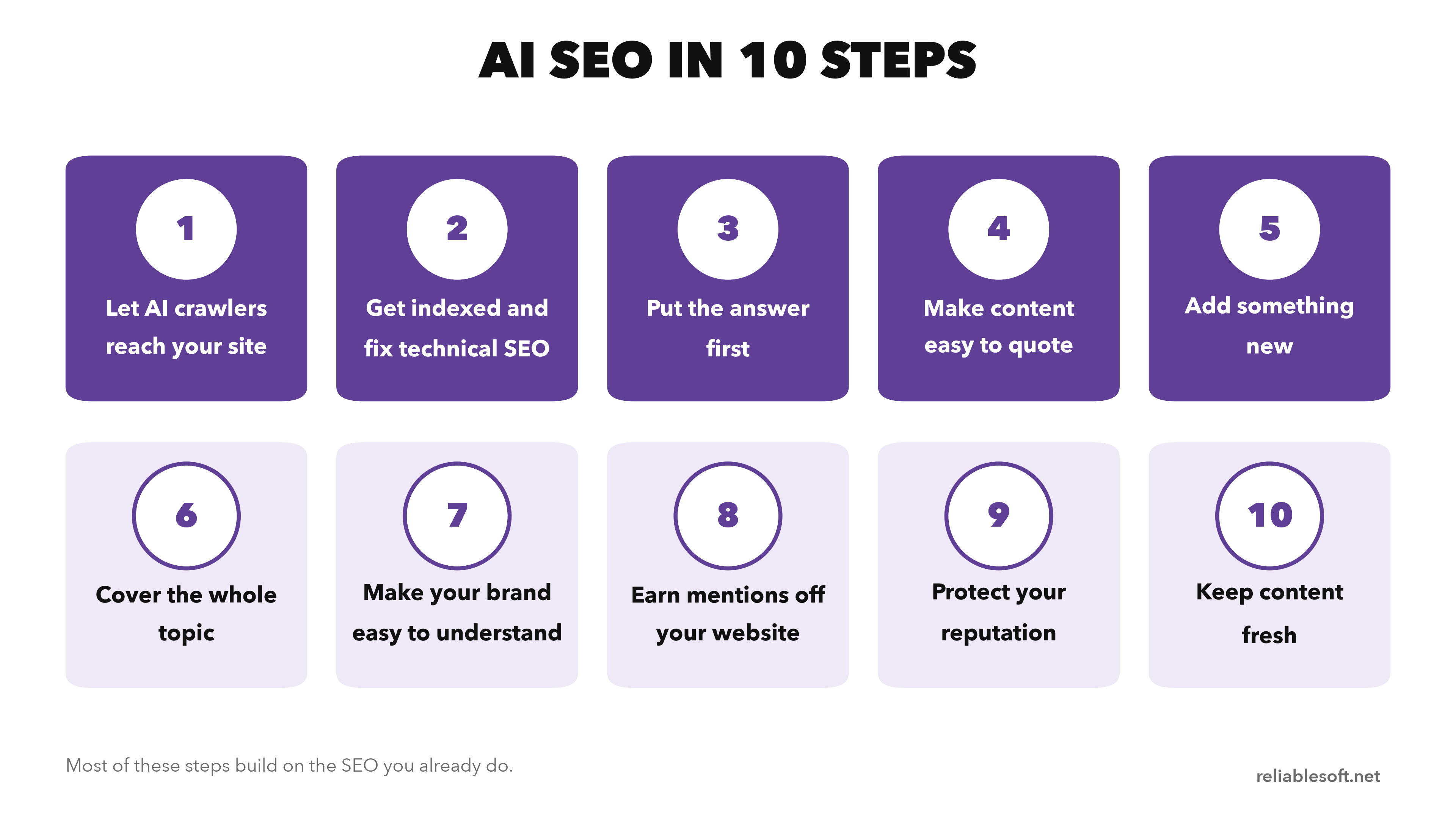
These are the 10 steps I follow.
Steps 1 and 2 make sure AI tools can reach and trust your pages at all. Steps 3 to 6 are about your content, and steps 7 to 10 about your brand and the wider web.
Step 1: Let AI Crawlers Reach Your Site
Each AI company uses its own crawlers, and most of them separate search (finding pages to cite in answers) from training (collecting content to train future models). They are controlled separately in your robots.txt file:
| Company | Search and citations | Model training |
|---|---|---|
| Googlebot (also feeds AI Overviews and AI Mode) | Google-Extended | |
| OpenAI | OAI-SearchBot, ChatGPT-User | GPTBot |
| Anthropic | Claude-SearchBot, Claude-User | ClaudeBot |
| Perplexity | PerplexityBot, Perplexity-User | Not used for training, per Perplexity |
This means you can block training and still appear in AI answers.
For example, OpenAI says you can allow OAI-SearchBot to appear in ChatGPT search results while disallowing GPTBot. And Google says blocking Google-Extended "does not impact a site's inclusion in Google Search."
If you want to be visible everywhere but keep your content out of model training, your robots.txt could include:
User-agent: GPTBot
Disallow: /

User-agent: ClaudeBot
Disallow: /

User-agent: Google-Extended
Disallow: /
Make sure you are not blocking Googlebot, Bingbot, OAI-SearchBot, Claude-SearchBot or PerplexityBot. If you are not sure how to edit the file, follow my guide to robots.txt disallow and allow rules.
Check your CDN too. Robots.txt is not the only place bots get blocked.
In July 2025, Cloudflare changed its default setting to block AI crawlers. If your site uses Cloudflare or another firewall, check its bot settings and make sure the search bots you want are allowed.
Step 2: Get Indexed and Fix Technical SEO
Google is explicit about this: to be eligible for its AI features, a page must be indexed and eligible to be shown in Google Search with a snippet. No index, no citation.
So the technical basics still come first:
- Verify your site in Google Search Console and Bing Webmaster Tools, and submit your sitemap to both.
- Check the Pages report for important URLs that are not indexed.
- Keep important content in the HTML. AI tools can read images, but they rely mostly on the text of your page. If you use a JavaScript framework, make sure the content renders for crawlers.
- Make the site fast, mobile-friendly and easy to navigate, and reduce duplicate content.
My technical SEO guide has the full checklist.
Step 3: Put the Answer First
This is where most content struggles. Traditional articles often open with a long introduction, build up context and get to the answer eventually. AI doesn't have that patience. It wants the answer straight away.
The rule is simple: put the bottom line at the top.
Before: "URLs are an important part of every website, and there are many things to think about when you create them. In this article, we'll look at what slugs are, why they matter and how to optimize them."
After: "A slug is the part of a URL that comes after the domain name and identifies one specific page, like /ai-seo-tutorial/ on this page. Keep it short, lowercase and descriptive. Here's how to write one."
The second version answers the question in the first sentence and still gives people a reason to keep reading. I use the same pattern on every page I update: a direct answer in the first two sentences, then the detail.
One warning: some people now chop their articles into tiny, disconnected pieces "for AI." Google says there's no need to do that. Write for people. Just get to the point faster.
Step 4: Make Your Content Easy to Quote
Once the answer comes first, formatting does the rest. AI tools work best with clearly structured information:
- Headings that match the questions people ask. Instead of a one-word heading like "Pricing", write the full question: "How much does a CRM cost for a small business?"
- Bullet lists and numbered steps for processes and features.
- Simple comparison tables for tools, prices, pros and cons. Ask an AI to compare a few products and it will often return a table. Give it one that's ready to use.
- Short paragraphs that make one point each.
If you already have older posts, you don't need to rewrite everything. Start with the top of each page, because that is what both readers and AI see first.
Cut long introductions, add a short summary near the top and turn vague subheadings into direct questions. My on-page SEO guide covers the rest of the page.
Step 5: Add Something AI Can't Find Anywhere Else
This is the most important technique in AI SEO.
If your content is a lightly rewritten version of what's already online, AI treats it as general knowledge.
Once something is general knowledge, the AI doesn't need your page. It can answer without citing anyone, or it cites the biggest, most famous sources instead.
Google makes the same point in its guide. It calls this "commodity content": articles like "7 Tips for First-Time Homebuyers" that say what thousands of other articles already say.
What it rewards instead is content with a unique point of view and first-hand experience.
So give AI something new. This is often called information gain:
- Publish original data from your own business (like the Search Console numbers at the top of this page)
- Run a small survey and share the results
- Write case studies with real results and real timelines
- Add your own experience, or quotes from people with real expertise
- Use specific numbers, prices and details rather than vague statements
Research backs this up. In the original GEO study, the three best-performing changes were citing sources, adding quotations from credible sources and adding statistics. Each improved a source's visibility in AI answers by 30% to 40%.
Keyword stuffing, the old-school tactic, gave little to no improvement.
You don't need a big research budget. Even one statistic that nobody else has can give AI a reason to cite you.
Step 6: Cover the Whole Topic
Because of query fan-out, the AI is not only looking for your main keyword. It is looking for answers to all the smaller questions around it.
That favors websites that cover a topic in depth:
- One strong main page per topic, with supporting pages for the important sub-questions
- Clear internal links between them, so both people and crawlers can see how they connect
- Sections that answer the follow-up questions a reader would naturally ask next
Keyword research and Google's "People also ask" box are the easiest ways to find those follow-up questions.
Don't overdo it. Google warns that creating separate pages for every possible variation of a query, mainly to manipulate rankings or AI answers, breaks its scaled content abuse policy. Cover the topic for readers, not for every possible search.
Step 7: Make Your Brand Easy for AI to Understand
AI needs clarity, especially if your brand name is similar to other words or other companies. Help it understand four things:
- Who you are
- What your business does
- What you're known for
- Where your official profiles are
The easiest way to do this is to describe your business the same way everywhere: your website, your social profiles, your Google Business Profile and any directories you're listed in. Same name, same description, same topics.
On your own site, an About page and author pages that explain each writer's experience make it clear who stands behind the content.
When Google is confident about who you are, it often shows a knowledge panel about your brand next to the search results. That's a good sign the connections are working.
If you run a local business or an online store, add your details to Google's own systems.
Google says its AI answers can include local business information and product listings, and recommends Google Business Profile and Merchant Center feeds to make them visible.
What about structured data? Google says it isn't required for its AI features and there's no special schema for them. It still helps with rich results in normal search, so if you already use it, keep it.
Step 8: Earn Mentions Off Your Website
AI tools pay close attention to what's said about you elsewhere. A study covered by Search Engine Land found that Reddit, YouTube and LinkedIn are among the websites AI search engines cite most.
In AI search, mentions of your brand matter even when there's no link.
Do it the right way:
- Show up where your audience asks questions. Answer helpfully on the platform itself, and mention your brand only where it's genuinely part of your experience.
- Don't spam communities or buy mentions. Google specifically says that seeking inauthentic mentions isn't as helpful as it might seem, because its AI features rely on the same spam systems as normal search.
- Earn coverage the classic way. Guest appearances, interviews, research others want to quote. My guide to off-page SEO has more ideas.
Video is a big opportunity.
YouTube is one of the most-cited sources in AI answers, and it's still far less crowded than written content.
AI tools understand a video through its title, description and transcript, so a clear video that answers one question well can be cited just like an article.
You can see this in the AI Mode screenshot above: two of the sources are YouTube videos.
Start with the questions your customers ask most and answer each one in a short video. See my guide to YouTube SEO to help those videos rank.
Step 9: Protect Your Reputation
When someone asks an AI, "Is this brand any good?", it summarizes what people say in reviews, forums and public discussions.
AI is quite good at spotting self-promotion. If the only place that says you're the best is your own website, that carries little weight. What other people say about you counts for a lot more.
You can't "SEO your way out" of a bad reputation. Improve the product, reply to reviews in public, ask happy customers to leave reviews, and let real-world opinion shift over time.
Step 10: Keep Your Content Fresh
AI tools want to give answers that are accurate right now. An article with last year's prices, old screenshots or tools that no longer exist is easy to skip.
You don't need to write anything new for this. Update what you already have:
- In Google Search Console, find the pages that already get the most impressions. Those are the pages AI is most likely to find.
- Update numbers, prices, dates and examples that have changed.
- Replace old screenshots and remove tools or tips that no longer work.
- Add a short section that answers a new question people are asking about the topic.
- Show a clear "last updated" date near the top of the page.
Don't just change the date without improving the page. Google's guidance on helpful content asks whether pages have their dates changed to seem fresh when the content hasn't substantially changed. The page has to be better, not just newer.
How to Track Your AI Visibility
Traditional rank tracking doesn't translate well to AI search, because AI answers change from one person and one conversation to the next. But there are now good free tools.
1. Search Console's Generative AI report. Google's generative AI performance report shows how often your pages appear in AI Overviews and AI Mode, which pages get the most impressions, and where those impressions come from by country and device.
It is now available for all websites. It shows impressions, not clicks: clicks from AI features are still counted in your normal Search results report.
You'll find it under Performance, Search results, Generative AI (the screenshot at the top of this page is ours).
2. Bing Webmaster Tools AI Performance report. It shows how often your content is cited in Microsoft Copilot, AI-generated summaries in Bing and some partner tools, which URLs are cited, and the "grounding queries" the AI ran to find them.
Setup takes a few minutes: see how to use Bing Webmaster Tools.
3. AI referrals in your analytics. Visits from AI tools usually show up as referral traffic, not organic search. In Google Analytics 4, open Reports, Acquisition, Traffic acquisition, switch the dimension to "Session source" and filter with this regular expression:
chatgpt|openai|perplexity|claude\.ai|gemini\.google|copilot
4. Prompt audits. Open a fresh chat or an incognito window and ask the questions your customers would ask.
Note whether you appear, how you are described and who is recommended instead.
Do this monthly with the same prompts, so you can see changes over time. A simple sheet is enough:
| Prompt | Platform | Mentioned? | Cited (linked)? | Who else is recommended |
|---|---|---|---|---|
| best digital marketing course for freelancers | AI Mode | Yes | Yes (YouTube video) | Google Digital Marketing & E-commerce Certificate |
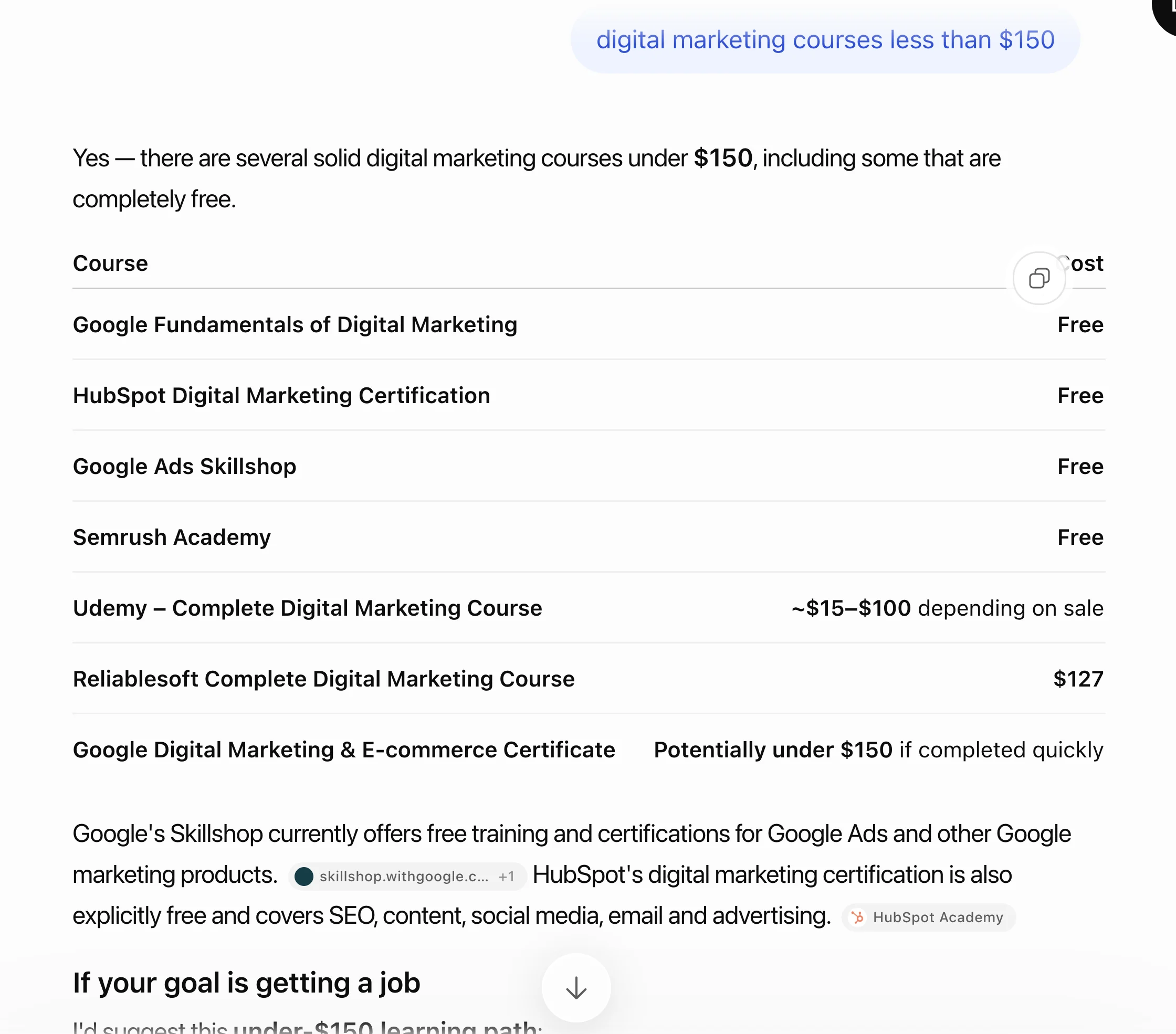
| digital marketing courses less than $150 | ChatGPT | Yes | No | Google, HubSpot, Semrush, Udemy |
Here is the ChatGPT example from that sheet:
Be wary of third-party tools that promise ranking success or claim to use "internal" Google metrics. Google says no third-party tool has access to its internal ranking or AI systems.
Paid AI visibility trackers can save time on prompt audits, but treat their numbers as estimates.
One thing to keep in mind: citations and clicks are not the same thing. You can be cited thousands of times and get only a small number of visits.
Being cited still helps your brand, because people see your name in the answer. That's why you want both, classic SEO and AI SEO, not one or the other.
AI SEO Myths: What You Don't Need to Do
A lot of AI SEO advice online is guesswork. Google's own guide has a section on what you can ignore, and it rules out several popular tactics:
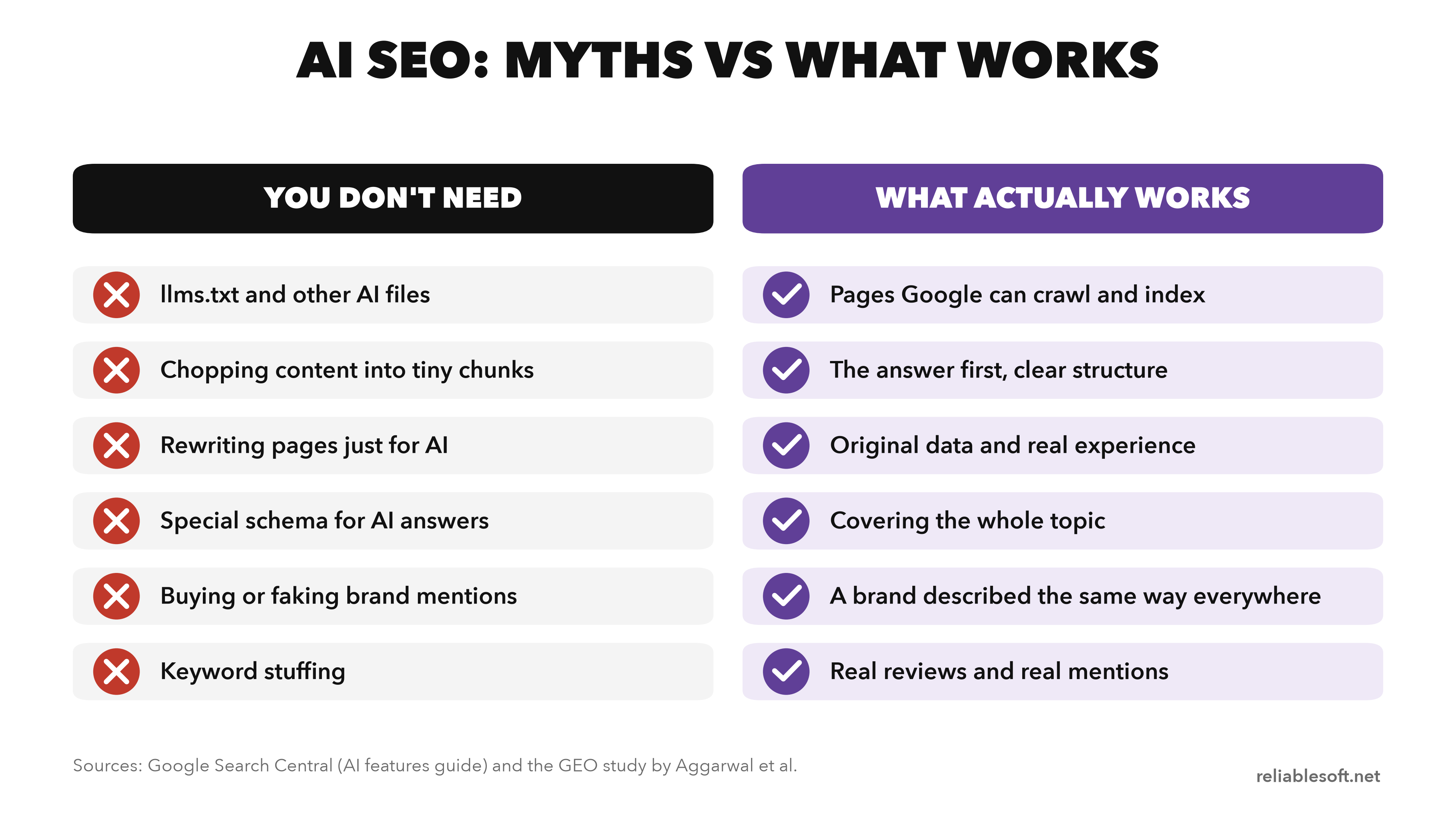
- llms.txt files and other "AI files". Google Search doesn't use them. Creating one neither helps nor harms your visibility in Google. Other services may read them, so it's your choice, but don't expect results in Google from it.
- Chopping content into tiny chunks. Google's systems understand pages that cover several topics and show the relevant part. There's no ideal page length.
- Rewriting pages just for AI. AI understands synonyms and meaning, so you don't need to cover every wording of a question or stuff in long-tail variations.
- Special schema markup for AI. Structured data isn't required for AI features, and there's no special markup for them.
- Buying or faking mentions. Inauthentic mentions run into the same spam systems as the rest of Google Search.
- Keyword stuffing. The GEO study found it gave little to no improvement in AI answers.
Can SEO Be Done by AI?
Partly. AI tools are now very good at speeding up SEO tasks, but they can't do SEO for you. They don't know your business, your customers or your results, and they make factual mistakes with complete confidence.
Here is where AI helps and where you still need a person:
| SEO task | What AI does well | What still needs a human |
|---|---|---|
| Keyword research | Brainstorm seed keywords, group keywords by intent | Real search volumes from a keyword tool, picking the targets |
| Content planning | Outlines, follow-up questions, topic clusters | Deciding what's worth publishing for your audience |
| Writing | First drafts, rewrites, simplifying complex text | Experience, original data, fact-checking, your voice |
| On-page SEO | Title and meta description ideas, alt text, FAQ ideas | Choosing the final version and checking it matches the page |
| Technical SEO | Explaining errors, writing redirects, regex and spreadsheet formulas | Testing changes before they go live |
| Reporting | Summarizing exported data, spotting patterns | Connecting the numbers to business decisions |
Can ChatGPT Help With SEO?
Yes. ChatGPT, Claude and Gemini are useful SEO assistants for brainstorming, outlining, rewriting and analysis. They are not a source of data.
ChatGPT doesn't know your rankings or real search volumes unless you give it that data, so pair it with Search Console and a keyword research tool. To get better answers from these tools, learn the basics of prompt engineering.
Can ChatGPT Write SEO Content?
It can write a draft, and Google doesn't penalize content just because AI helped create it. What Google cares about is whether the content is helpful and meets its spam policies.
Using AI to mass-produce pages mainly to rank breaks the scaled content abuse policy.
The bigger problem is the one from step 5: AI writes by summarizing what's already online, which is exactly the "commodity content" that AI search doesn't need to cite.
Use AI for structure and speed, then add what only you have: experience, data, examples and opinions.
My guide to writing SEO-friendly blog posts shows the full process.
AI SEO Checklist
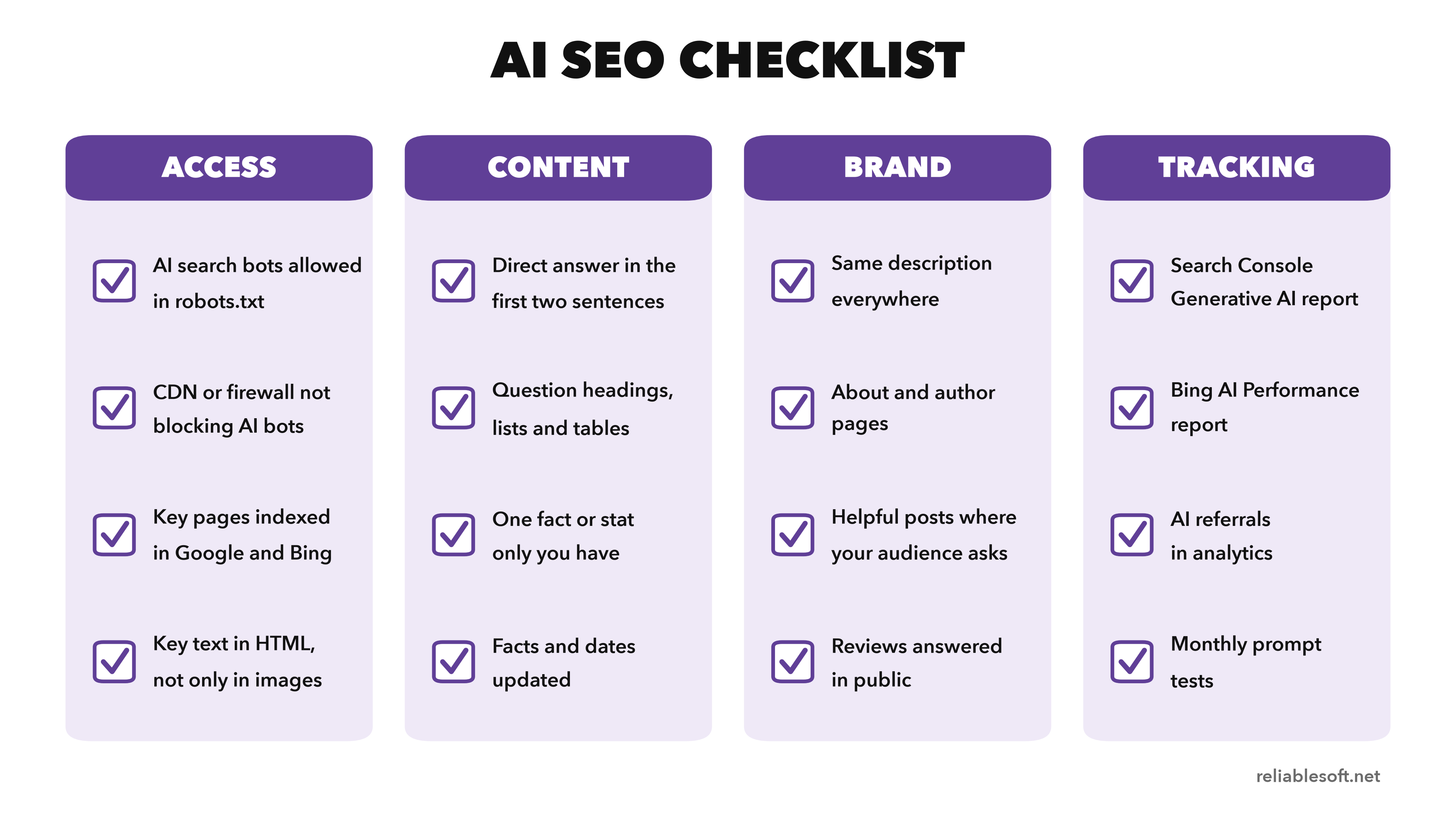
Use this checklist to review any website or page:
Access
- AI search bots (OAI-SearchBot, Claude-SearchBot, PerplexityBot) are allowed in robots.txt
- Googlebot and Bingbot are not blocked anywhere
- Your CDN or firewall isn't blocking the AI bots you want
- Important pages are indexed in Google and Bing
- Key information is in the HTML text, not only in images
Content
- Each page answers its main question in the first two sentences
- Headings are written as the questions people ask
- Lists, steps and tables are used where they help
- Every important page has at least one fact, statistic or example only you have
- Sources are cited for the claims you make
- The topic is covered in depth, with internal links between related pages
- Numbers, prices, dates and screenshots are up to date
Brand
- Your business is described the same way on your site, social profiles and directories
- You have an About page and author pages
- Google Business Profile or Merchant Center is set up, if relevant
- You take part helpfully in communities where your audience asks questions
- You answer reviews in public
Tracking
- Search Console's Generative AI report is checked monthly
- Bing Webmaster Tools' AI Performance report is set up
- AI referrals are filtered in Google Analytics 4
- The same set of prompts is tested every month
AI SEO FAQ
Is SEO Still Worth It With AI?
Yes. Google answers this question directly in its guide: SEO best practices continue to be relevant because its AI features are rooted in its core search ranking and quality systems.
AI answers are built from pages that rank, so if you stop doing SEO, you also disappear from AI answers.
SEO is not dead, and nothing is replacing it. It has changed. Fewer searches end in a click, especially simple definition questions that AI can answer on the page. But:
- Organic search still sent 714,000 clicks to my website in 16 months.
- A 2026 Seer Interactive study found that pages cited in an AI Overview get 120% more organic clicks per impression than pages that aren't cited on the same results.
- People who click from an AI answer usually arrive better informed and closer to a decision.
The same study also found that cited pages still get fewer clicks than results with no AI Overview at all. That's why the goal is both: rank well, and be the source AI chooses.
To understand the fundamentals, start with what SEO is and why it's important.
Will AI Replace SEO?
No. AI search tools need sources, and they find them by searching an index of web pages, which is exactly what SEO works on.
What is changing is how results are shown and how you measure success. The names may change too (GEO, AEO, LLMO), but the work of being found, understood and trusted stays the same.
How Much Does AI SEO Cost?
For most websites, AI SEO costs time more than money.
The measurement tools from Google, Bing and Google Analytics are free, the main AI assistants have free plans, and most of the work (clearer answers, original information, fresher pages) is content work you or your team can do.
Costs come in at three points:
- Paid tools, when you want to track many prompts across several AI platforms automatically. These are monthly subscriptions.
- Original research, such as surveys or data studies that give AI something new to cite.
- Outside help, if you hire an SEO agency or consultant. AI SEO is usually part of an SEO service rather than a separate one, so ask what's included before paying extra for "GEO."
Can a Beginner Do AI SEO?
Yes. Most of AI SEO is clear writing: answering questions directly, adding your own experience and data, and keeping pages up to date.
The technical parts, like checking robots.txt and indexing, are one-off checks you can do with free tools. Start with the SEO basics, because AI SEO builds on them.
How Can You Learn AI SEO for Free?
Yes, you can learn it without paying anything. This is the order I'd follow:
- Learn SEO basics first. AI SEO builds on them. Start with my SEO basics guide and the learning plan in how to learn SEO from scratch.
- Read Google's own guide. Optimizing your website for generative AI features on Google Search is short and is the most reliable source there is for Google.
- Set up the free tools. Search Console, Bing Webmaster Tools and Google Analytics 4 give you real data from day one.
- Practice on one page. Pick a page that already gets impressions, apply steps 3 to 5 from this tutorial, and watch the Generative AI report over the following weeks.
- Take a free course. See my list of free SEO courses.
If you prefer a structured program, The Complete SEO Course by Reliablesoft Academy includes a dedicated AI SEO course on getting content recommended and cited by ChatGPT, Google AI Overviews and other AI tools, alongside courses on technical, on-page and off-page SEO.
Resources to Learn More About SEO
- The Complete SEO Course - SEO training by Reliablesoft Academy, including a dedicated AI SEO course.
- SEO Checklist - a free, downloadable checklist for the SEO basics that AI SEO builds on.
- AI Search Engines - the main AI search tools and what each one is best for.


