


Local SEO is the process of getting a business found in local search results, such as the map results on Google Search and Google Maps when someone searches for "plumber near me" or "Italian restaurant in Chicago". It matters for any business with a physical location or a service area.
The most important local SEO tasks are:
- Claiming, verifying and completing your Google Business Profile
- Keeping your business name, address and phone number consistent everywhere
- Getting genuine reviews and replying to them
- Optimizing your website and earning links for your city and services
In this guide, you will learn how local search works, how Google ranks local businesses, and exactly what to do, step by step, to show up when nearby customers search for what you offer.
What Is Local SEO?
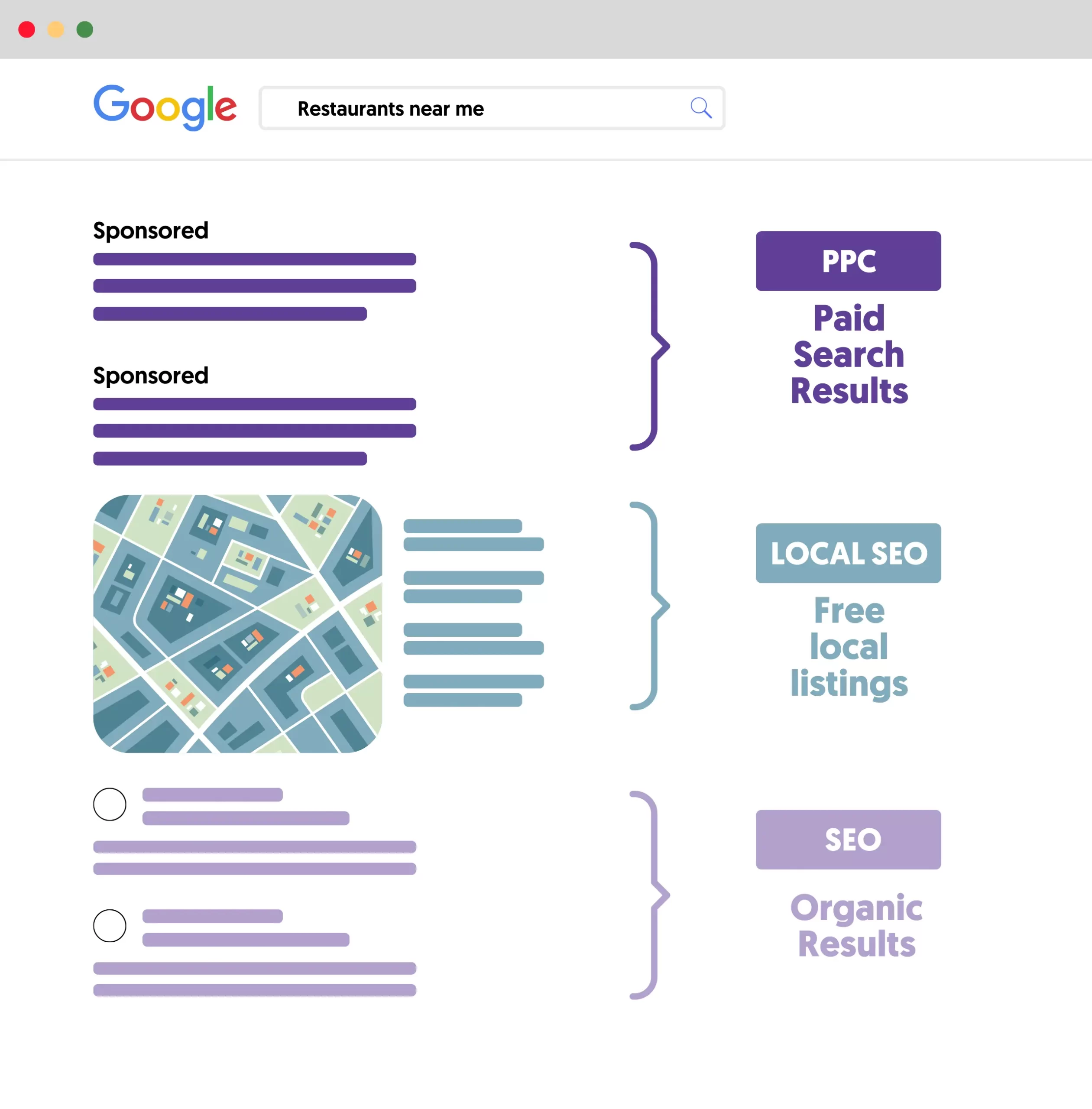
Local SEO (local search engine optimization) is the practice of optimizing your online presence so your business appears in location-based searches. When Google detects that a search has local intent, it shows a map with a short list of businesses, often called the Local Pack, above the regular organic results.
A search can be local in two ways:
- Explicitly local: the searcher names a place, such as "dentist in Austin" or "cleaning services Chicago".
- Implicitly local: the searcher does not name a place, but the need is local, such as "coffee shop", "emergency plumber" or anything with "near me". Google uses the searcher's location to show nearby businesses.
Local SEO is essential for shops, restaurants, clinics, salons, law firms, agencies and service businesses like plumbers, cleaners and electricians that serve customers in a specific area.
Local SEO vs. SEO: What Is the Difference?
Local SEO is a type of SEO, not a separate discipline. The fundamentals are the same, but the goals and signals are different.

| Local SEO | Regular SEO | |
|---|---|---|
| Goal | Reach customers in a specific area | Reach customers anywhere |
| Where you appear | Local Pack, Google Maps and organic results | Organic results |
| Key assets | Google Business Profile, reviews, citations, location pages | Website content, technical health, backlinks |
| Keywords | Service plus location, "near me" searches | Topic and informational keywords |
| Competition | Other businesses in your area | Every site targeting the same keyword |
If you serve customers in person or in a defined area, you need both. Your website's organic rankings support your local rankings, and your Business Profile brings customers who never visit your site. Our guide to the types of SEO explains how local SEO fits with the other kinds.
How Does Local SEO Work?
When you search for a local business, Google builds the results from Business Profiles, information on business websites, reviews, and what it already knows about each business across the web.
Google explains in its Business Profile help pages that local results are mainly based on three factors:
- Relevance: how well a Business Profile matches what someone is searching for. Complete, detailed business information helps Google match you to the right searches.
- Distance: how far the business is from the person searching, or from the location they name in the search.
- Prominence: how well known the business is. Google looks at information such as how many websites link to your business and how many reviews you have. More reviews and positive ratings can help your local ranking.
You cannot change your distance from a customer, and Google is clear that there is no way to request or pay for a better local ranking. What you can control is relevance and prominence, and that is what every step below is about.
How To Do Local SEO: Step by Step
Follow these steps in order. The first three give you the biggest gains, and the rest build on them over time.
- Claim and verify your Google Business Profile
- Complete and optimize your profile
- Make your NAP consistent everywhere
- Do local keyword research
- Optimize your website for local search
- Add LocalBusiness structured data
- Get more reviews and reply to them
- Earn local links and mentions
- Track your local SEO results
1. Claim and Verify Your Google Business Profile
Your Google Business Profile is the single most important local SEO asset. It is free, and it is what appears in the Local Pack and on Google Maps.
Go to Google Business Profile, sign in with a Google Account, and either add your business or claim it if it already exists on Google.
Then verify it. Verification proves you are authorized to manage the business, and Google says verified businesses are more likely to show up in search results. Google chooses the verification methods available to you based on your business type, public information and region. They can include phone or text, email, a live video call, a video recording, or mail. Google recommends video verification when it is offered, and reviews can take up to five business days.
2. Complete and Optimize Your Profile
Google says businesses with complete and accurate information are more likely to appear in local results. Fill in everything that applies to you:
- Business name: your real business name, exactly as customers see it. Adding keywords or locations to the name breaks Google's guidelines and can get your profile suspended.
- Categories: choose the primary category that best describes your business, then add secondary categories for other services.
- Address or service area: show your address if customers visit you. If you visit customers, set a service area instead.
- Hours: keep regular and special hours (holidays, events) accurate, so Google does not send customers to a closed door.
- Services and products: list what you offer, with short descriptions and prices where it makes sense.
- Attributes: details such as parking, Wi-Fi, accessibility or online appointments.
- Photos and videos: add your logo, a cover photo, the inside and outside of your premises, your team and your work. Real photos help customers choose you.
After that, keep the profile active. Post updates about offers, events and new services, answer questions, and update anything that changes.
3. Make Your NAP Consistent Everywhere
NAP stands for name, address and phone number. A citation is any place online that lists your NAP, such as a directory, a social media profile or a local chamber of commerce website.
Consistent citations help search engines trust that your business information is correct. Inconsistent ones, like an old address on one directory and a new one on your website, create doubt.
- Use exactly the same name, address format and phone number as your Business Profile.
- Use a local phone number rather than a toll-free one where you can.
- Claim your listings on the other major platforms, especially Bing Places and Apple Business Connect (Apple Maps), plus Yelp and the directories that matter in your industry.
- Put your NAP in your website footer or on your contact page so it appears on every page.
- When you move or change your number, update every listing, not just your Business Profile.
Focus on quality over quantity. A handful of accurate listings on trusted sites beats hundreds of low-quality directories.
4. Do Local Keyword Research
Local keyword research tells you which words customers in your area use to find businesses like yours. The process is the same as regular keyword research, but you focus on searches with local intent.
Start with a seed list. Write down every service you offer, the way a customer would say it. A cleaning company might list "house cleaning", "deep cleaning", "move out cleaning", "carpet cleaning" and "commercial cleaning".
Add locations and modifiers. Combine services with your city, neighborhoods and nearby towns ("house cleaning Chicago"), and with modifiers such as "near me", "best", "affordable" and "24 hour".
Mine Google for ideas. Type your keywords into Google and note the autocomplete suggestions, the questions under "People also ask" and the related searches at the bottom of the page. They often reveal long-tail keywords that tools miss.
Check local search volume. Use Google Keyword Planner or an SEO tool, set the location to your city or region, and see which terms people actually search for there. You can also look up which local keywords your competitors rank for.
Group the keywords by service. Each group becomes a page on your website, which is the next step.
5. Optimize Your Website for Local Search
Your website still matters for local rankings. The same trust and relevance signals that help you rank in organic results also help you in local results, so follow standard on-page SEO practices with a local focus:
- Create a page for each main service, targeting the service plus location keywords you found.
- Create location pages if you serve several towns or have several branches. Make each one genuinely useful, with local details, testimonials and photos, not the same text with the city name swapped.
- Use your local keywords naturally in page titles, headings, meta descriptions and URLs.
- Add your NAP and an embedded Google Map to your contact page.
- Make it fast and mobile friendly. Most local searches happen on phones, often while people are on the move.
- Make it easy to act: click-to-call phone numbers, clear directions, and booking or contact forms.
- Link your Business Profile to the most relevant page, usually your homepage or the location page for that branch.
6. Add LocalBusiness Structured Data
Structured data is code that describes your business to search engines in a format they understand. Google supports LocalBusiness structured data for details like your name, address, phone number, opening hours, and the type of business you run.
It is not a magic ranking factor, but it helps Google connect your website to your business and show accurate information about it. Most SEO plugins for WordPress let you add it without touching code, and our technical SEO guide covers structured data in more detail.
7. Get More Reviews and Reply to Them
Reviews are one of the prominence signals Google names directly. They also persuade customers: people compare star ratings and read recent reviews before they call.
Google lets you create a review link or QR code from your Business Profile. Share it where happy customers will see it:
- In thank you emails or messages after a purchase or job.
- On receipts, invoices or a card handed over at the end of a visit.
- In a follow-up reminder a few days later.
- On your social media profiles and website.
Never pay or reward customers for reviews. Google's review guidelines say that offering incentives, like free or discounted goods or services, in exchange for posting, changing or removing reviews is fake and misleading content and is strictly prohibited. The same applies to asking only happy customers for reviews or writing reviews for yourself.
Reply to every review, positive and negative. Thank people for good reviews, and answer complaints calmly and helpfully. Your replies are public, and future customers read them too.
8. Earn Local Links and Mentions
Links and mentions from other websites are part of how Google measures prominence. For a local business, the most valuable ones usually come from your own community. Here are practical ways to earn backlinks locally:
- Partner with other local businesses, for example with a joint event, offer or guide that both of you link to.
- Sponsor or take part in local events, charities and sports teams, which usually list their sponsors on their websites.
- Get featured in local press by sharing news, data or expert comments with local newspapers, magazines and news sites.
- Join local organizations such as your chamber of commerce or business association, which often have member directories.
- Turn unlinked mentions into links. Search for your business name, and set up a Google Alert for it. When a site mentions you without a link, politely ask them to add one.
Our guide to off-page SEO covers more ways to build your reputation beyond your own website.
9. Track Your Local SEO Results
Measure what is working so you know where to spend your time.
- Business Profile performance: see how people find your profile, which searches you appear for, and how many calls, direction requests, bookings and website clicks you get.
- Google Search Console: see which local queries bring visitors to your website and where your pages rank.
- Google Analytics: track what visitors from local searches do on your site, such as form submissions and calls.
- Local rank tracking: SEO tools can track your positions in the Local Pack from different points in your area, because local rankings change from street to street.
Local SEO Tools
You can do most local SEO with free tools:
- Google Business Profile: the essential tool for managing your profile, posts, reviews and performance reports.
- Google Search Console: for your website's search performance and technical issues.
- Google Keyword Planner: for local search volume by city or region.
- Bing Places and Apple Business Connect: for your listings on Bing and Apple Maps.
- AI assistants like ChatGPT, Claude or Gemini: for brainstorming keywords, drafting service page copy, writing review replies and outreach emails. Always review what they write before you publish it.
- Paid SEO tools such as Semrush: for local rank tracking, competitor research and citation audits once you are ready to invest.
Common Local SEO Mistakes To Avoid
- Stuffing keywords or city names into your Business Profile name.
- Leaving your profile incomplete or letting hours go out of date.
- Using different names, addresses or phone numbers on different sites.
- Buying reviews, offering discounts for reviews, or only asking happy customers.
- Ignoring negative reviews instead of replying.
- Creating near-identical location pages that only swap the city name.
- Relying on your Business Profile alone and neglecting your website.
Frequently Asked Questions
How do I do local SEO as a beginner?
Start with your Google Business Profile. Claim and verify it, fill in every field, add real photos, and start asking customers for reviews. Then make sure your name, address and phone number match everywhere, and create a page on your website for each main service you offer in your area.
Can I do local SEO myself?
Yes. Most local SEO tasks, like managing your Business Profile, getting reviews and updating your website, are things a business owner can do with free tools. Many owners hire help later for content, links and technical work once the basics are in place.
How long does local SEO take?
Profile and listing fixes can show results within a few weeks, especially for searches with little competition. Competitive searches in larger cities usually take several months of steady work on reviews, content and links.
Is local SEO free?
The core tools are free, including Google Business Profile, Bing Places, Apple Business Connect and Google Search Console. Your main investment is time. Paid tools and agencies can speed things up but are not required to get started.
Do I need a website for local SEO?
You can appear in local results with only a Business Profile, but a website makes you more competitive. It gives Google more information about your services and area, supports your organic rankings, and gives customers a place to learn more and contact you.
Learn More About Local SEO
Local SEO is one part of a complete SEO strategy. To build the skills step by step, compare the best local SEO courses, work through our SEO checklist, or test yourself with our local SEO quiz.
If you want a structured path from the basics to landing and keeping local clients, our SEO Courses Bundle covers local SEO alongside keyword research, on-page, technical and off-page SEO.


