


Disclaimer: This post contains affiliate links. I earn a commission if you make a purchase at no extra cost to you.
Knowing where your pages rank in Google tells you which keywords bring traffic, which pages are close to page one, and whether an update helped or hurt.
The quickest free way to check your keyword rankings is Google Search Console, which shows the average position of every query your site appears for. For a quick check of a single keyword, free rank checkers like Ahrefs, Seobility and SEO Review Tools show your live position in seconds. If you need to track a list of keywords every day, a paid rank tracker is the better fit.
In this guide, I will show you how to use each option, what to look for in a rank checker, and which tool fits which job.
Best Tools To Check Your Keyword Rankings in Google
Free tools
- Google Search Console Performance Reports
- Google Analytics 4 (Search Console Reports)
- Ahrefs Keyword Rank Checker
- Seobility Ranking Checker
- SEO Review Tools Rank Checker
- Manually Checking Google (With Personalization Turned Off)
Paid rank trackers (with free trials)
1. Google Search Console Performance Reports
The first tool you can use to check your keyword rankings is Google Search Console. The platform is free and serves as a centralized hub for managing and monitoring your website's SEO performance.

To start using Search Console, sign in with your Google Account.
Once you have signed in, you need to add your website as a property before you can monitor your keyword performance.
There are several ways you can verify your website in Google Search Console.
The easiest method is to link the Google Analytics account that you are using to collect data on your website's traffic.
Because setting up the Google Analytics account involves adding a tracking code to your website, Google can verify that you own the site.
If you do not have a Google Analytics account, you must use one of the other verification methods. Some options include adding an HTML file or tag, updating your DNS records, or using Google Tag Manager.
To check your keyword rankings in Google Search Console, click the "Search Results" report under "Performance". You will then be presented with an interactive dashboard giving you access to your website statistics, including:
- Total clicks
- Total impressions
- Average click-through rate (CTR)
- Average position
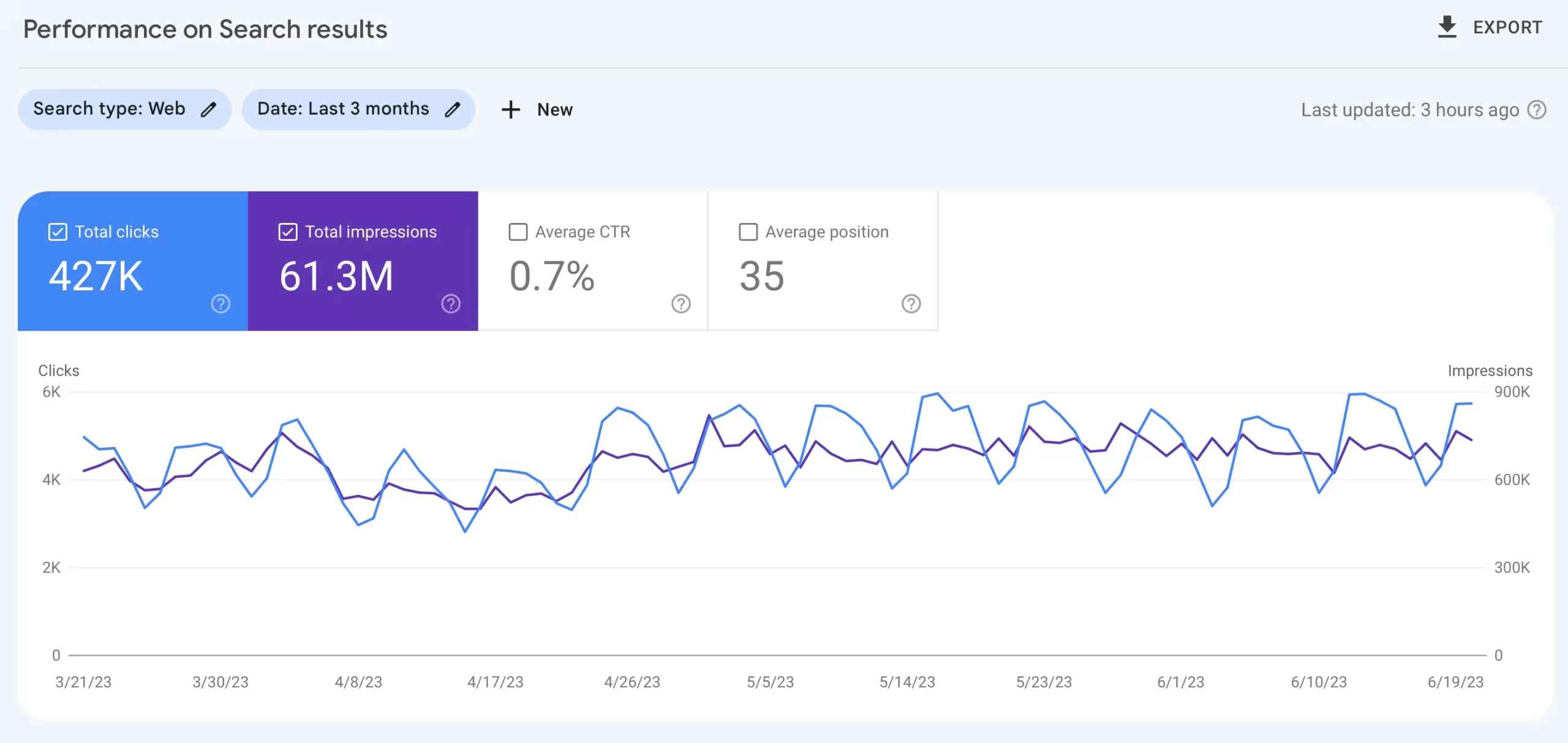
You can select or deselect any metric to see how each chosen metric is trending over the specified timeframe. The default timeframe is three months, but you can change this period to whatever you like.
Scrolling down the page, you will find the Queries tab, which lists every keyword your website has generated a ranking for during the specified period. It will display the average ranking, CTR, and total number of clicks.
You can also view your keyword performance for particular pages by clicking the report's "Pages" filter.
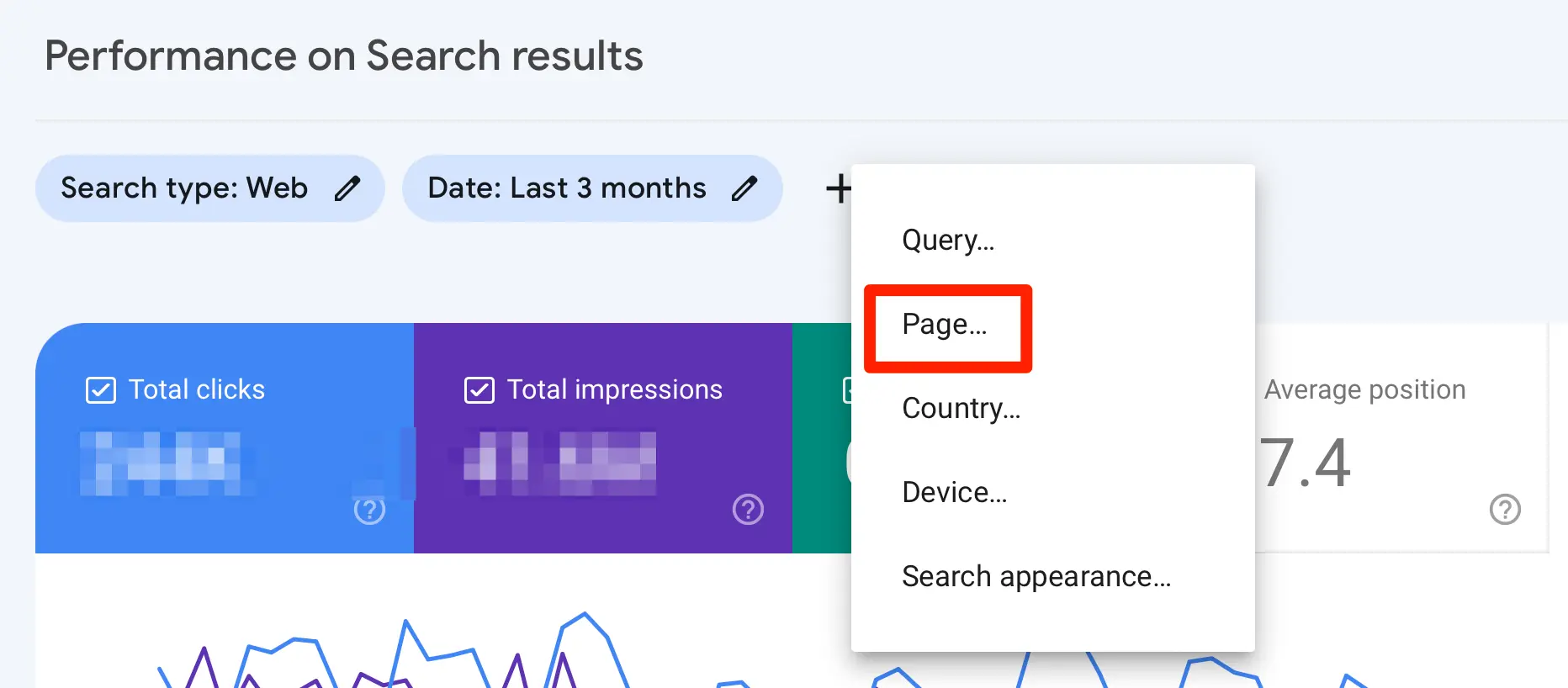
Here, you will see the total stats for all your ranking pages. When you click on a page, you can see which queries it ranks for and the countries and devices driving the most impressions and clicks.
Keep in mind that the position in Search Console is an average across every search where your page appeared. A keyword showing position 8 may rank 3rd in one country and 20th in another, so use the country and device filters when a number looks off.
2. Google Analytics 4 (Search Console Reports)
If you already use Google Analytics 4, you can see your Google rankings there as well by linking it to Search Console.
Once the two are linked, GA4 adds two reports:
- Google Organic Search Queries: the queries your site appears for, with clicks, impressions, CTR and average position from Search Console.
- Google Organic Search Traffic: your landing pages, with Search Console and Analytics metrics side by side, which you can break down by country and device.
The second report is the useful one. It shows which ranking pages keep visitors engaged and which ones lead to conversions, something Search Console alone cannot tell you.
Two things catch people out. The Search Console reports are unpublished by default, so you need to open the Library in GA4 and publish the Search Console collection before they appear in the menu. And the data arrives about 48 hours after Search Console collects it.
To create the link, you need the Editor role on the GA4 property and must be a verified owner of the Search Console property. If you are new to GA4, start with our guide on how to learn Google Analytics.
3. Ahrefs Keyword Rank Checker
The Ahrefs Keyword Rank Checker is a free tool that shows where a website ranks in Google for any keyword, in hundreds of locations. There is no registration.
Enter a keyword, your domain and the location you care about, and the tool shows your position along with the pages ranking around you.
It is the fastest way to answer a single question like "where do I rank for this keyword in the US?" without setting anything up. It is a one-off check, though, so it does not keep a history of your positions.
4. Seobility Ranking Checker
The Seobility Ranking Checker checks your live position for a keyword and shows the full top 20 results on Google, including a preview of each result's title and description.
You can change the country, choose desktop or mobile, and pick a city for localized results. This makes it one of the few free tools that can check local rankings.
The number of free checks is limited. A free Seobility account gives you 5 checks a day, and the paid plans, which start at $69.90 per month with a 14-day free trial, add more checks and long-term ranking monitoring.
Seeing the top 20 is a useful bonus: you can compare your title and description with the pages ranking above you.
5. SEO Review Tools Rank Checker
The SEO Review Tools Rank Checker lets you check up to 10 keywords at a time for your domain and export the results to CSV. You may be asked to create a free account first.
You can choose between 14 country versions of Google on desktop and 5 on mobile, including google.com, google.co.uk and google.ca.
Its limits are worth knowing. It only checks the first page of Google (the top 10 results), so a keyword ranking 15th shows as not found, and it does not support local search.
It works best for a quick check of a small keyword list, or for seeing whether a competitor's domain beats yours on the same terms.
6. Manually Checking Google (With Personalization Turned Off)
Possibly, the most direct way to check your keyword rankings is to search for them manually on Google.
Before you open another tab and enter one of your target terms, take some steps to ensure that you are getting the most accurate results.
If you search in the browser you normally use while signed in to your Google account, you will not get the same results as a random searcher.
Open a private browser window to get more accurate results. In Google Chrome, this is an Incognito Window; in Firefox or Safari, it is a Private Window.
If you want to search while signed in, turn off personalized results first. Go to your Google Account, click Data & privacy, then Personalization settings, and turn off Personalized Recommendations in Search services. You can also go directly to google.com/search-personalization.
Google also takes your location into account. To see the results for a specific country, open Google's Search settings, go to Language & region, and set the Results region.
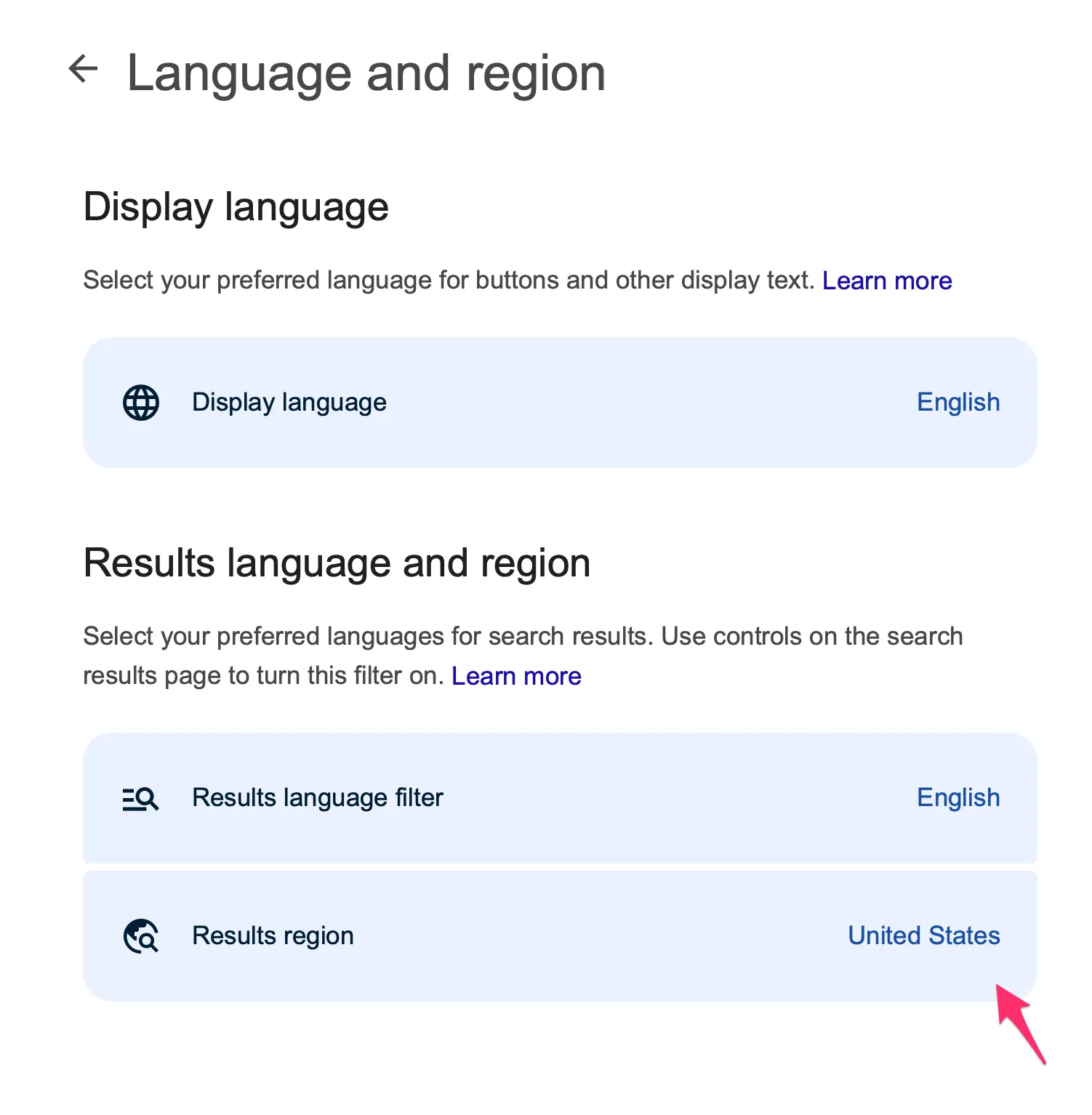
After taking these steps, you can begin searching the keywords you want to check. You will need to scroll through the results and possibly visit page two and beyond before you find your website (if you rank for that term at all). Record the results you find; otherwise, you won't be able to track your performance over time.
This is a bit of a cumbersome method of checking your keyword performance, and even a private window is still influenced by your location and device. For a neutral result without the manual work, use one of the free rank checkers above.
Paid Rank Trackers (With Free Trials)
Free tools are enough for occasional checks. If you want your rankings for a fixed list of keywords recorded every day, with competitors alongside, a paid rank tracker does it for you. All three below have a free trial.
7. Semrush Organic Research Report
Semrush provides a comprehensive suite of SEO tools designed to help businesses efficiently plan and monitor every aspect of their search engine performance.
Among these tools is the Organic Research Report, which can tell you everything you need to know about your Google keyword rankings.
The tool is divided into sections, which you can toggle between to analyze your keyword performance from different perspectives.
The report starts on the Overview tab. Here, you will find the total number of keywords the site organically ranks for and the estimated organic traffic.
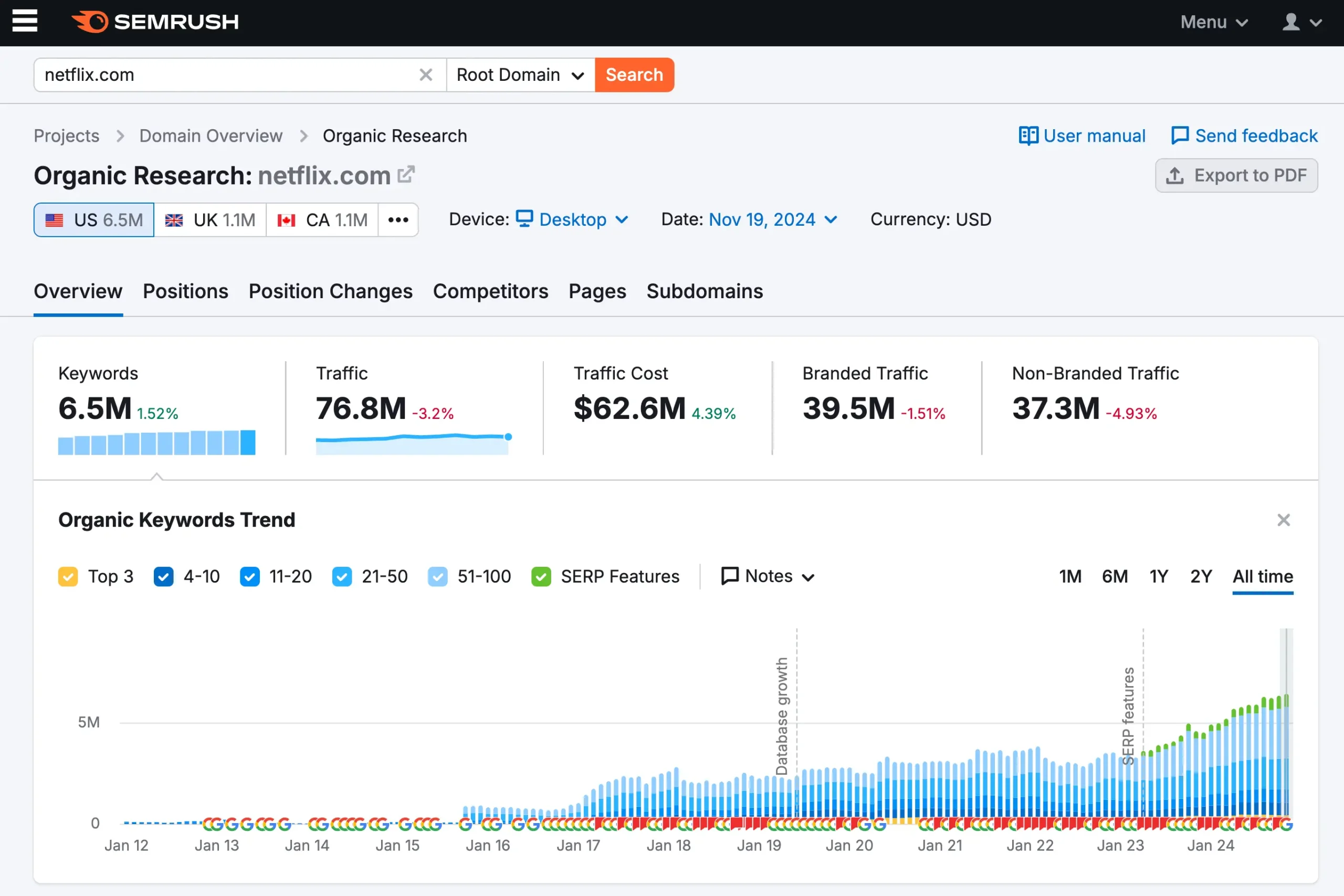
The graph shows your historical rankings, a very useful feature for spotting anomalies in your traffic due to Google updates. If you're using Semrush Guru, you can also analyze your rankings for a specific period.
In the Positions section, you will find a complete list of all the keywords for which the website ranks.
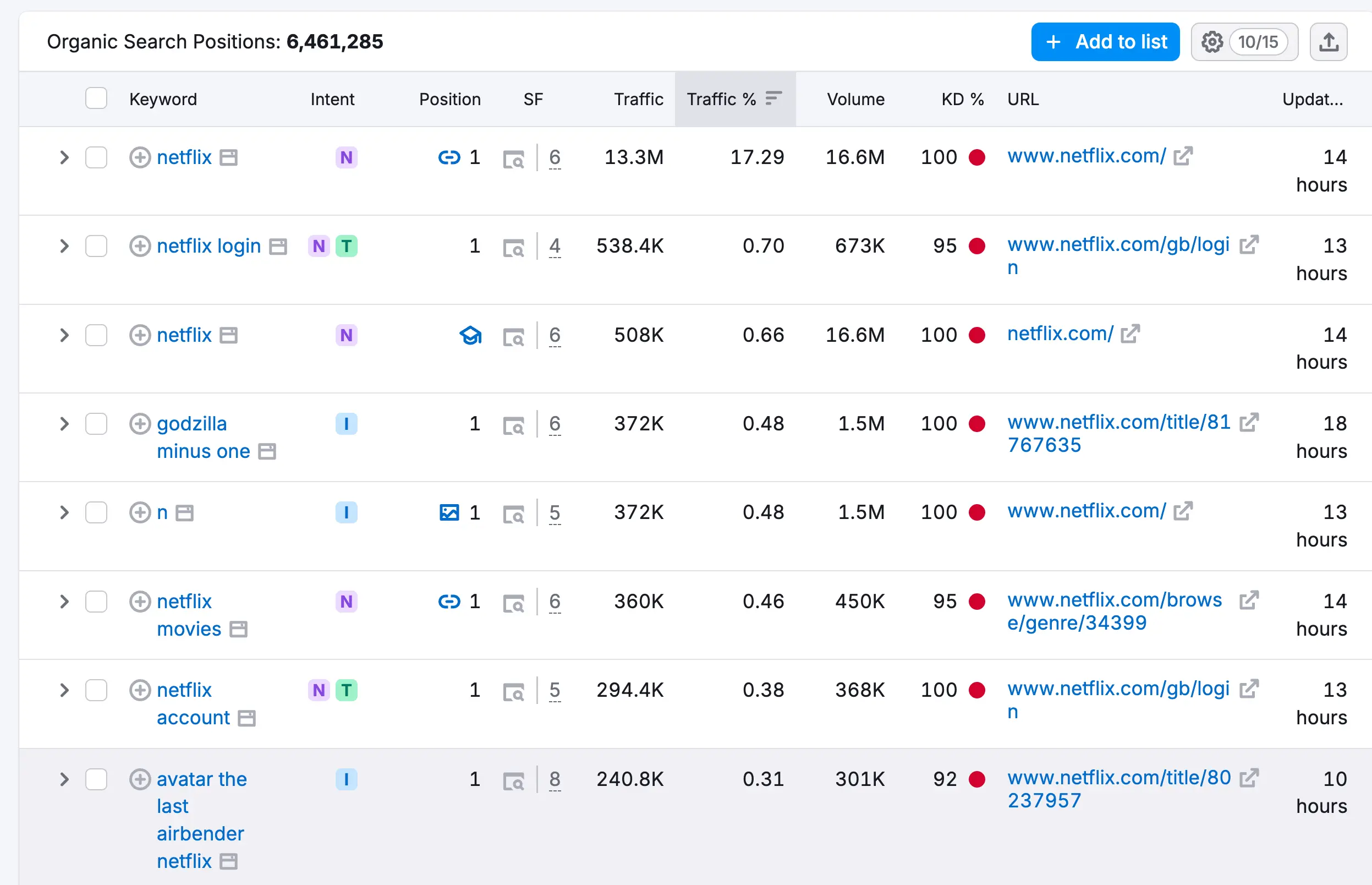
This includes:
- The current position for that keyword
- Any changes in ranking
- The average monthly search volume over the past year
- A keyword difficulty score that estimates how hard it is to rank for that keyword
- The URL of the page ranking for that keyword.
The Competitors section gives an overview of the website's primary search competitors' performance. It does this by comparing the number of common keywords the website shares with a particular competitor to calculate a Competition Level metric, which is measured as a percentage (up to 100%).
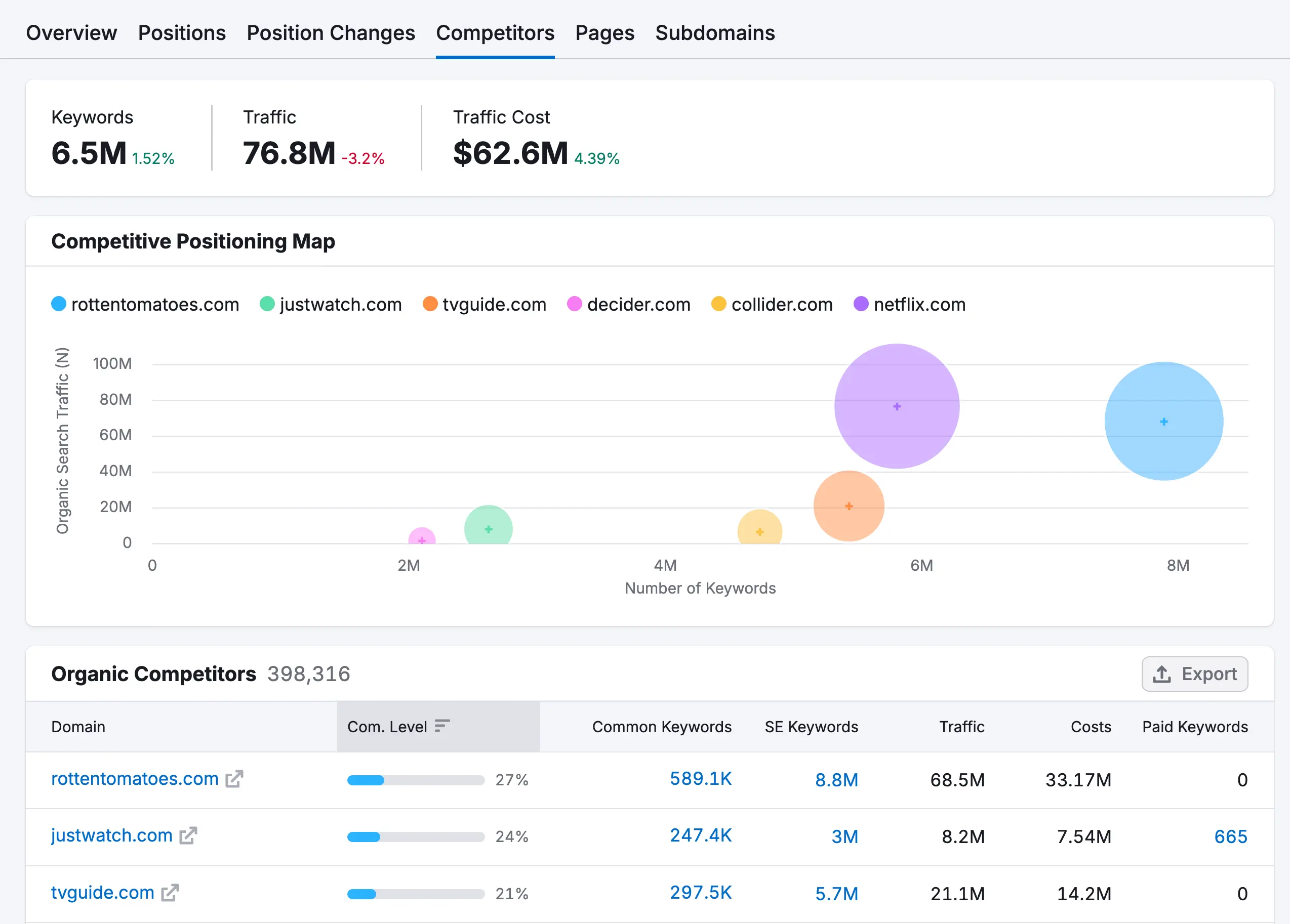
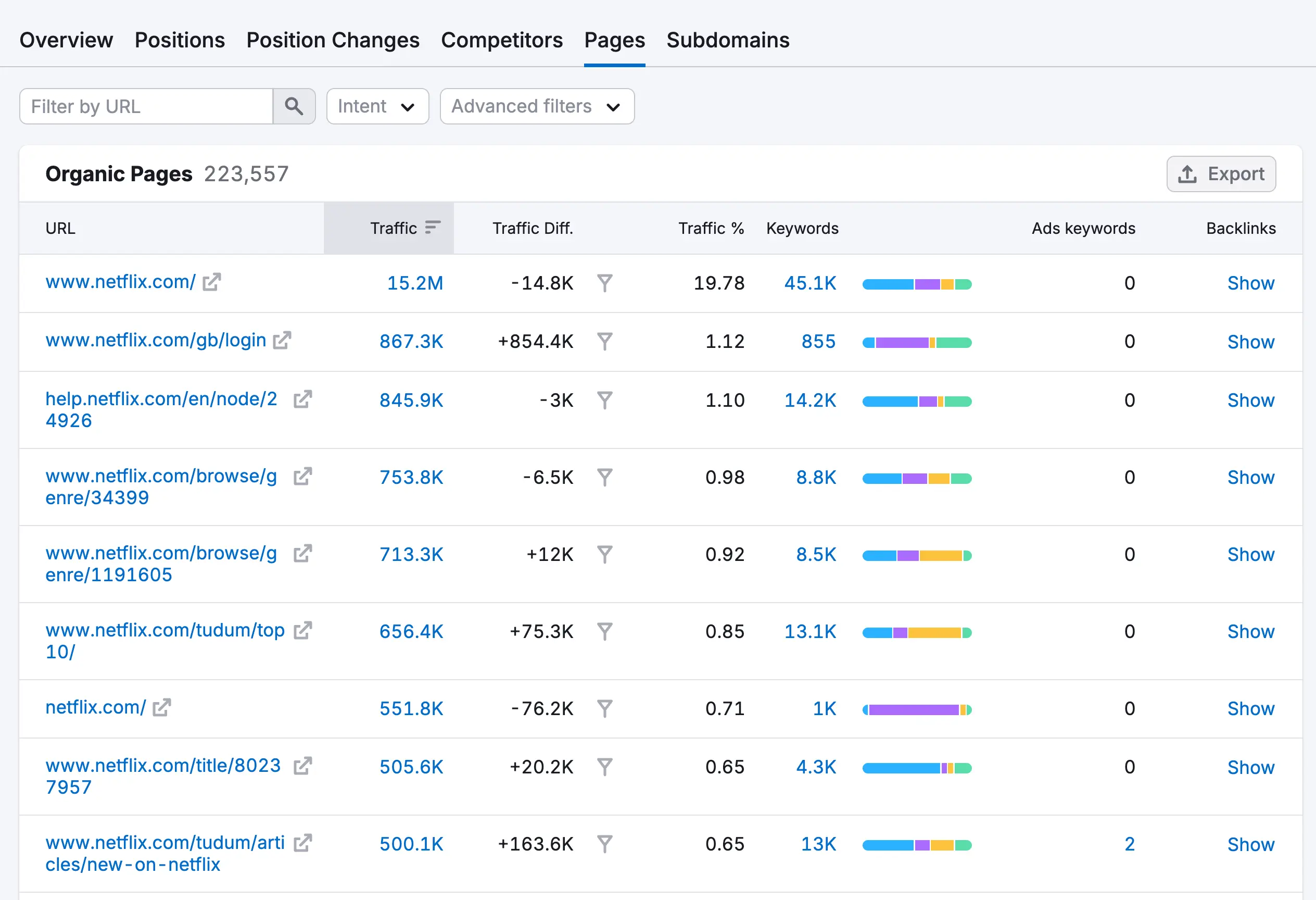
The Pages section details how well your pages perform in Google.
You can see the total organic traffic for each page, the percentage of total traffic to the page that comes from organic search, and the total number of keywords a page ranks for.
Overall, Semrush is a powerful tool for checking your SEO rankings in Google. If you want to make the most of everything the solution offers, you must sign up for a paid plan. Semrush does come with a free account, but it caps how much of each report you can see.
8. SE Ranking Rank Tracker
SE Ranking is another suite of SEO tools built around a robust keyword rank tracker. It records your positions daily across the top 100 results on Google, Bing, Yahoo and YouTube, on desktop and mobile.
Upon creating your account, you will need to create a project with your website before you can track your keyword performance.
The first step is to add the domain you want to track. Next, you will add the keywords you want to track. You can do this manually by typing them in one by one or importing a file with multiple keywords.
SE Ranking also has a suggestions box that you can quickly use to add keywords to the list. This box is automatically populated with keywords that the site is already ranking.
The next step is to specify the search engines you want to track. Naturally, Google will be the primary choice for most.
After that, you will add any competitors you want to track. Like keywords, SE Ranking can suggest competitors for you.
Finally, you can link your Google Analytics and Google Search Console accounts before the project goes live.
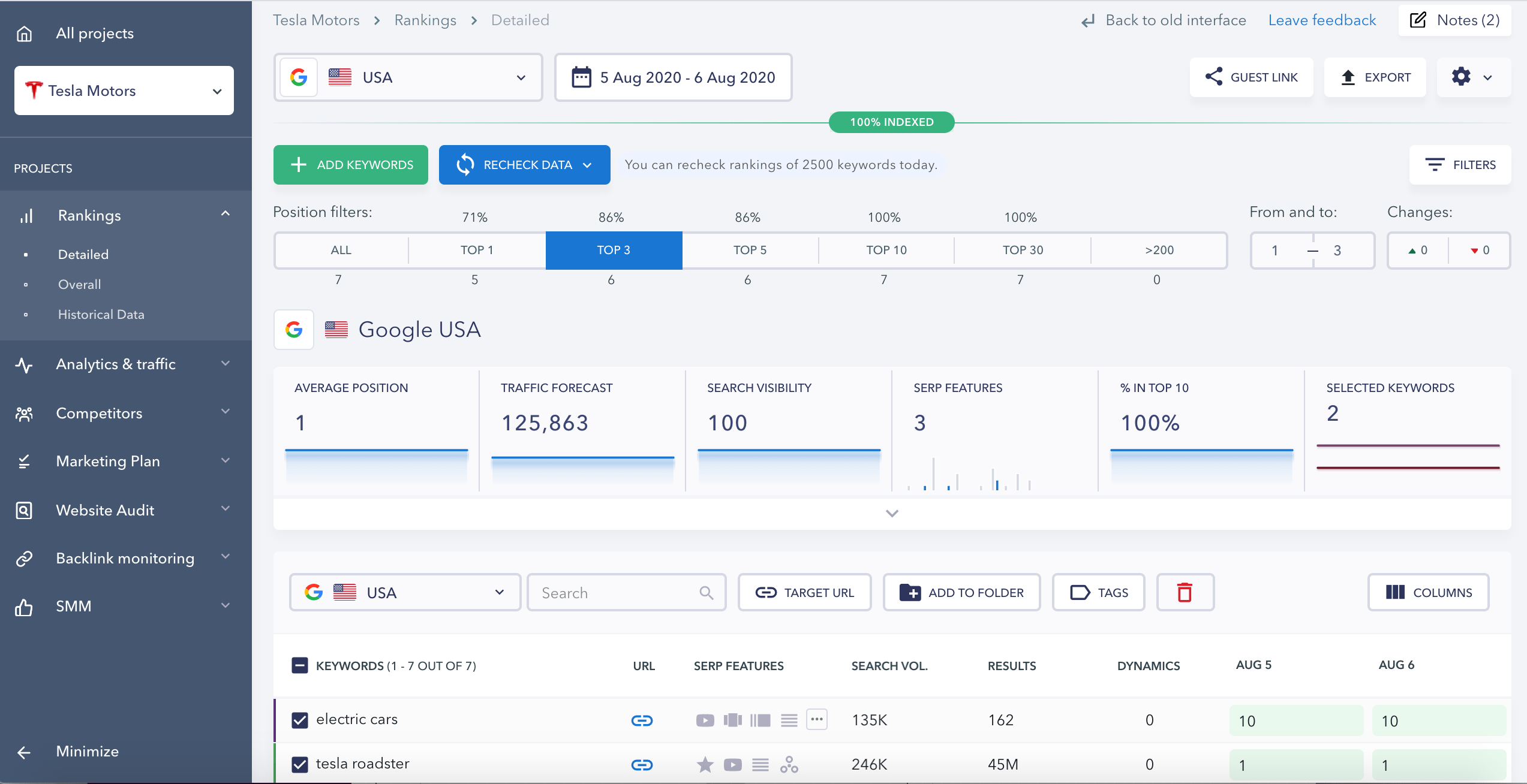
Go to the Rankings section on the left-hand menu to begin tracking your keyword performance. You will see a list of all the keywords you added, the monthly search volume, and your current position for each term.
The overview displays your average position, estimated traffic based on your ranking, and the percentage of keywords ranking in the top 10.
Down the page, you will see a list of the keywords you have added for tracking. If you are currently ranking for a keyword, the URL of the ranking page will be present. When you click on the SERP Competitors button for a keyword, you are taken to a list of the top 100 ranking pages for that term.
SE Ranking also tracks whether your site appears in AI Overviews and AI assistants such as ChatGPT, which is becoming as useful as the position itself.
SE Ranking doesn't have a free plan. Its paid plans are billed monthly or annually, and annual billing saves 20%.
9. Sitechecker Rank Tracker
Sitechecker also provides a comprehensive suite of digital marketing solutions.
With the Rank Tracker tool, you can track your website's keyword rankings to see where you stand and how your positioning is changing over time. It covers the top 100 Google results in 155 countries, on desktop and mobile, and can check rankings in specific cities.
To get started, you add the keywords that you want to track to the tool. You'll need to specify the location and the language of the searcher in the settings for each keyword.
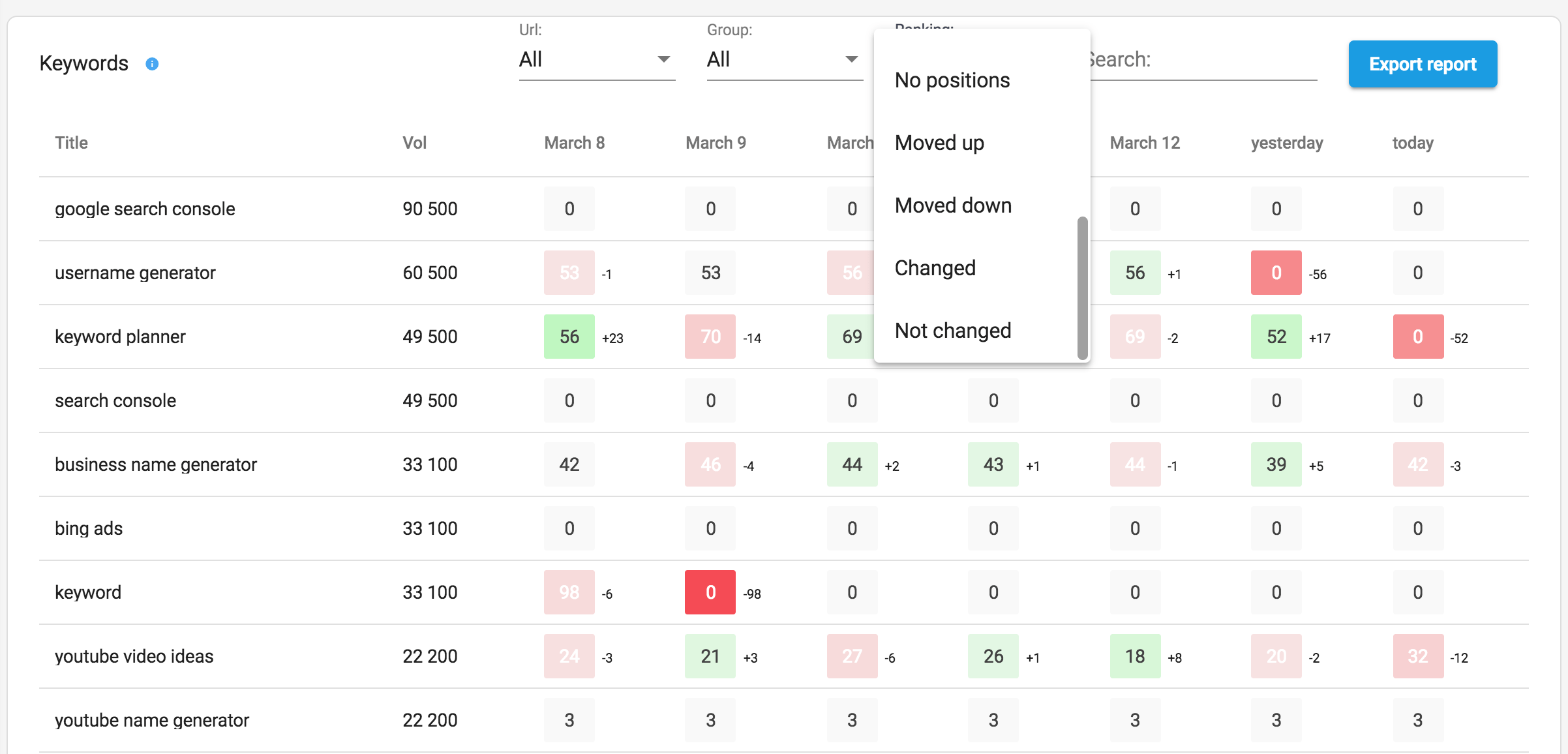
Once the data comes in, you will see graphs showing the overall trend for the provided keywords, along with current and historical positions for each keyword.
When you click on a keyword, you can see the SERP results for that term and where your competitors are ranking.
Sitechecker's paid plans start at $99 per month, or $83 per month with annual billing.
Sitechecker offers a 14-day free trial, with no credit card required, so you can test the platform before committing.
What to Look for in a Rank Checker
Most rank checkers show a position number. The ones worth using let you control where that number comes from:
- Location settings: rankings differ by country and, for local businesses, by city. If your customers are local, check at city level, not just the country.
- Device filtering: mobile and desktop rankings are not the same. Check the one most of your visitors use.
- Competitor tracking: seeing a competitor's position on the same keyword tells you whether a drop is yours alone or the whole SERP moving. Our guide on how to find competitor keywords shows you which terms to compare.
- Ranking history: a single check tells you where you are today. A daily history shows you when a change happened, which you need to connect it to a Google update or to an edit you made. It is also how you spot two of your own pages taking turns on the same keyword, a sign of keyword cannibalization.
- Neutral results: the tool should check Google without your personal search history, which is the main advantage over checking by hand.
Which Tool Should You Use?
It depends on what you want to know:
- How is my whole site doing? Use Google Search Console. It covers every keyword your site appears for, for free, and GA4 adds what those visitors do next.
- Where do I rank for one keyword right now? Use a free checker: Ahrefs for any location, Seobility if you need a city or the top 20, SEO Review Tools for up to 10 keywords at once.
- How are my key terms moving over time, against competitors? Use a paid rank tracker such as Semrush, SE Ranking or Sitechecker, and start with the free trial.
- Local or national? For national rankings, any of the tools above will do. For local rankings, pick a tool that checks by city (Seobility, SE Ranking or Sitechecker).
Checking your rankings shows you where you stand. The Complete SEO Course shows you how to improve them, with practical lessons on technical, on-page and off-page SEO that you can apply to your own website.
Key Learnings
Knowing how to check your keyword rankings in Google is an important part of any SEO strategy.
The first tool you should use is Google Search Console. It is free, it covers every query your site appears for, and you can analyze keywords and pages individually. Link it to GA4 to see what those visitors do on your site.
For a quick check of a single keyword, the free rank checkers from Ahrefs, Seobility and SEO Review Tools give you a neutral position in seconds. You can also check by hand in a private window with personalization turned off, but it is slow and still influenced by your location.
If you need to track a list of keywords every day, alongside your competitors, a paid rank tracker like Semrush, SE Ranking or Sitechecker does the work for you.
Once you know where you rank, the next step is to improve those positions. Our guide on how to rank higher on Google walks you through it, from on-page SEO to earning backlinks. Good keyword research, including the long-tail keywords that are easier to rank for, makes sure you are tracking the terms worth ranking for.


