



Search engines work in three stages. They crawl the web to discover pages, index those pages by analyzing and storing what they contain, and then rank and serve the most relevant, useful pages when someone types a query.
Understanding these stages helps you build a website that search engines can find, understand, and show in the results. It is the first thing to learn before you start with Search Engine Optimization (SEO) or any other Search Engine Marketing (SEM) task.
In this guide, you’ll learn how search engines work step by step, what happens at each stage, how ranking algorithms decide the order of results, and where AI Overviews fit in.
What Is A Search Engine?
A search engine is a software system that finds web pages that answer a user’s query. The results are shown on a search engine results page (SERP), ordered by how relevant and useful each result is for what the user is looking for.
Modern search engines don’t just return a list of links. Depending on the query, the results page can include articles, videos, images, forum discussions, local business listings, shopping results, and AI-generated summaries.
The most popular search engine is Google, with about 91% of the global market, followed by Bing and Yahoo.
How Do Search Engines Work? (Step by Step)
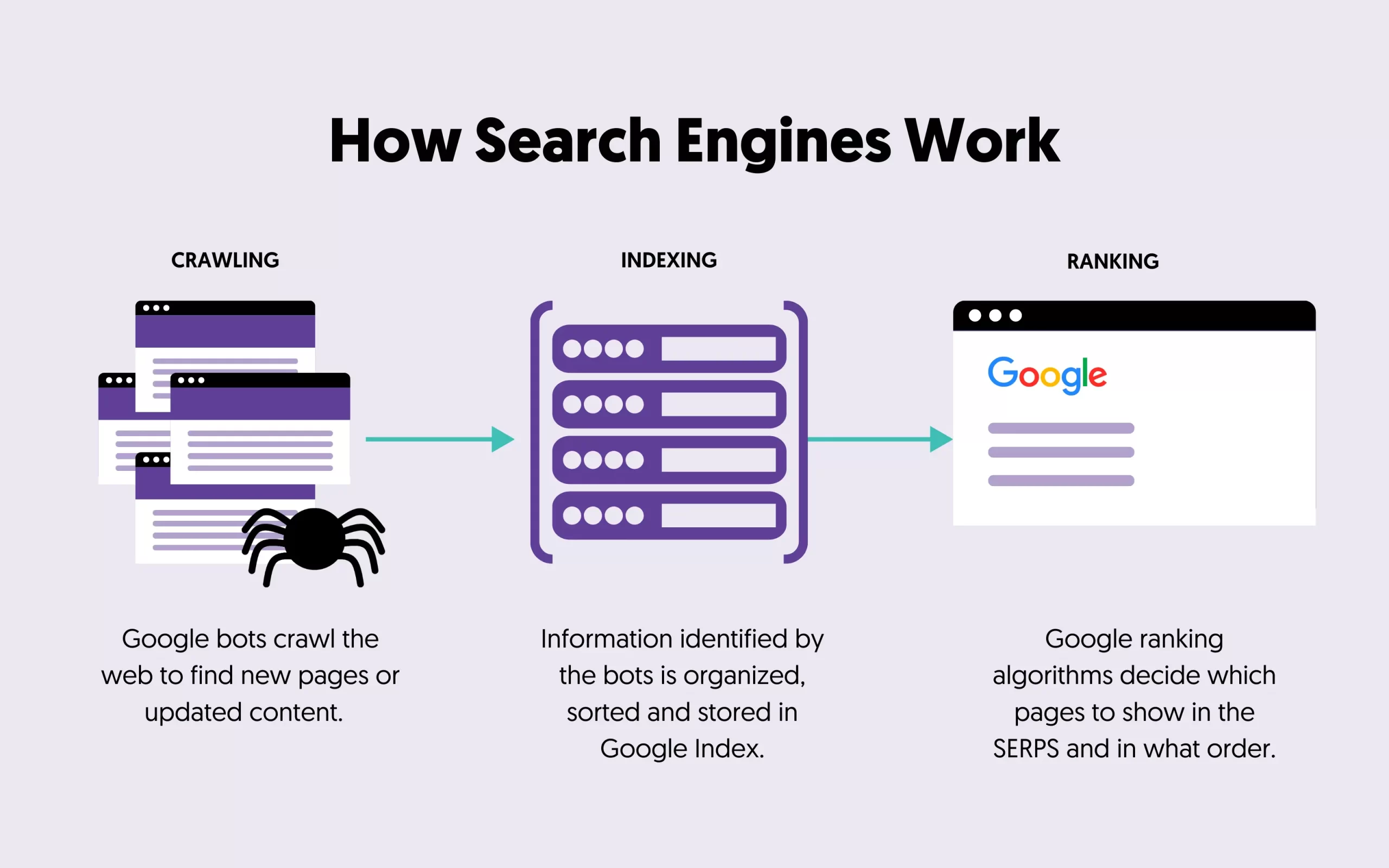
Search engines use automated programs called crawlers (also known as spiders or bots) to find pages on the web. They then analyze those pages, store the information in a huge database called an index, and pull the best matches from that index every time someone searches.

The process has three main stages:
- Crawling: discovering pages and downloading their content (text, images, and videos).
- Indexing: analyzing each page, working out what it is about, and storing that information in the index.
- Ranking and serving: finding the pages in the index that match a query and deciding the order to show them in.
Not every page makes it through every stage. A page can be crawled but not indexed, or indexed but never shown for any query.
1. Crawling
Crawling is how search engines find out which pages exist. There is no central registry of every page on the web, so search engines have to keep looking for new and updated pages all the time. Google calls this “URL discovery”.
Crawlers discover pages in three main ways:
- Pages they already know: they revisit pages they have crawled before to check for changes.
- Links: when a crawler visits a page, it follows the links on it (to pages on the same site and to other websites) to find more pages.
- Sitemaps: site owners can submit a list of their pages so the search engine knows what to crawl.
Once a URL is discovered, the crawler may visit it and download its content. Google’s crawler is called Googlebot, and it uses an algorithm to decide which sites to crawl, how often, and how many pages to fetch from each one. It also slows down if a website’s server is struggling, so it doesn’t overload it.
During the crawl, Google also renders the page: it runs any JavaScript using a recent version of Chrome, much like your browser does. This matters because many websites load content with JavaScript, and without rendering that content would be invisible to the search engine.
The scale is huge. Google’s index covers hundreds of billions of web pages and is well over 100,000,000 gigabytes in size.
What can stop a page from being crawled?
The most common problems are a server that is down or slow, network issues, and robots.txt rules that block the crawler. Pages behind a login can’t be crawled at all.
How to help crawlers find your website
Your first concern when optimizing a website for search engines is making sure they can access it. If crawlers can’t reach your pages, those pages can’t rank.
- Submit an XML sitemap that lists all the important pages of your website.
- Link to every important page from other pages on your site, so crawlers can reach it by following links.
- Use robots.txt to stop crawlers from wasting time on pages that don’t need to be crawled, such as internal search results or admin areas. Robots.txt manages crawling. It does not keep a page out of Google or make it private.
- Add your website to Google Search Console and Bing Webmaster Tools (read our webmaster tools guide). They show you how search engines crawl your site and report any errors they find.
For large websites, it also helps to understand your crawl budget. For more examples, read our technical SEO guide.
2. Indexing
After a page is crawled, the search engine tries to understand what it is about. This stage is called indexing.
During indexing, the search engine analyzes the page’s text, its title and headings, image alt text, images, videos, and other content. It records things like the language of the page, the country it is relevant to, how fresh it is, and how usable it is. It then stores this information in its index.
Google likes to compare its index to the index at the back of a book, except that it includes an entry for every word on every page it has indexed.
Duplicate pages and the canonical version
Indexing also includes deciding which version of a page to show. The web contains many pages with the same or very similar content, such as the same product page under several URLs. Google groups these pages together and picks the one that best represents the group. That page is called the canonical, and it is the version that normally appears in the results.
Indexing is not guaranteed
Not every page that is crawled gets indexed. The most common reasons are low-quality content, a noindex rule telling search engines not to index the page, and a website design that makes the content hard to process.
If a page is not in the index, it can’t appear for any search. If you want to keep a page out of the results, use a noindex tag or password-protect it. Don’t block it in robots.txt: if crawlers can’t access the page, they can’t see the noindex tag either.
How to check if your pages are indexed
There are two ways to do that.
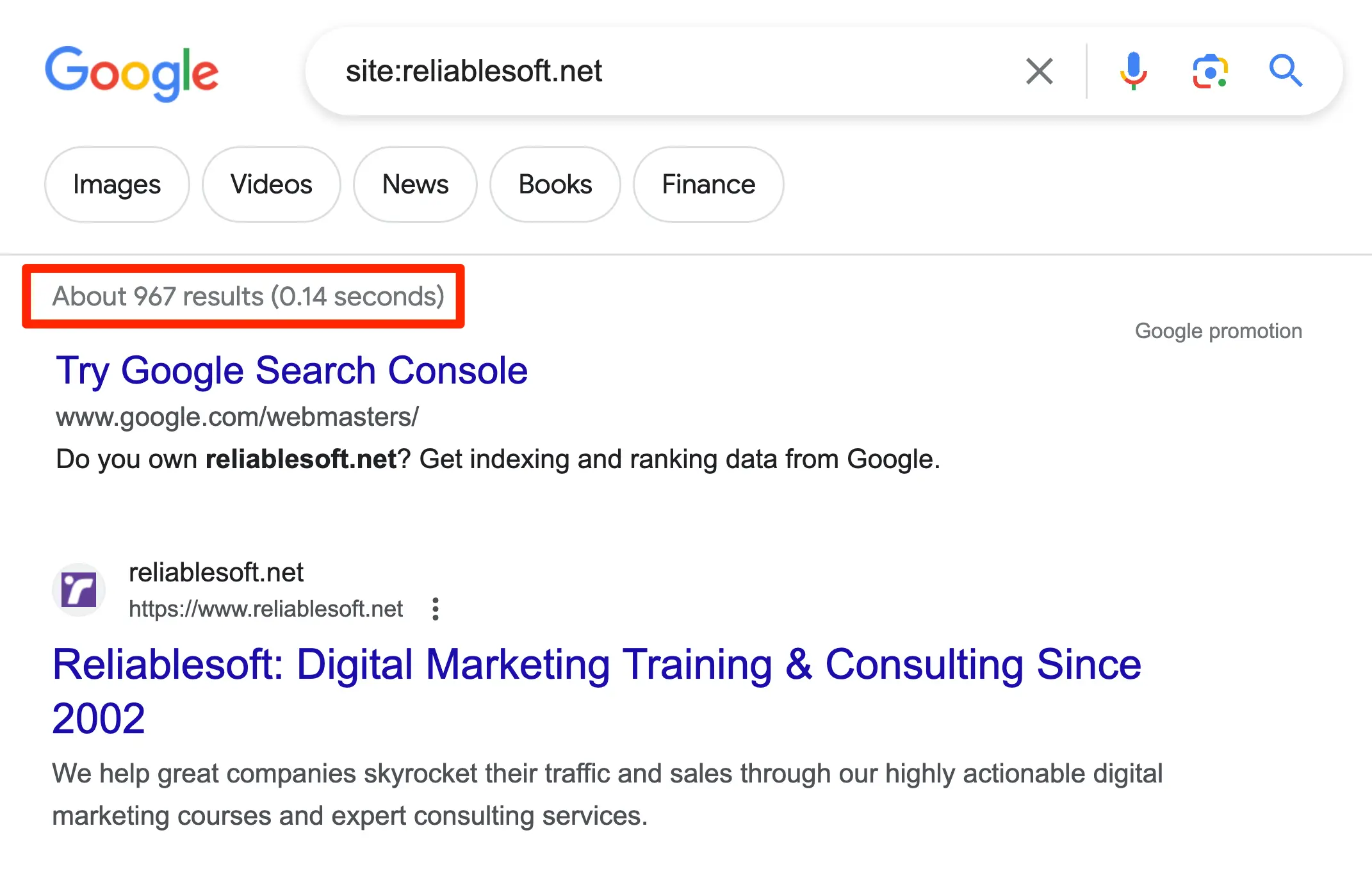
The quick way is to search Google for site: followed by your domain name, for example, site:reliablesoft.net. This shows pages from your website that are in Google’s index, but the number of results is only a rough estimate.
The accurate way is to add your website to Google Search Console and open the Page indexing report under Indexing > Pages. It shows which pages are indexed, which are not, and why.
If you have updated a page and want Google to see the changes sooner, you can ask Google to recrawl it. To see a page the way Googlebot does, read how Google finds and sees a website.
3. Ranking and Serving Results
The third stage happens every time someone searches. The search engine looks through its index for pages that match the query and returns the ones it believes are the most relevant and highest quality, in order. This is done by ranking algorithms: systems that weigh many signals to decide which results are best for that query.
Ranking is fully automated. Google does not accept payment to rank a page higher in the organic results. Paid ads are shown separately and labeled as sponsored.
The results also depend on who is searching. The same query can return different results depending on the user’s location, language, and device. A search for “bicycle repair shops” in Paris shows different results from the same search in Hong Kong.
Watch the video tutorial to learn how search engines work.
How Do Search Engine Algorithms Work?
Search engine algorithms look at hundreds of factors to find the best match for a query. Nobody outside the search engines knows the exact list or how each factor is weighted, and modern systems rely heavily on machine learning and AI.
Google groups the main factors into five areas: the meaning of the query, the relevance of the content, the quality of the content, the usability of the page, and the user’s context and settings.
Here is a simplified version of what happens between typing a query and seeing the results:
Step 1: Understand the query
First, the search engine works out what kind of information the user is looking for. It analyzes the words in the query (the search terms) to understand the intent behind them.
For example, when you type “how to make a chocolate cake”, the words how to tell the search engine you want instructions, so the results include recipe pages. If you search for “buy refurbished laptop”, the words buy and refurbished tell it you want to purchase something, so the results include online shops.
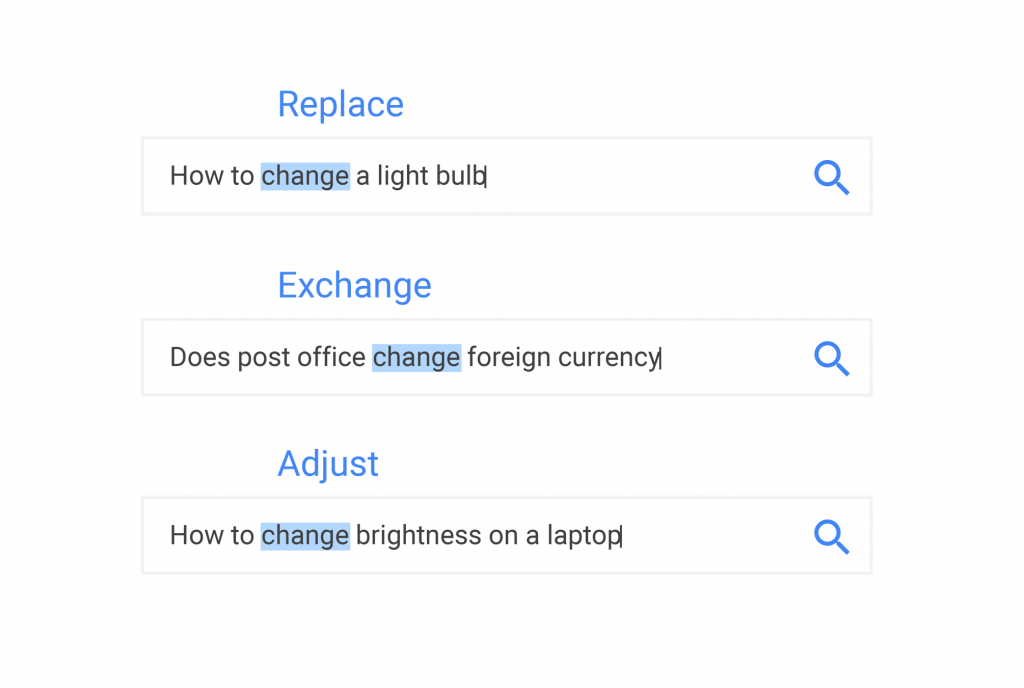
Language models help search engines understand that different queries can mean the same thing. They know that “how to change a light bulb” and “how to replace a light bulb” are the same question.
They also correct spelling mistakes, understand plurals and synonyms, and interpret questions written in natural language, whether typed or spoken.
Step 2: Find and rank matching pages
Next, the search engine looks in its index for the pages that best answer the query and puts them in order. This is the stage where good SEO techniques can influence the outcome.
These are some of the most important factors:
- Relevance: does the page contain the information the user is looking for? The words on the page, its title, and its headings all help, but relevance goes beyond matching keywords.
- Type of content: if the user wants images, videos, or a local business, those types of results are shown.
- Quality of the content: search engines try to reward content that is helpful and reliable and shows expertise, experience, authoritativeness, and trustworthiness.
- Links from other websites: a page that other reputable websites link to (with backlinks) is seen as more trustworthy than one with no links.
- Freshness: for news and other time-sensitive queries, recently published or updated pages are preferred.
- Usability: when other signals are similar, pages that work well on mobile and load quickly can have an advantage.
- Language and location: users are shown pages in their language, and searches like “Italian restaurants in Ohio” return results for that area.
- How people interact with results: Google also uses aggregated, anonymized interaction data to judge whether results are relevant to a query.
Step 3: Present the results
Finally, the results are shown on the SERP. Besides the classic list of organic results, the page can include paid ads, featured snippets, videos, images, local results with a map, a knowledge panel, and People Also Ask questions, depending on the query.
Google can also show an AI Overview at the top of the page: an AI-generated summary that answers the query and links to the web pages it is based on. For longer, more complex questions, users can switch to AI Mode for a conversational answer with links. Both can run several related searches in the background (Google calls this “query fan-out”) to put the answer together.
AI Overviews are not shown for every query. They appear only when Google decides they add something beyond the regular results. Other search engines, including Bing, and AI search engines work in a similar way: they still depend on crawling and indexing web pages before they can use them in an answer.
Search Engine vs Web Browser
People often mix up search engines and web browsers, but they are different things that work together.
A web browser is the app you use to open and view websites. A search engine is a website or service that finds pages for you. You use a browser to reach a search engine, and then use the search engine to find the pages you want to visit.
| Web browser | Search engine | |
|---|---|---|
| What it is | Software installed on your computer or phone | A service you reach through a browser or app |
| What it does | Loads and displays web pages | Finds web pages that answer a query |
| Examples | Chrome, Safari, Edge, Firefox | Google, Bing, Yahoo, DuckDuckGo |
| Do you need it? | Yes, to view any website | Only when you don’t know the exact web address |
So yes, you need both. Most browsers come with a default search engine built into the address bar, which is why the two are easy to confuse. You can usually change the default search engine in your browser settings.
How SEO Helps Your Website Rank
Knowing how search engines work shows you where Search Engine Optimization (SEO) fits in. Each stage has a matching part of SEO:
- Crawling: technical SEO makes sure search engines can find and access every important page.
- Indexing: clear, unique, high-quality content helps search engines understand your pages and choose to index them.
- Ranking: on-page SEO, helpful content, and links from other websites give ranking algorithms reasons to put your page above others.
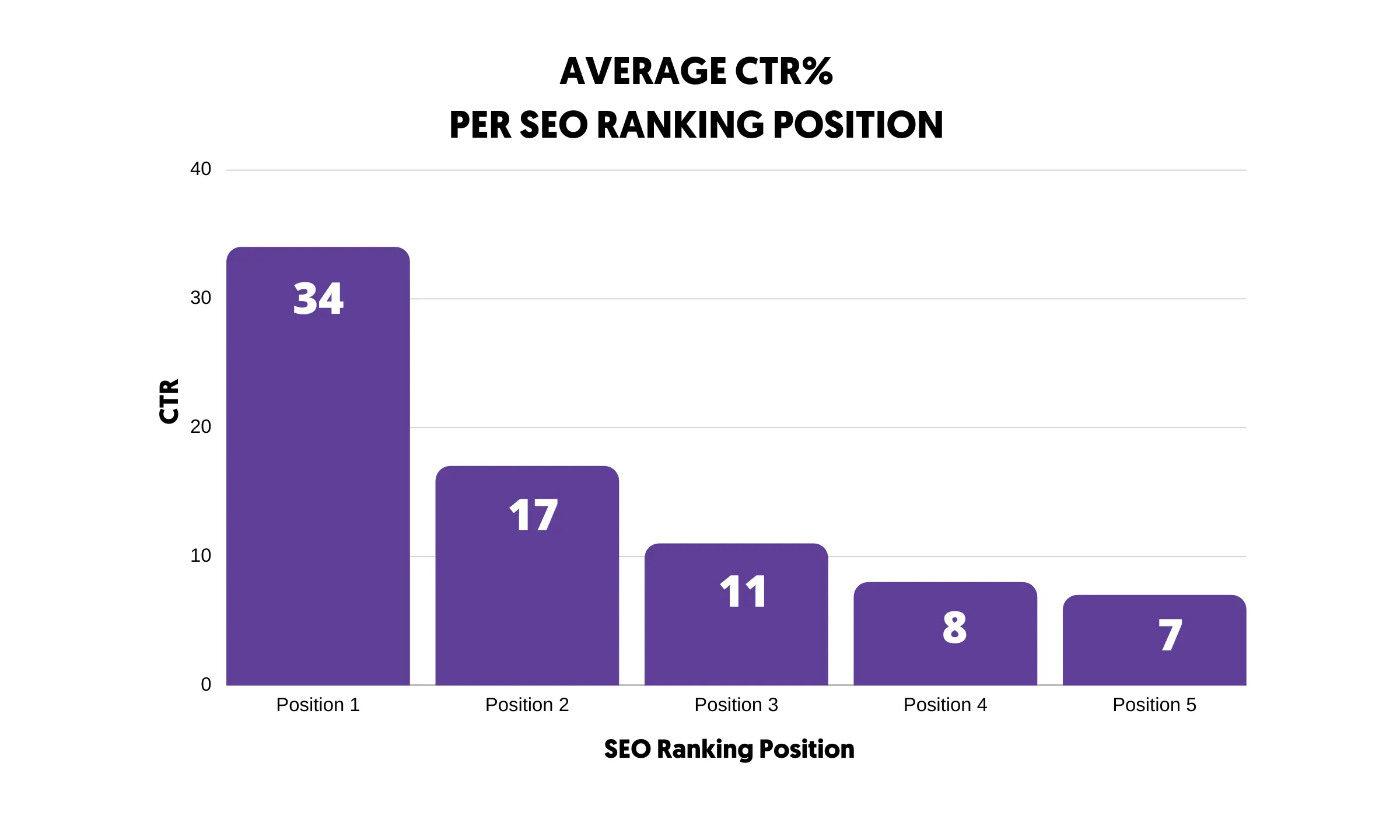
Ranking matters because most clicks go to the results at the top of the first page. A page on the second or third page of results gets very little traffic.
The same work also makes your pages eligible for AI Overviews. Google says there are no extra requirements: a page needs to be indexed and eligible to appear in Search with a snippet, and the usual SEO best practices apply.
Traffic is just one of the benefits of SEO. Once you rank for keywords that matter to your business, you also gain visibility, trust, and customers who are actively looking for what you offer.
Conclusion
Search engines look simple from the outside, but a lot happens behind that single search box.
The process starts with crawling, where search engines discover pages and download their content. During indexing, they analyze each page, choose the canonical version, and store the information in their index. When someone searches, ranking algorithms pick the most relevant, useful pages and present them in order, sometimes alongside an AI-generated overview.
The whole process is automated, and search engines keep improving their algorithms with machine learning and AI.
As a website owner, your job is to make crawling and indexing easy with a simple, well-linked site structure. Once search engines can read your website without issues, give them the right signals with helpful content and good SEO, so their algorithms pick your pages when someone types a relevant query.


