




A pillar page is a comprehensive page that covers a broad topic from every angle and links to more detailed pages about each subtopic. It is the hub of a topic cluster: the subtopic pages link back to it, and together they show search engines and readers that your website covers the topic in depth.
In this guide, you’ll learn what makes a good pillar page, how it differs from a topic cluster and a landing page, see examples, and follow seven steps (plus a template) to create your own.
What Is A Pillar Page?
A pillar page is a long, well-structured page about one broad topic, such as “content marketing” or “email marketing”. It gives readers an overview of everything they need to know and links to other pages that cover each part in more detail.
Pillar pages are sometimes called cornerstone content. They target broad, high-volume topics and head keywords, while the pages they link to target narrower, long-tail topics.
The main characteristics of a pillar page are:
- Broad scope: it covers a whole subject at a high level, not one narrow question.
- Clear structure: the content is broken into sections, each covering a subtopic, usually with a table of contents at the top.
- Links to cluster pages: each section links to a more detailed page on the same site.
- Two-way linking: the cluster pages link back to the pillar page.
- Ungated: anyone can read it without filling in a form or logging in, so search engines can crawl it too.
- Kept up to date: it is updated regularly, because it is one of the most important pages on the site.
Why Are Pillar Pages Important For SEO?
There are several reasons why pillar pages are important for SEO and content marketing:
They show search engines what your site is about - A pillar page and its cluster pages, linked together, make it clear that your site covers a topic in depth. This builds topical authority, one of the ways search engines judge whether a site is a reliable source on a subject.

They give users the content they want in one place - For broad topics, readers often prefer a single page that explains the whole subject and points them to the details they need.
They organize your content - Instead of dozens of loosely related blog posts, you get a clear structure that is easier for users to navigate and for search engines to crawl.
They can rank for competitive keywords - Because pillar pages cover a topic thoroughly, they naturally include related keywords and questions, which helps them rank for the head term and many long-tail variations. They are also more likely to attract natural links from other websites.
They are easy to quote in AI answers - A page with clear sections, each answering one question, is easy for search engines to extract answers from, whether for a featured snippet or an AI Overview.
Pillar Page vs Topic Cluster
A pillar page and a topic cluster are not alternatives. The pillar page is the center of the topic cluster.
A topic cluster is a group of pages about the same broad topic:
- The pillar page covers the whole topic at a high level.
- The cluster pages each cover one subtopic in depth.
- Internal links connect them: the pillar page links to every cluster page, and every cluster page links back to the pillar page.
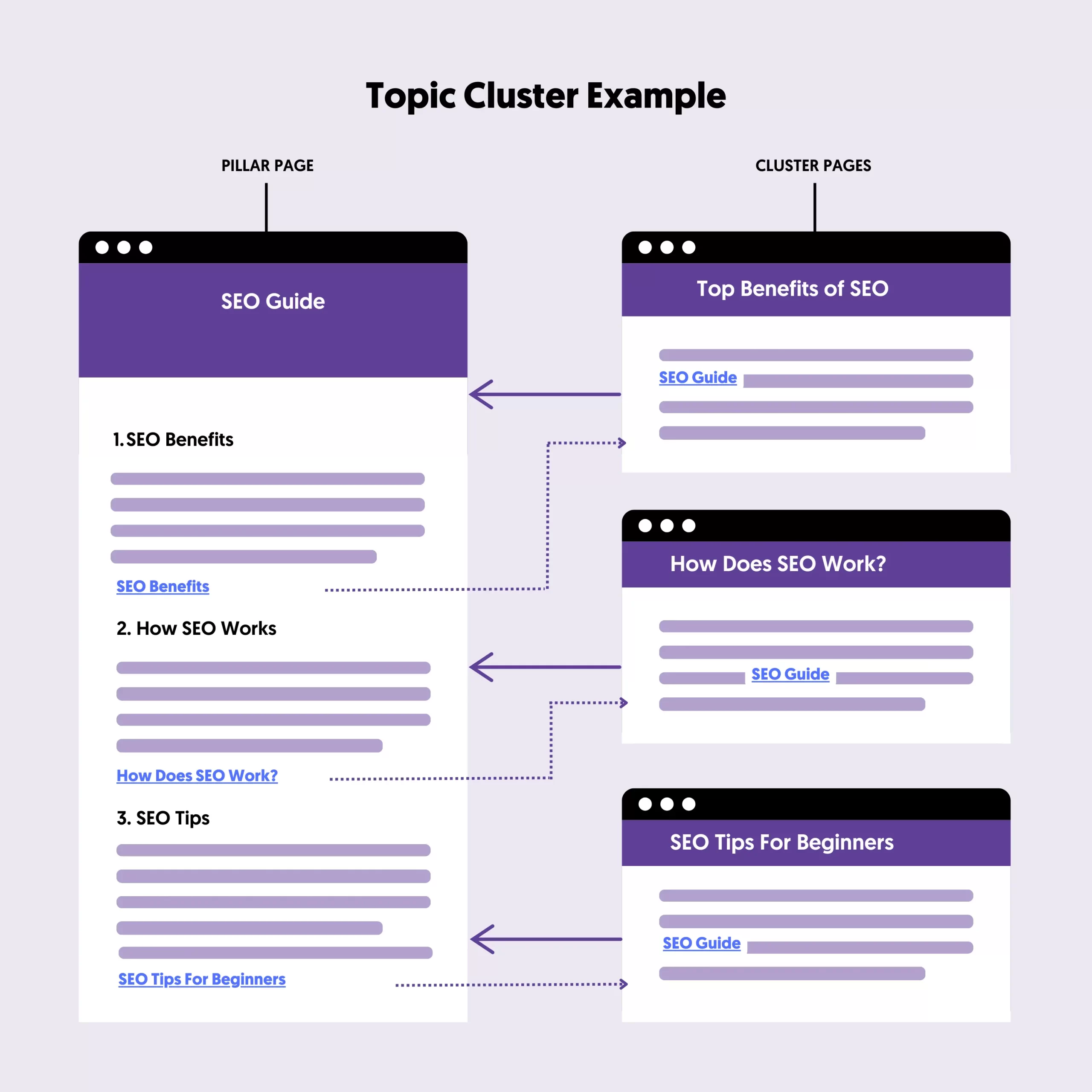
For example, a pillar page about “email marketing” could link to cluster pages about email list building, newsletter design, email automation, and email marketing metrics.
How much you put on the pillar page itself is up to you. Some pillar pages include almost everything about the topic on one page and link out only for the details. Others are shorter overviews that rely on the cluster pages for depth. I prefer the first approach: a thorough single page is easier to maintain, and readers can find most of what they need without leaving it.
Types of Pillar Pages
There are three common types of pillar pages:
The guide (or “10x”) pillar page - A complete guide to a topic, often in the form of “What is X” or “The complete guide to X”. It aims to be far more useful than anything else on the topic. This is the most common type.
The resource pillar page - A curated collection of links to the best resources on a topic, both on your site and on others, with a short description of each. It works well for topics where readers want to learn from many sources.
The how-to pillar page - A step-by-step process for a broad task, such as starting an online business, where each step links to a detailed guide.
Pillar Page Examples
Here are examples of pillar pages on this site, each at the center of its own topic cluster:
- SEO Basics: Easy SEO Guide For Beginners - a guide pillar that explains SEO and links to detailed guides on technical, on-page, and off-page SEO.
- Digital Marketing Guide - a guide pillar covering every digital marketing channel, with a link to a detailed guide for each.
- Content Marketing Guide - the hub of our content marketing cluster, including this page.
- How to Start an Online Business - a how-to pillar where each step links to a detailed guide.
- SEO Checklist - a checklist-style pillar that links each item to the guide that explains it.
What they have in common: a broad topic, a table of contents, a clear section for each subtopic, and links to deeper pages that link back.
Pillar Page vs Landing Page
Pillar pages and landing pages are both important, but they do different jobs:
| Pillar page | Landing page | |
|---|---|---|
| Goal | Educate and rank for a broad topic | Get visitors to take one action (buy, sign up, download) |
| Traffic source | Mostly organic search | Mostly ads, email, and social media |
| Length | Long, with many sections | Usually short and focused |
| Links | Many internal links to related content | Few or no links, to avoid distractions |
| Access | Ungated | Often has a form |
A pillar page can still include calls to action, but its main job is to inform. See our landing page best practices for how to build pages designed to convert.
How To Create A Pillar Page
Follow these seven steps to create a pillar page:
- Choose your topic and subtopics
- Decide how much goes on the pillar page
- Do keyword research
- Create your content
- Optimize for on-page SEO
- Add internal links
- Monitor performance
1. Choose Your Topic and Subtopics
The first step is to decide which topic your pillar page will cover. Some guidelines:
- Choose a broad topic - If a topic doesn’t have many subtopics, a regular blog post is enough.
- Choose topics with search demand - Pillar pages take a lot of work, so target topics people actually search for.
- Choose topics relevant to your business - The best topics are the ones your potential customers care about.
- Check your existing content - If you already have several articles on the topic, you can turn the strongest one into the pillar page and use the others as cluster pages, instead of creating something new that competes with them.
Next, list the subtopics. A simple way is to search for your topic on Google and note the questions in the ‘People also ask’ box and the related searches at the bottom of the page. Each subtopic becomes a section on the pillar page and, if it deserves more depth, its own cluster page.
2. Decide How Much Goes on the Pillar Page
Decide whether your pillar page will cover the topic in depth on one page, or give an overview and rely on cluster pages for the details.
A good way to decide is to search for your main keyword and look at the pages that rank at the top. If they are long, complete guides, your pillar page should be too. If the top results are shorter overviews, you can keep the pillar page lighter and put the depth into cluster pages.
Whichever you choose, keep the URL short and close to the main keyword (for example, /content-marketing/), and add a table of contents at the top.
3. Do Keyword Research
Next, do keyword research to decide which keywords the pillar page and each cluster page will target. You need:
Your main head keyword - For example, ‘content marketing’, ‘email marketing’, or ‘start an online business’. This is what the pillar page targets.
Related keywords for the sections - Keywords closely related to the main topic, often the ones you found in step 1. These become the section headings on the pillar page, or the titles of your cluster pages.
Long-tail keywords - More specific long-tail keywords with lower search volume but clearer intent. Use them in your content and as topics for supporting articles that link back to the pillar page.
4. Create Your Content
Start with an outline: your headings, what each section will cover, which keyword it targets, and which existing pages on your site you will link to. It saves a lot of time when you start writing.
Then write the content, keeping these points in mind:
- Answer first - Start each section with a direct answer to its question, then add the detail. This helps readers who skim and makes your content easy to quote in search results.
- Write as much as the topic needs - Word count is not a ranking factor. Cover the topic well, but don’t add filler.
- Show your experience - Share examples, results, and lessons from your own work. This makes the page more useful and more trustworthy.
- Use data - Back up your claims with research or your own data. Pages with original data are more likely to attract links.
- Be better, not just longer - Look at what already ranks and find a way to be more useful: clearer, more up to date, better examples, or a different angle.
5. Optimize For On-Page SEO
Follow basic on-page SEO best practices so search engines can understand your page:
- Include the main keyword in the title, URL, and first paragraph.
- Use H2 headings for the main sections and H3s for subsections, and give each heading an id so your table of contents can link to it. This also helps you win sitelinks in Google.
- Add images, diagrams, or videos where they explain something better than text, with descriptive alt text.
- Use lists and tables for steps and comparisons. They make the page easier to scan and easier for search engines to extract.
- Make sure the page loads fast, works well on mobile, and that cluster pages have breadcrumbs pointing back to the pillar page. Our technical SEO guide covers these.
6. Add Internal Links
Internal links are what turn a long article into a pillar page. Once the page is published:
- Link from the pillar page to every cluster page.
- Link from every cluster page back to the pillar page, using the main keyword or a close variation in the anchor text.
- Link to the pillar page from your main navigation, your blog, or other important pages if it is one of your key topics.
- Find other related articles on your site and add links to the pillar page from them.
Our guide to internal linking best practices explains how to do this well.
Then promote the page: share it with your email subscribers and on your social media channels, and let anyone you mention or link to know about it. These are simple off-page SEO steps that can earn the page its first backlinks.
7. Monitor Performance
Finally, track how your pillar page performs. The most important metrics are:
- Rankings and organic traffic - Which keywords the page ranks for and how many visitors it gets from search. Check this in Google Search Console.
- Engagement - Engagement rate and time on page in Google Analytics show whether people read the content.
- Clicks to cluster pages - Whether readers use the pillar page as a hub and continue to the detailed pages.
- Conversions - Email sign-ups, leads, or sales that start on the pillar page.
Be patient. It can take several months for a new pillar page to reach its best rankings, and it keeps improving as you add and link more cluster pages.
Pillar Page Template
You can use this outline as a starting point for your own pillar page:
- Title - “What Is [Topic]? The Complete Guide” or “[Topic]: Everything You Need to Know”
- Introduction - A short, direct definition of the topic and what the reader will learn
- Table of contents - Linking to every section
- What is [topic]? - The definition in more detail
- Why [topic] matters - The benefits or the problem it solves
- One section per subtopic - A short answer, the key points, and a link to the cluster page for more detail
- Examples or case studies
- FAQ - Answers to the questions from ‘People also ask’
- Key takeaways and next steps - A summary and a link to the most useful next page
Key Learnings
A pillar page is the hub of a topic cluster: a thorough page about a broad topic that links to detailed cluster pages, which link back to it.
Pillar pages help search engines understand what your site is about, help readers find everything on a topic in one place, and can rank for competitive keywords and their long-tail variations.
To create one, choose a broad topic and its subtopics, do your keyword research, write content that answers each question directly, and link the pillar page and its cluster pages together. Then keep it updated.


